If you’re at the stage where you want to do more with your phone and start building automations—customized mini-apps to carry out tasks—then Tasker (for Android) and Apple Shortcuts (for iOS) are likely to be included in the tools you turn to. You’ll find an introduction to both these apps and what they can do for you below, as well as an explanation of how they’re similar and how they’re not. The main difference is that Android continues to allow its apps to dig deeper into the operating system and its features than iOS does, and Tasker can take full advantage.
For those who’ve never looked into phone automations, there’s an almost limitless array of possibilities here, all built around the idea of “if this happens, then do that”—so on the most basic level, plugging in your headphones can increase the volume level, or logging into the work wifi can put your phone in silent mode.
Tasker has more capabilities than Apple shortcuts but requires more effort
Even Tasker’s biggest fans would admit it’s not the easiest app to come to grips with. It’s also going to cost you $3.99, so be sure you’re going to make full use of it before purchasing. Once you’re used to the app, though, you’ll find it’s a powerful and capable piece of software, and there is a simplified “Tasky” interface you can switch to that lets you edit existing automations rather than starting from scratch.
Head to the full Tasker interface, and you can see it’s split into tabs: Profiles (the triggers that make something happen and the linked actions to take), Tasks (actions to carry out that aren’t linked to triggers), Scenes (custom edits to the user interface), and Vars (stored values and settings, like your phone’s battery life). Automations often combine these elements into projects, which can be found along the bottom tab.
Tasker’s triggers and actions take some getting used to.
Credit: Lifehacker
Importing an example project is perhaps the easiest way to get started. Tap the + (plus) button (lower right), then choose TaskerNet and make your pick. When you’ve found something you like, tap the Import button, and it’ll be added to Tasker and set up; you’ll also need to grant the automation all the necessary permissions.
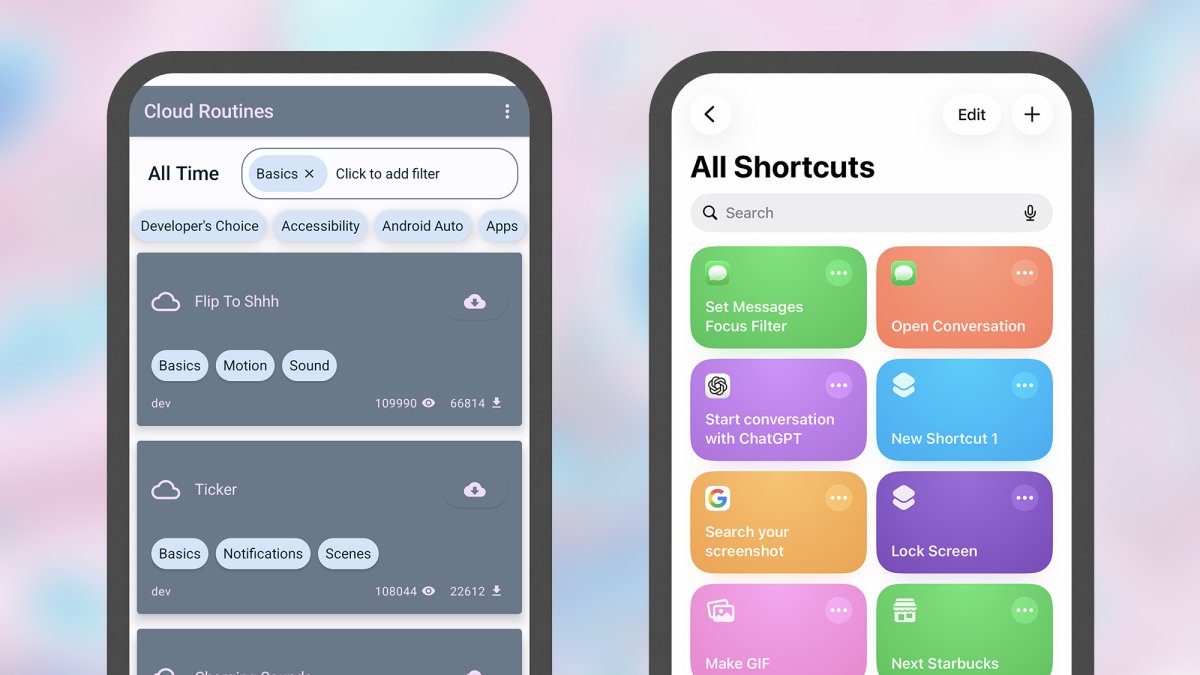
There’s a Flip to Shhh automation that you should be able to find in the TaskerNet directory—placing your phone face down will mute it. When you’ve loaded the project, you’ll see it at the bottom of the screen, ready for selecting: Under the Profiles tab, there’s an Orientation Face Down toggle switch (which is what the automation is waiting for), and if you tap on it, you’ll see the linked action—turning on Do Not Disturb. Under Tasks, we have a standalone task, which is the setup for the automation, and you can edit this to change the on-screen message.

Tasks can be coded to go into great detail.
Credit: Lifehacker
To fully explain Tasker and its idiosyncrasies takes a lot more space than what’s available here—check out the vast amount of information on the Tasker website—but you can start building simple automations from the Profile tab by clicking the + (plus) button and choosing a trigger and an action from the lists provided. You could pick a time as the trigger, and switching to dark mode as the action, for example.
If this already seems like too much effort, looking at what Tasker is capable of can encourage you to dive in: Run searches from doodled sketches, get a notification when your WhatsApp message goes from unread to read, or switch to voice typing automatically when your phone is flat on a surface, for example.
Apple Shortcuts is easier to learn than Tasker, but you have less control
Apple Shortcuts is the iPhone Tasker in some ways, but it’s much more straightforward: Creating and editing automations is simpler, and while there’s less you can do with it in terms of interacting with the fundamentals of your phone, the capabilities here are going to be enough for most casual tinkerers.
All of your current shortcuts show up in the Library tab of the app, while under Automations, you can find the shortcuts that run automatically, without any input from you—maybe based on the time of day or the opening of an app. Under Gallery, you can browse through shortcuts curated by Apple.

Shortcuts is easier to understand than Tasker.
Credit: Lifehacker
As with Tasker, starting with an example is a good way to get into the flow of the app. If you open the Gallery, you should be able to find a Remind Me at Work shortcut: Tap the + (plus) button in the corner to add it to your own library. Getting within 100 meters of your office is the trigger, and displaying a reminder is the action.
What do you think so far?
The shortcut will want to know where you work, and will ask for this information when you add it to your library. When the shortcut runs, you get prompted for something to add to a work note inside Apple Notes—so you can build up a comprehensive list of everything you don’t want to forget, specifically for your workplace.

Numerous triggers can be used for automations in Shortcuts.
Credit: Lifehacker
Tap the three dots on any shortcut in your library to see a breakdown of how it works. Triggers can be based on times and dates, locations, apps opening or closing, Focus Modes, or on changes to settings like wifi and Bluetooth. Actions can include a host of tasks in Apple’s own apps (from setting calendar entries to getting map directions), as well as some third-party ones, and you’re also able to control various aspects of the phone, such as changing the Airplane Mode status or screen brightness level.
You’ll find plenty of shortcuts written by users and available on the web. These tasks and automations can be set up to track a home move via QR codes, log your daily water intake, or get the weather forecast for the location of an upcoming calendar event. You can also start building your own by tapping the + (plus) button on the Library or Automation tabs.
Tasker vs. Shortcuts is Android vs. iOS
Comparing Tasker against Shortcuts is an interesting way to look at Android versus iOS overall. Even as Google and Apple have borrowed features off each other over the years, there have remained some pretty distinctive differences as well, and many of them come to the fore when using these two tools.
Apple Shortcuts gives you a lot of guidance, and offers a workflow that’s easier to follow—though it’s still capable of some very clever automations. It is also more limited in terms of the control you get over the mobile operating system and the apps installed on it: Shortcuts can only dig into apps as much as the developers allow.

Tasker has a steeper learning curve than Shortcuts.
Credit: Lifehacker
Tasker can interact with apps whether or not their developers or Google have done anything to help. Unlike Shortcuts, it can read the content of notifications, draw on top of other apps, and even carry out actions on your behalf (like screen taps and swipes), for example. Tasker can also do continuous monitoring better than Shortcuts can.
Apple (understandably) wants to keep some limits on Shortcuts because of security and privacy reasons, but Google puts the onus on you to only run the automations and tasks that you understand and trust. For better or worse, Tasker and Android give you more freedom if you want to truly hack into what your phone is capable of (and are patient enough to figure out the interface).