No Result
View All Result
Global Finances Daily
  • Alternative Investments
  • Crypto
  • Financial Markets
  • Investments
  • Lifestyle
  • Protection
  • Retirement
  • Savings
  • Work & Careers
No Result
View All Result
  • Alternative Investments
  • Crypto
  • Financial Markets
  • Investments
  • Lifestyle
  • Protection
  • Retirement
  • Savings
  • Work & Careers
  • Login
Global Finances Daily
No Result
View All Result
Home Protection

How to Turn Off the AI ‘Coach’ In the Google Health App

June 9, 2026
in Protection
0
How to Turn Off the AI 'Coach' In the Google Health App


We may earn a commission from links on this page.


Ever since the Fitbit app became the Google Health app, the app’s AI features are impossible to avoid for Premium users—or at least it may seem that way. There is a way to turn off the AI coach and return a little peace to your Today screen, without waiting for your Premium trial (or subscription) to expire. 

Why you may want to turn off the Google Health Coach

The AI-based Health Coach is the centerpiece of the Google Health app, at least if you have a premium subscription. You may have accepted a three-month free trial of Google Health Premium when you connected a new device, or you may pay for Google AI Pro or Ultra, which includes the Health Coach. 

When the Coach is enabled, it updates the main screen of the app with a few paragraphs of text several times a day. (You’ll also get a notification with each of these updates). The Coach will tell you how well you slept, or congratulate you on a hard workout, or suggest workouts for the day given how recovered you seem to be. 

But, as I wrote in my Fitbit Air review, the Coach hallucinates pretty often, misreporting your workout data or misunderstanding what you’ve told it are your goals. One user, returning to their normal routine after surgery, posted to Reddit that the Coach keeps trying to talk them out of doing workouts. They called it a “Demotivation Coach.” Others have pointed out that the Coach doesn’t seem to be reading its own data correctly. 

On a more personal note, the Coach uses a tone that I find insufferable: arrogant and excessively positive, except when it’s being unnecessarily negative. I’d prefer neutral, factual feedback or none at all. Fortunately, there’s a way to turn it off.


What do you think so far?

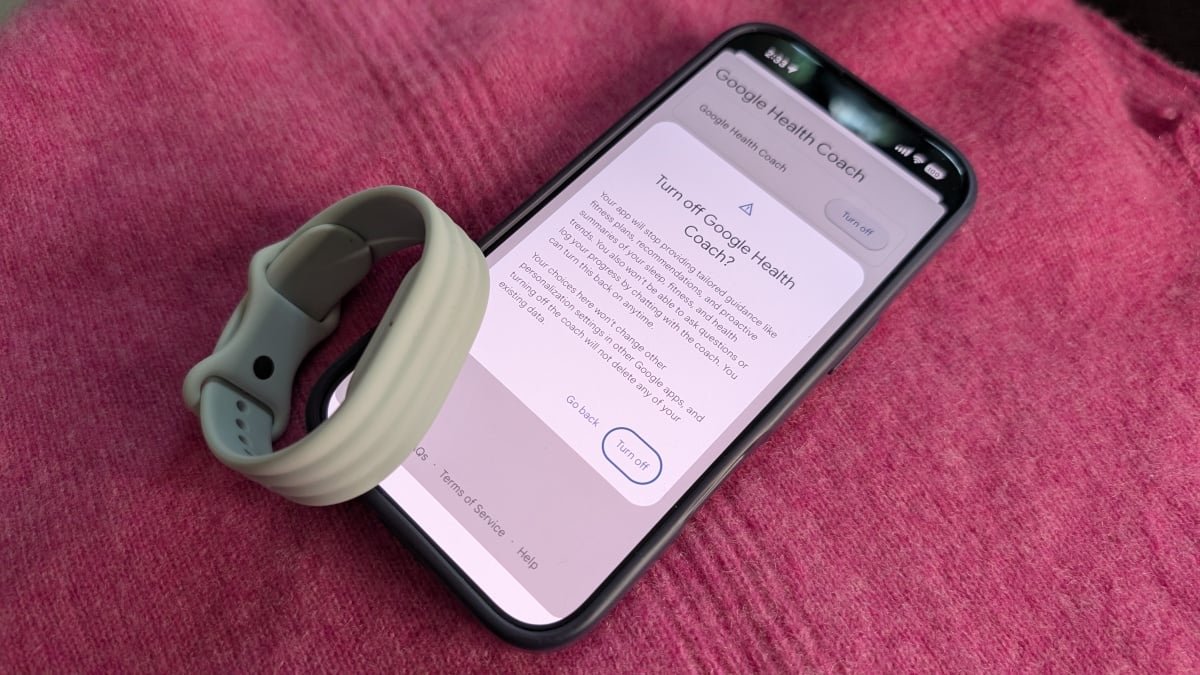
How to turn off the Google Health Coach


Credit: Beth Skwarecki

This is a bit tricky, since it’s not in the app’s settings, but in your Google account settings. Here’s how to disable the Coach: 

  1. From the Google Health app, tap your profile picture in the upper right corner.

  2. Tap Your data in Google Health

  3. Tap Manage feature privacy controls

  4. Tap the Google Health Coach, and you’ll see an option to turn it off. 

When you return to the Google Health app, you’ll still see the paragraphs of text that the Health Coach previously wrote, but you won’t get any new ones. There will be a card inviting you to re-enable the Health Coach, but you can tap “not now.” You can re-enable the Coach at any time by hitting the “Ask Coach” button in the corner (it does not go away) and following the prompts to turn it back on. 


Editorial Team

Editorial Team

Related Posts

All the New Features Coming to Messages in iOS 27
Protection

All the New Features Coming to Messages in iOS 27

June 12, 2026
30 of the Gayest Straight Movies Ever Made
Protection

30 of the Gayest Straight Movies Ever Made

June 12, 2026
These Insignia QLED TVs Are 40% Off Right Now
Protection

These Insignia QLED TVs Are 40% Off Right Now

June 12, 2026
My Apple Watch Doesn’t Support watchOS 27, but Here’s Why I’m Not Buying a New One
Protection

My Apple Watch Doesn’t Support watchOS 27, but Here’s Why I’m Not Buying a New One

June 12, 2026
Five Hacks Every Meta Smart Glasses User Should Know
Protection

Five Hacks Every Meta Smart Glasses User Should Know

June 12, 2026
Apple’s Image Playground Just Caught Up to ChatGPT and Gemini
Protection

Apple’s Image Playground Just Caught Up to ChatGPT and Gemini

June 12, 2026
Load More
Next Post
For Our Place founder Shiza Shahid, a Trip to Marrakech Means Craft, Tagine, and Cooking as Connection

For Our Place founder Shiza Shahid, a Trip to Marrakech Means Craft, Tagine, and Cooking as Connection

Popular News

  • The 10 best banks for college students in 2025

    The 10 best banks for college students in 2025

    0 shares
    Share 0 Tweet 0
  • College sticker prices top $100,000 at 16 schools for 2026-27

    0 shares
    Share 0 Tweet 0
  • CME now trades crypto 24/7. Here’s why it matters

    0 shares
    Share 0 Tweet 0
  • How to Contact Hilton Customer Service

    0 shares
    Share 0 Tweet 0
  • I Used Monarch Money for 30 Days: Here’s What Happened

    0 shares
    Share 0 Tweet 0

Latest News

US, Iran inch closer to deal, timing remains unclear

US, Iran inch closer to deal, timing remains unclear

June 14, 2026
0

US, Iran inch closer to deal, timing remains unclear

CFTC

CFTC sues New Mexico as prediction market jurisdiction fight expands

June 14, 2026
0

The Commodity Futures Trading Commission has taken New Mexico to federal court over efforts to regulate prediction markets. Summary The...

Blockworks bets on Messari in high-stakes crypto data race - 1

Blockworks bets on Messari in high-stakes crypto data race

June 14, 2026
0

Blockworks has acquired Messari after securing a $192 million valuation earlier this year, deepening its push into crypto data infrastructure...

Switzerland votes on proposal to cap population at 10 million

Switzerland votes on proposal to cap population at 10 million

June 14, 2026
0

Switzerland votes on proposal to cap population at 10 million

Global Finances Daily

Welcome to Global Finances Daily, your go-to source for all things finance. Our mission is to provide our readers with valuable information and insights to help them achieve their financial goals and secure their financial future.

Subscribe

  • About Us
  • Contact
  • Privacy Policy
  • Terms of Use
  • Editorial Process

© 2025 All Rights Reserved - Global Finances Daily.

No Result
View All Result
  • Alternative Investments
  • Crypto
  • Financial Markets
  • Investments
  • Lifestyle
  • Protection
  • Retirement
  • Savings
  • Work & Careers

© 2025 All Rights Reserved - Global Finances Daily.

Welcome Back!

Login to your account below

Forgotten Password?

Retrieve your password

Please enter your username or email address to reset your password.

Log In
This website uses cookies. By continuing to use this website you are giving consent to cookies being used. Visit our Privacy and Cookie Policy.