No Result
View All Result
Global Finances Daily
  • Alternative Investments
  • Crypto
  • Financial Markets
  • Investments
  • Lifestyle
  • Protection
  • Retirement
  • Savings
  • Work & Careers
No Result
View All Result
  • Alternative Investments
  • Crypto
  • Financial Markets
  • Investments
  • Lifestyle
  • Protection
  • Retirement
  • Savings
  • Work & Careers
  • Login
Global Finances Daily
No Result
View All Result
Home Protection

I Tried Android 17’s ‘Bubbles’ and It Makes Multitasking Way Easier?

June 18, 2026
in Protection
0
I Tried Android 17’s ‘Bubbles’ and It Makes Multitasking Way Easier?


Android 17 is on its way to Pixel phones around the world, and while there aren’t a huge number of major upgrades—Google now usually pushes these out through the year—there is a useful new feature that gives you easier access to your apps. The feature is called Bubbles, and it’s an extension of the chat bubbles that rolled out with Android 11 and that have since largely been forgotten about. This time the bubbles are coming to all categories of app, so you can set a floating shortcut to appear at the side of the screen containing the apps you use the most.

This shortcut expands and collapses as you tap on it, and you can have up to five different bubbles on the go at any one time. You can put your bubbles anywhere you want on screen if you’re using a regular phone, but if you’re using a foldable they get docked to the bottom right corner. It’s like having an extra mini launcher to call on.

Creating a new bubble.
Credit: Lifehacker

The clever part is that these bubbles aren’t simply another way of launching the app: They actually give you access to it in a slightly smaller window, so you can quickly check up on something or interact with an app before going back to whatever you were doing before. So if you’ve writing a text message and you’ve got a website you need to refer to in a bubble, you can quickly get an overlay of that site, check what you need to, and then get back to the message.

It promises to make multitasking much more intuitive and smooth on Android, and I’ve been using it extensively since I got the Android 17 update. I found it did take me a little while to figure out how I could best make use of it, but it’s already changing the way that I use my phone.

Using bubbles on Android 17

You can create a bubble for an app by long-pressing on its icon on the home screen or in the app drawer, and choosing Bubble. If the app has its own long-press menu, then you’ll just see the bubble icon without the text—it looks like a rectangle with an arrow pointing to one corner of it.

Tap on your new bubble to open the full selection, and you’ll see there’s a + (plus) icon for adding more bubbles as well. Tap and hold, and you can drag the bubbles shortcut to a different part of the screen. To get rid of a bubble, tap and hold on it, and drag it down to the X at the bottom. You can do this for all your bubbles at once, if you need to.

There are some apps that I can’t create bubbles for, and I’m not sure why. It’s possible the developer hasn’t enabled the feature, or perhaps they’re just incompatible with bubbles. They included the Google Authenticator app, the games I’ve got on my phone, and the default Camera app for Pixels.


What do you think so far?

Android 17 Bubbles

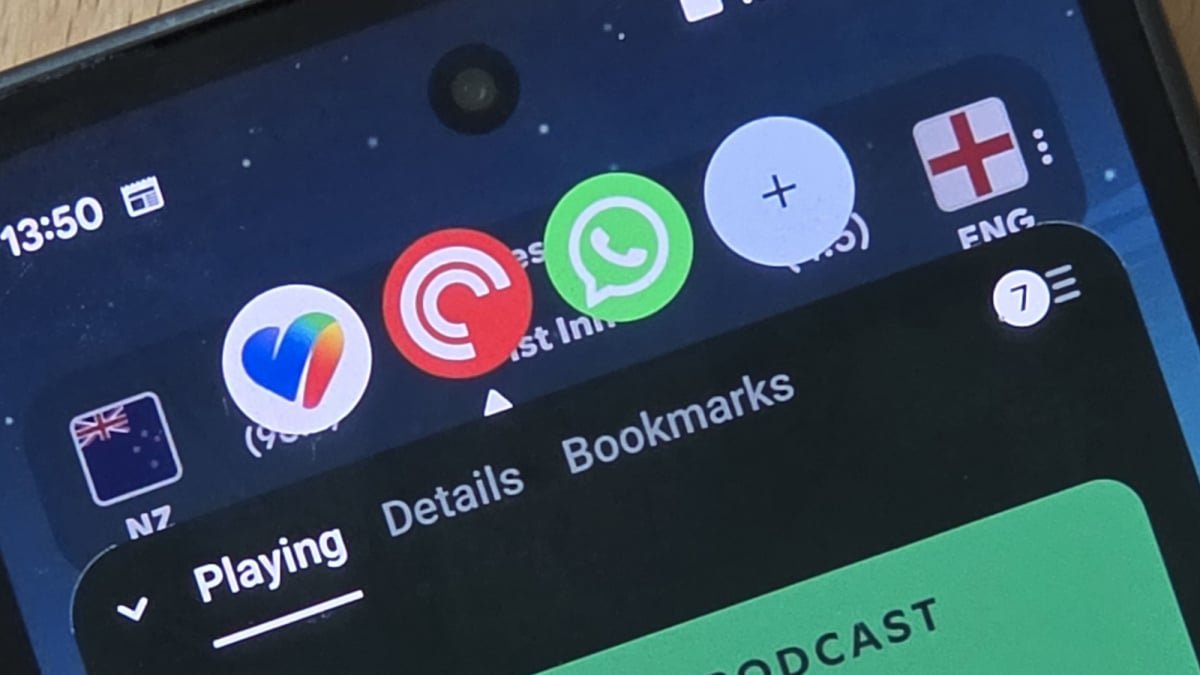
You can switch between bubbles from the row at the top.
Credit: Lifehacker

When you select a bubble, you get the app overlaid on top of whatever else is on your screen, and you can interact with it normally—it’s just that the window is slightly smaller than it otherwise would be. You can then tap outside the window to close your app bubbles, or use the row at the top to switch to a different bubble.

This doesn’t replace launching an app in the normal way—you can still do that with apps that you’ve made into bubbles—it just gives you an alternative, quicker way of accessing certain apps without losing what you were already doing. It’s a bit like a more agile recent apps screen, or Slide Over on the iPad.

I’ve got WhatsApp, Pocket Casts, and Google Health set up as bubbles, so I can quickly check and reply to messages, start and stop podcasts, and look up my daily steps without too much of an interruption. While doing these tasks and going back to a previous screen would usually take several swipes and taps, now they just take a couple of taps.


Editorial Team

Editorial Team

Related Posts

This Mighty Anker Power Station and Solar Panel Bundle Is 50% Off Right Now
Protection

This Mighty Anker Power Station and Solar Panel Bundle Is 50% Off Right Now

June 18, 2026
Apple Is Making 'Hide My Email' Less Effective, but There Are Alternatives
Protection

Apple Is Making ‘Hide My Email’ Less Effective, but There Are Alternatives

June 17, 2026
The Best Early Prime Day Deals on Tech for Under $50
Protection

The Best Early Prime Day Deals on Tech for Under $50

June 17, 2026
The Best Early Prime Deals on Fitness Wearables
Protection

The Best Early Prime Deals on Fitness Wearables

June 17, 2026
You Can Now Use Your HSA/FSA Funds to Buy a Fitbit Air
Protection

You Can Now Use Your HSA/FSA Funds to Buy a Fitbit Air

June 17, 2026
These Over-Ear Nothing Headphones Are Up to 29% Off Right Now
Protection

These Over-Ear Nothing Headphones Are Up to 29% Off Right Now

June 17, 2026
Load More
Next Post
‘I’ll probably be working until I die’: I’m 60, work as a waiter and have $2,000 in a Roth IRA. What will happen to me?

‘I’ll probably be working until I die’: I’m 60, work as a waiter and have $2,000 in a Roth IRA. What will happen to me?

Popular News

  • Josh Garber

    How to Contact Hilton Customer Service

    0 shares
    Share 0 Tweet 0
  • The 10 best banks for college students in 2025

    0 shares
    Share 0 Tweet 0
  • NYC Subway Disables Trip-History Feature Over Tap-and-Go Privacy Concerns

    0 shares
    Share 0 Tweet 0
  • How to Build a Music Library That You Actually Own

    0 shares
    Share 0 Tweet 0
  • El puntaje de crédito y el informe de crédito: ¿En qué se diferencian?

    0 shares
    Share 0 Tweet 0

Latest News

Cointelegraph

Bitcoin to $145K by October? This Old Post With ‘Crazy Accurate’ BTC Price Predictions Say So

June 18, 2026
0

A viral social media post is reviving an alleged Bitcoin prediction that appears to have called several major BTC price...

Stocks slip as Fed rate outlook offsets optimism over Iran deal

Stocks slip as Fed rate outlook offsets optimism over Iran deal

June 18, 2026
0

Stocks slip as Fed rate outlook offsets optimism over Iran deal

‘I’ll probably be working until I die’: I’m 60, work as a waiter and have $2,000 in a Roth IRA. What will happen to me?

‘I’ll probably be working until I die’: I’m 60, work as a waiter and have $2,000 in a Roth IRA. What will happen to me?

June 18, 2026
0

“I’m afraid I’m in a bad place.”

I Tried Android 17’s ‘Bubbles’ and It Makes Multitasking Way Easier?

I Tried Android 17’s ‘Bubbles’ and It Makes Multitasking Way Easier?

June 18, 2026
0

Android 17 is on its way to Pixel phones around the world, and while there aren't a huge number of...

Global Finances Daily

Welcome to Global Finances Daily, your go-to source for all things finance. Our mission is to provide our readers with valuable information and insights to help them achieve their financial goals and secure their financial future.

Subscribe

  • About Us
  • Contact
  • Privacy Policy
  • Terms of Use
  • Editorial Process

© 2025 All Rights Reserved - Global Finances Daily.

No Result
View All Result
  • Alternative Investments
  • Crypto
  • Financial Markets
  • Investments
  • Lifestyle
  • Protection
  • Retirement
  • Savings
  • Work & Careers

© 2025 All Rights Reserved - Global Finances Daily.

Welcome Back!

Login to your account below

Forgotten Password?

Retrieve your password

Please enter your username or email address to reset your password.

Log In
This website uses cookies. By continuing to use this website you are giving consent to cookies being used. Visit our Privacy and Cookie Policy.