You’ve got all kinds of options when it comes to choosing how to communicate digitally with friends and family: not just dedicated messaging apps such as iMessage and WhatsApp, but also the DM features built into social media platforms like Instagram, Facebook, and Snapchat. Some of these apps put a lot of emphasis on security and privacy, with mentions of end-to-end encryption and disappearing messages (WhatsApp now lets you hide your phone number for example). For the ultimate in private messaging, though, there’s an app you might not have heard of before.
Delta Chat is decentralized (so there’s no one point of failure or control), open-source, end-to-end encrypted, and anonymous—you don’t need to supply a phone number to get started. You can even message people who don’t have the app. Here’s what you need to know, and why you might want to make use of it.
How Delta Chat works
Delta Chat has been around for about a decade now, and started as a way to keep your messages out of the clutches of big tech companies. Over the years, it’s added more and more features, become easier to use, and expanded to more platforms. There have also been some changes in the way Delta Chat works as a platform.
For much of Delta Chat’s existence, it’s worked through email: You signed up with your email address, and the chat app was essentially a wrapper for certain conversations in your inbox. Much of the storage and infrastructure work was handled by your email provider of choice, and anyone with an email address could join in.
Now, though, Delta Chat provides an email address for you, and handles all of the necessary plumbing behind the scenes. Not only does this make the service more convenient, it means you don’t need to reveal anything to use it—you won’t be asked for a phone number, an email address, a name, or anything else.
You don’t have to give any personal details when creating an account.
Credit: Lifehacker
That may sound like it leaves the service open to spam, but the encryption stops that: Essentially, no one can spam you without knowing your specific encryption key. Your address is a random string of characters that you can pass on to trusted contacts—there’s no public directory of users, and no way of looking someone up.
There are plenty of the usual chat app features here: audio and video calls, group chats, read receipts, and the option to have your messages disappear after a certain amount of time. You can easily share files with contacts, and you can log in on multiple devices simultaneously.
Getting started with Delta Chat
You can start your Delta Chat journey through the desktop apps for Windows or macOS, or through the mobile apps for Android or iOS. As noted above, you don’t need to provide any personal information to sign up for the service: Just tap or click Create new profile on the opening splash screen to begin.
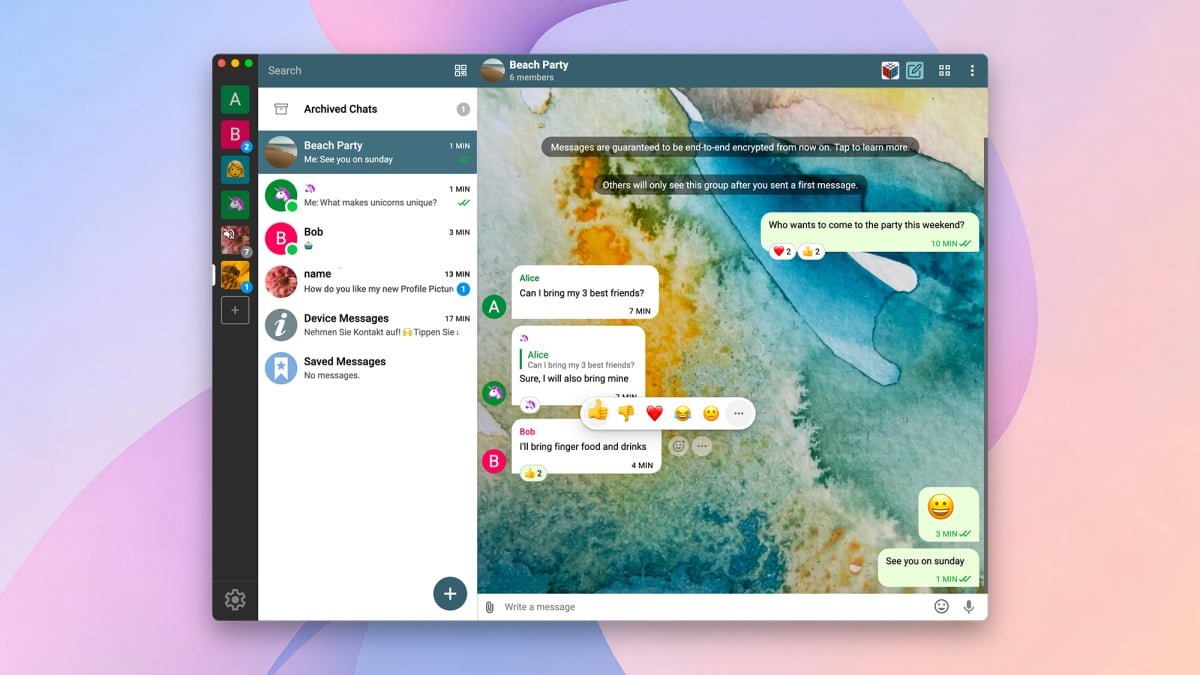
The app will ask you for a username that your contacts will recognize you by, but it doesn’t have to be your real name, and there’s the option to add a profile picture as well. You are then taken to the main chat screen, though you won’t have any chats yet—just a welcome message and a folder for your saved messages.
To add someone on Delta Chat, tap the QR code icon at the top (Android and desktop) or bottom (iOS) of the interface. Ask your prospective contact to scan this with Delta Chat on their own device, though there are also options if you’re doing the scanning. You can also generate an invite link to paste into an email or another messaging app.

The chat interface is a familiar one.
Credit: Lifehacker
Everything works very much as you would expect once you’re in the Delta Chat interface. Via a long press on mobile or a right-click on the desktop, you can find options for muting, pinning, and archiving specific conversations, while the new chat button (a plus icon on Android and the desktop; a pen-in-a-box icon on iOS) lets you start a new conversation or create a new group chat.
What do you think so far?
To get to the settings for an individual chat, tap the three dots (top right) on Android, tap the contact name at the top then the three dots (top right) on iOS, and click the three dots (top right) on the desktop. The options here let you set up disappearing messages, search through chats, and clear the conversation history, as well as muting and archiving.
There’s a main settings screen, via the large cog icon on the desktop app interface, the three dots (top right) on Android, and the Settings tab on iOS. The options here include being able to set backgrounds for your chat, turn read receipts on and off, and configure the quality of shared media files.
Why pick Delta Chat over the competition?
There are all kinds of encrypted, secure chat apps out there, including WhatsApp and Signal—so what are the compelling reasons to pick Delta Chat instead? The fact that you don’t have to offer any personal data is a big one: You don’t need a phone number or an email address, and no one is going to find you (or spam you) unless you specifically decide to add them.
Then there’s the decentralized aspect of it. Delta Chat’s storage servers and nodes are spread out in several different locations, so one power outage or technical failure doesn’t bring down the entire system. You can even host your Delta Chat data yourself, if you want.
Due to the email infrastructure underpinning Delta Chat, it’s also harder to block and censor than something like Signal, and easier to get your messages exported out.
If you decide to give this app a go, there is the standard problem of trying to convince family and friends to install it too, on top of whatever they’re already using—but you don’t necessarily have to persuade your entire contacts list to join Delta Chat: It could work well as a private app for you and a handful of people closest to you.