No Result
View All Result
Global Finances Daily
  • Alternative Investments
  • Crypto
  • Financial Markets
  • Investments
  • Lifestyle
  • Protection
  • Retirement
  • Savings
  • Work & Careers
No Result
View All Result
  • Alternative Investments
  • Crypto
  • Financial Markets
  • Investments
  • Lifestyle
  • Protection
  • Retirement
  • Savings
  • Work & Careers
  • Login
Global Finances Daily
No Result
View All Result
Home Protection

How to Get Started With Google Bard Extensions

September 19, 2023
in Protection
0
How to Get Started With Google Bard Extensions


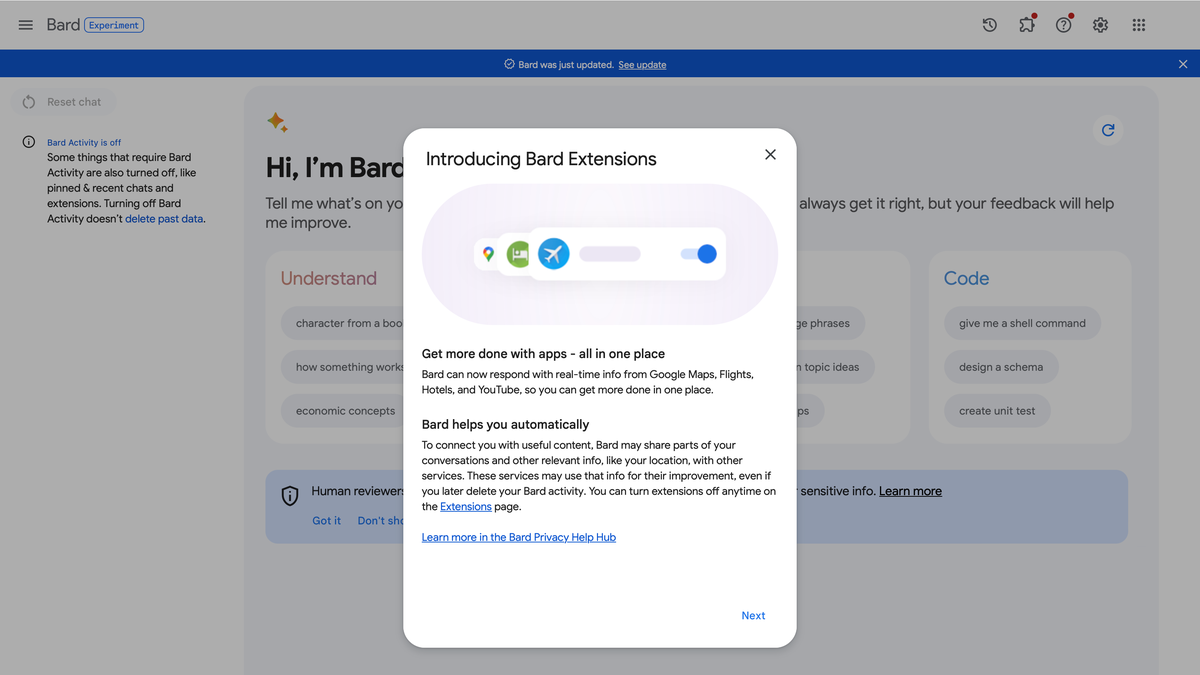
Today, Google announced Bard Extensions, a new feature that lets you connect Bard to your Google services. Think of them like ChatGPT plugins, if those plugins were proprietary and connected to OpenAI services. Bard Extensions allow you to connect Bard to services like Gmail, Drive, Docs, YouTube, and more, so you can access them without ever leaving the AI conversation.

How Google Bard Extensions work

Imagine you’re making vacation plans, and using Bard to do some research. In addition to the usual web searches Bard can make to give you information on your destination, it can show you relevant YouTube videos with sightseeing ideas, connect to Google Flights to find you the best flight deals, or Google Hotels to recommend lodging. If you’re planning the trip with others, you can ask Bard to coordinate with those friends in Gmail to figure out the ideal travel dates.

Google offers another useful scenario: If you’re applying for a job, you can ask Bard to dig through your Google Docs library, locate a specific resume, and draft a personal statement based on its contents. (I imagine you could extend this to draft the entire cover letter based on both your resume and the job description, but perhaps Google thought that idea was a bit unethical to promote.)

Since Bard is a Google product, integrating Google services directly in conversations makes a lot of sense. In theory, it could push Bard to be the most of useful of the current AI chatbots.

Introducing Extensions ✨ | Bard

Are Bard Extensions secure?

Google sure wants you to think so. The company states that none of your Workspace (Gmail, Docs, Drive) info connected to extensions is ever seen by human reviewers, nor is it used to show you ads or train Bard’s AI model. It is also deleted whenever it is done using the data to satisfy your request, so if you’re asking for a summary of the emails you received from a client, for example, it won’t delete that data until you’re done with that query.

However, according to Google, the service will share the following data with extensions you use: information from your conversation, preferences such as language and device type, as well as location information. That means you should feel safe knowing nobody is scraping your Google Docs files or your Gmail when connecting to Bard, but anything you discuss with Bard is collected.

Extensions only work if you keep Bard Activity turned on. This setting stores the data you amass while using Bard for a default of 18 months (although you can set up auto-deletion from anywhere from three to 36 months). Any data reviewed by humans, however, is kept for up to three years. Turning off Bard Activity is the only way to stop Google from keeping this data. However, that means you won’t be able to use your extensions, either.

How to set up Google Bard Extensions

To get started with Bard Extensions, head to bard.google.com/extensions. Sign into your compatible Google Account. In this window, you’ll see all the extensions Bard currently supports: Google Flights, Google Hotels, Google Maps, Google Workspace (Gmail, Drive, and Docs), as well as YouTube. Click the toggle next to each extension you’d like to give Bard access to. You can return to this page to revoke access at any time.

Whenever you make a request to Bard that requires one of these extensions, you’ll see it appear in the chat as the bot loads the content. For example, ask for a video on Portugal, and you’ll see the YouTube logo as Bard generates its answer. Ask when the cheapest flights to Denver are, and you’ll see “Google Flights” appear.

In other Bard news

Google also announced two new features alongside extensions: The first allows you to click the “G” button on any Bard results to prompt the bot to double-check its answers. If Bard finds additional supporting evidence, it will highlight it in green. If it finds contradictory information, it will highlight it in orange.

You can also share Bard chats with others, who can then pick up the conversation where you left off. If you start a chat with Bard about Roman history, for example, you can send it to your friend who thinks about the Roman Empire daily to keep the conversation going.

Editorial Team

Editorial Team

Related Posts

Gemini Is Getting a UI Overhaul and Embracing Its Agentic Side
Protection

Gemini Is Getting a UI Overhaul and Embracing Its Agentic Side

May 20, 2026
Google Releases Gemini 3.5 Flash Frontier Model Focused On Agentic AI
Protection

Google Releases Gemini 3.5 Flash Frontier Model Focused On Agentic AI

May 20, 2026
Google's AI Mode Is Getting Gemini's Latest Model
Protection

Google’s AI Mode Is Getting Gemini’s Latest Model

May 20, 2026
I Compared Garmin and Strava's Race Day Predictions, and Both Were Off in Different Ways
Protection

I Compared Garmin and Strava’s Race Day Predictions, and Both Were Off in Different Ways

May 19, 2026
Google Just Announced When Its First 'Intelligent Eyewear' Smart Glasses Will Launch
Protection

Google Just Announced When Its First ‘Intelligent Eyewear’ Smart Glasses Will Launch

May 19, 2026
10 Hacks Every Apple Passwords User Should Know
Protection

10 Hacks Every Apple Passwords User Should Know

May 19, 2026
Load More
Next Post
Condé Nast Traveler

Cruise Etiquette: What’s the Cruise Ship Dress Code These Days?

Popular News

  • Current Trends Explained: 'Devil Couldn't Reach Me,' Gloving, and Katseye

    Current Trends Explained: ‘Devil Couldn’t Reach Me,’ Gloving, and Katseye

    0 shares
    Share 0 Tweet 0
  • The 10 best banks for college students in 2025

    0 shares
    Share 0 Tweet 0
  • The Morning Briefing: Openwork takes Tenet ARs and bigger is better

    0 shares
    Share 0 Tweet 0
  • ResidentShield Renters Insurance Review 2024: Pros and Cons

    0 shares
    Share 0 Tweet 0
  • Microsoft’s New ‘Recall’ Feature Is Equal Parts Cool and Dangerous

    0 shares
    Share 0 Tweet 0

Latest News

Ethereum stalls as JPMorgan crowns Bitcoin the new institutional base layer

Ethereum stalls as JPMorgan crowns Bitcoin the new institutional base layer

May 20, 2026
0

Ethereum’s slide behind Bitcoin is no longer just a price story; JPMorgan says the institutional plumbing now confirms that BTC...

Career and Experiential Learning Coach, Opportunity Hub

Career and Experiential Learning Coach, Opportunity Hub

May 20, 2026
0

Pacific University achieves excellence and distinction by investing in exceptional people to think, care, create, and pursue justice in our...

Samsung Elec talks break down, union to go on strike

Samsung Elec talks break down, union to go on strike

May 20, 2026
0

Samsung Elec talks break down, union to go on strike

Gemini Is Getting a UI Overhaul and Embracing Its Agentic Side

Gemini Is Getting a UI Overhaul and Embracing Its Agentic Side

May 20, 2026
0

Google's Gemini app is getting an overhaul, in terms of both design and function. At Google I/O 2026, the company...

Global Finances Daily

Welcome to Global Finances Daily, your go-to source for all things finance. Our mission is to provide our readers with valuable information and insights to help them achieve their financial goals and secure their financial future.

Subscribe

  • About Us
  • Contact
  • Privacy Policy
  • Terms of Use
  • Editorial Process

© 2025 All Rights Reserved - Global Finances Daily.

No Result
View All Result
  • Alternative Investments
  • Crypto
  • Financial Markets
  • Investments
  • Lifestyle
  • Protection
  • Retirement
  • Savings
  • Work & Careers

© 2025 All Rights Reserved - Global Finances Daily.

Welcome Back!

Login to your account below

Forgotten Password?

Retrieve your password

Please enter your username or email address to reset your password.

Log In
This website uses cookies. By continuing to use this website you are giving consent to cookies being used. Visit our Privacy and Cookie Policy.