The internet is not a private place. Every time you connect to a website, ads and beacons—both visible and invisible—attempt to follow your every move. They’ll even take the anonymized information they collect and build a profile that other trackers can use to identify you as you surf the web. It’s pretty bleak.
Luckily, modern browsers are fighting back. While there are certainly better options than others, most browsers have privacy protections built in. If you know what you’re doing, you can max out these protections and install some third-party boosters to retain some (if not most) of your privacy across the internet.
If you’re curious how your browser stacks up to the competition, check out Cover Your Tracks. I gave it a shot, and was surprised to find out that my super-private setup wasn’t as anonymous as I thought.
What is Cover Your Tracks?
Cover Your Tracks is a project created by the Electronic Frontier Foundation (EFF), a non-profit digital rights group, and aims to educate users on two key metrics: how unique their browser is, and how effective their tracker blockers are. The site pretends to load a series of trackers on your browser, and measures which trackers are actually able to load. If your protections are strong, more trackers will fail to load. If they’re not, well, trackers galore.
The site will load fake trackers like the following:
-
https://trackersimulator.org/?action=tracking_tally&ad_url=123456
-
https://eviltracker.net/?action=tracking_tally&trackingserver=123456
-
https://do-not-tracker.org/?action=tracking_tally&random=123456
The first link acts like an ad you might encounter on any random website. If your browser blocks the “ad,” it passes that test. The second link pretends to be an invisible beacon (or tracker). If you browser blocks the “beacon,” it passes. Finally, the third link acts like a domain that respects the EFF’s Do Not Track Policy. If your browser unblocks the domain’s scripts, it passes. (Why unblock the scripts at all? According to the EFF, so few sites choose to voluntarily abstain from tracking visitors, that it’s worth unblocking ads on these sites to reward them.) Partial credit is awarded to browsers that allow the ad or beacon to load, but block their respective cookies: Allowing the ad or tracker means you can be followed, but blocking cookies means the tracker likely can ID you.
Those trackers are only effective if they have a sense of the profile they’re following. That’s where browser uniqueness comes in: Cover Your Tracks takes a look at your browser fingerprint and compares it against its database of recently scanned browsers. It then generates a uniqueness score—the more unique your fingerprint, the easier it is to track you across sites. Cover Your Tracks anonymously collects and stores browser data like your timezone, screen resolution, system language, and system platform, among other data points, to compare against other users’ browsers.
How did I score?
I’m not necessarily a hardcore privacy enthusiastic, but I do enjoy protecting my privacy wherever I can online. As such, I use Safari whenever possible, with all of the privacy settings I can enable. That includes hiding my IP address from trackers and websites, as well as preventing cross-site tracking. I combine that with an ad blocker (I’m using AdGuard, but would love if uBlock Origin would make a Safari extension) for a private, ad-free web experience.
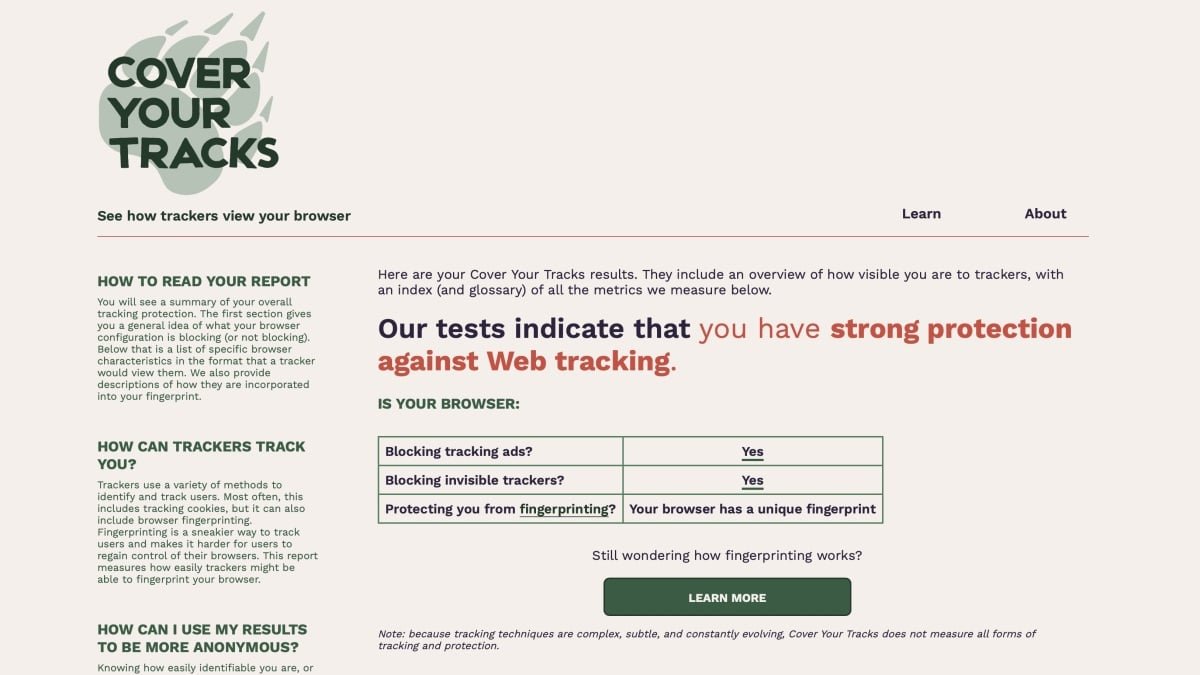
Those minimal steps do appear to have paid off—at least according to Cover Your Tracks. After processing my browser, the site concluded I have strong protection against web tracking. The tests confirmed my browser blocks tracking ads and invisible trackers, which is reassuring. The bad news, though, is that my current setup isn’t protecting me against fingerprinting—a practice where trackers build a profile to make it easier to identify you across the web. Cover Your Tracks said my browser had a unique fingerprint among the more than 250,000 browsers they had tested over the past 45 days, which means I stick out like a sore thumb on the internet. While the trackers my browser blocks won’t be able to see me, the ones my browser misses will, and they’ll know it’s my browser reading that article or watching that video.
I’m actually pretty surprised by this: Safari has “advanced tracking and fingerprinting protection,” which I keep enabled for all browsing. The fact Cover Your Tracks thinks I have a totally unique browser profile is a bit concerning to say the least.
What do you think so far?
When I tried the test in my Firefox browser—with all of its privacy protections enabled, coupled with uBlock Origin—it scored the same, save for the fingerprinting test. Unlike Safari, my Firefox browser is nearly unique: one in 125,883 browsers have the same fingerprint as mine, which, to my eyes, means my Firefox browser is twice as anonymous as my Safari browser, though that isn’t saying all that much.
How can you avoid fingerprinting on the web?
So, it turns out that any trackers that do break through my browsers defenses are able to see me in full view. That’s not great. Where do you go from here?
Unfortunately, this is tough. Fingerprinting is pretty difficult to avoid, because the more trackers you disable, the worse the web becomes. As the EFF explains, it’s a bit of a paradox, but after a certain point, you stop blocking the trackers that exist to track you, and you start to block elements that make websites work. If you disable JavaScript, you might stop a website from tracking you, but you might not be able to use it at all. On the flip side, using too many protections may actually inadvertently identify you, as trackers and sites see that you’re the only one constantly blocking everything all of the time.
There’s far from one way to be totally private on the web, but according to the EFF, the simplest way to attack fingerprinting includes the following:
-
Using Tor for your browsing, as the browser has a number of advanced anti-tracking features
-
Using a hardcore privacy extension (EFF recommends Privacy Badger and Disconnect, or NoScript if you’re using Firefox. Sadly, none are compatible with Safari.)
That all said, I did attempt the test using Tor with “Safer” privacy settings enabled, and earned the same unique browser score I did with Safari. So, I cranked up the settings to “Safest,” which, among other things, disables JavaScript on all websites. I tried to run the test again, and broke the website. Perhaps you really do need to give up a little privacy in order to use the internet at all.