No Result
View All Result
Global Finances Daily
  • Alternative Investments
  • Crypto
  • Financial Markets
  • Investments
  • Lifestyle
  • Protection
  • Retirement
  • Savings
  • Work & Careers
No Result
View All Result
  • Alternative Investments
  • Crypto
  • Financial Markets
  • Investments
  • Lifestyle
  • Protection
  • Retirement
  • Savings
  • Work & Careers
  • Login
Global Finances Daily
No Result
View All Result
Home Protection

This Hidden Spotify Feature Makes the Best Personalized Playlists

December 24, 2025
in Protection
0
This Hidden Spotify Feature Makes the Best Personalized Playlists


Spotify playlists are a surprisingly big part of my life. I make a handful of new, curated, choreographed ones for the spin classes I teach every week and otherwise meticulously maintain quarterly playlists designed to represent the overall vibe of specific, three-month periods in my life. I only edit those during the 12 weeks of the quarter, then leave them alone so I can revisit them and relive the era. This means I am constantly fiddling with the present playlist to make it just right, searching for songs that feel precisely aligned with however I’m feeling. It’s actually a time-consuming hobby—but I stumbled across a feature the other day that has made creating spin playlists and soundtracking Q1 of 2026 easier than ever.

The new Spotify feature

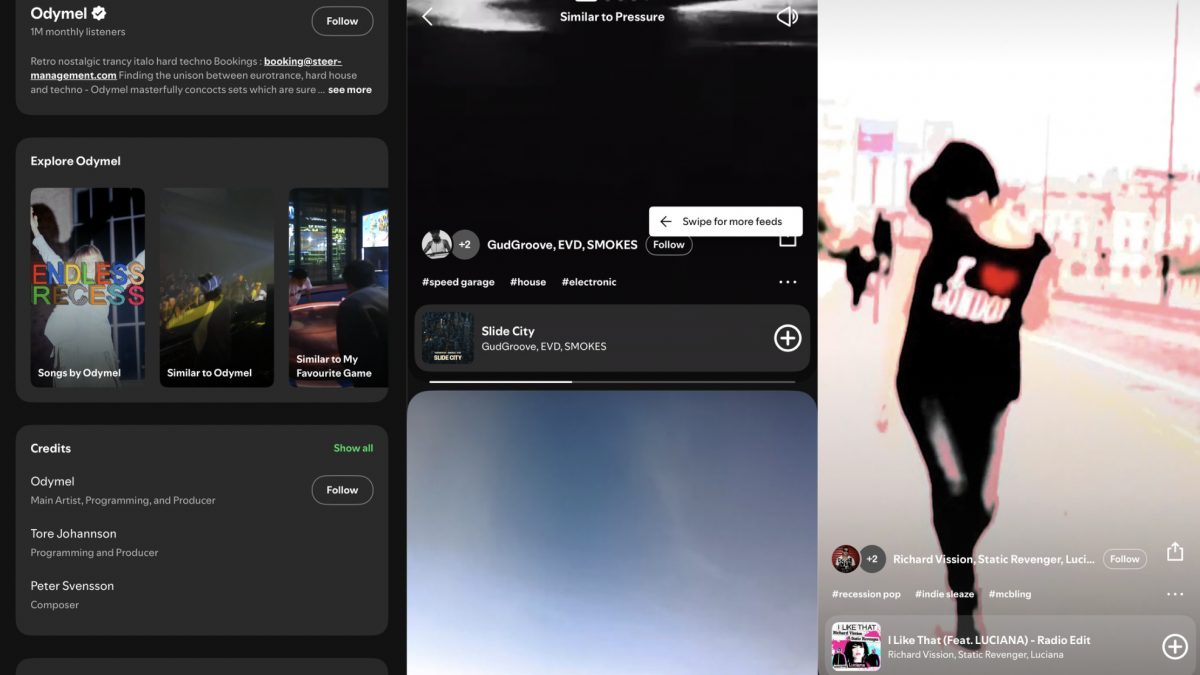
The best way I can describe the feature I stumbled upon is that it’s like Tinder for songs. If you’re listening to a song within the app, scroll down. Go past the buttons for Play and Next, past the About the artist section, past the lyrics, and stop when you see Explore [artist name]. Then, you’ll have three options like Similar to [artist name] and Similar to [song name], but these can differ slightly.

Tapping one of those opens up the new feature. Say you choose Similar to [song name]. You’ll be given 30 seconds of a song that Spotify’s algorithm considers “similar” to the one you were just listening to, plus the artist’s name, how many Spotify followers they have, and a three-dot menu that will let you add the song to your likes, add it to a playlist, go to the artist’s page, and more. If you like the 30-second clip, you can add the song to your playlists. If not, you can keep swiping downward to hear a new one.

See how it’s like Tinder? You make fairly snap decisions based on the quick preview and few details you get, then swipe away if you don’t like it. I found a community forum post on Spotify’s website about it, but otherwise, not much chatter. All I can tell is that it’s been out since about May.

Why I like the feature

I prefer this to the other music-discovery options on Spotify because it gives you a quick preview of the song and makes the finding process simple. I am, of course, a big fan of the pre-generated Discover Weekly playlist or New Releases playlist Spotify makes for me every week, but it’s time-consuming to listen to all the songs in them and it’s not intuitive to find other new songs based on the finite playlists themselves. The 30-second quick hits and easy, swipeable dismissal of the new feature help me figure out if a song is worth my time, either for spin class or personal use, add it to the appropriate playlist if so, and keep moving.


What do you think so far?

What I especially like is the three hashtags under the artist’s name. They are genre descriptions that match up with whatever song you’re previewing and I’ve found them helpful because I have a hard time describing what kind of music I even like. Apparently, per the new feature, I like something called “speed garage.” Tapping the #speedgarage hashtag that appears in the song previews brings me to another scrollable preview pane full of, exclusively, more speed garage—whatever that actually is. I still can’t define it, but I learned I like it, and that alone is more beneficial than a year’s worth of Discover Weekly playlists.

I used this feature during my Uber ride to the airport the other day and, by the time I was through TSA, I had 29 new songs in my Q1 playlist. I listened to them on the plane, weeded out ones that didn’t match the quarterly vibe well enough, then sent it to my friends, who all gave the collection rave reviews like, and I quote, “this slaps.”




Editorial Team

Editorial Team

Related Posts

Use the ‘4D’ Method to Keep Up With Your Inbox
Protection

Use the ‘4D’ Method to Keep Up With Your Inbox

December 25, 2025
Don't Fall for This 'Out of Stock' Purchase Scam
Protection

Don’t Fall for This ‘Out of Stock’ Purchase Scam

December 25, 2025
You Can Now Customize ChatGPT’s ‘Personality’ to Suit Your Tastes Even More
Protection

You Can Now Customize ChatGPT’s ‘Personality’ to Suit Your Tastes Even More

December 25, 2025
Why You Should Use LIFO to Manage Your Email Inbox
Protection

Why You Should Use LIFO to Manage Your Email Inbox

December 25, 2025
This Is the Easiest Way to Filter Junk Out of Your Gmail Inbox
Protection

This Is the Easiest Way to Filter Junk Out of Your Gmail Inbox

December 25, 2025
Use the RAFT Technique to Quickly Sort Emails
Protection

Use the RAFT Technique to Quickly Sort Emails

December 25, 2025
Load More
Next Post
Sanofi pushes ahead on adult vaccines with $2.2 billion Dynavax deal

Sanofi pushes ahead on adult vaccines with $2.2 billion Dynavax deal

Popular News

  • ‘Is it a case of them or us?’ We’re in our 40s. Do we retire early in our 50s — or save for our kids’ education?

    ‘Is it a case of them or us?’ We’re in our 40s. Do we retire early in our 50s — or save for our kids’ education?

    0 shares
    Share 0 Tweet 0
  • How to Contact Hilton Customer Service

    0 shares
    Share 0 Tweet 0
  • BTC, ETH, BNB, TRX remain muted ahead of US Jobless data and $28B options expiry

    0 shares
    Share 0 Tweet 0
  • 5 Things to Know About the Mercury Credit Card

    0 shares
    Share 0 Tweet 0
  • The Morning Briefing: Titan gets PE backing and AI could kill us or help us

    0 shares
    Share 0 Tweet 0

Latest News

ACA enhanced subsidies debate centers on affordability

ACA enhanced subsidies debate centers on affordability

December 25, 2025
0

Senate Minority Leader Chuck Schumer, a Democrat from New York, right, and Sen. Raphael Warnock, a Democrat from Georgia, depart...

CZ Urges to Protect Users from Scam Wallets after $50M USDT Theft

CZ Urges to Protect Users from Scam Wallets after $50M USDT Theft

December 25, 2025
0

Key NotesCZ proposes wallet-level blocks and UI filters to stop “poison” addresses and copy-paste traps.Case in point: an investor mis-sent...

Condé Nast Traveler

The Best Things to Do in the Palm Beaches, Florida

December 25, 2025
0

Palm Royale is well into its second season, and I've been watching from a perspective shaped by 25 years of...

How Trump's 'big beautiful bill' impacts your Giving Tuesday tax break

How Trump’s ‘big beautiful bill’ impacts your Giving Tuesday tax break

December 25, 2025
0

Yellow Dog Productions | The Image Bank | Getty ImagesIf you plan to donate money on Giving Tuesday, you could...

Global Finances Daily

Welcome to Global Finances Daily, your go-to source for all things finance. Our mission is to provide our readers with valuable information and insights to help them achieve their financial goals and secure their financial future.

Subscribe

  • About Us
  • Contact
  • Privacy Policy
  • Terms of Use
  • Editorial Process

© 2025 All Rights Reserved - Global Finances Daily.

No Result
View All Result
  • Alternative Investments
  • Crypto
  • Financial Markets
  • Investments
  • Lifestyle
  • Protection
  • Retirement
  • Savings
  • Work & Careers

© 2025 All Rights Reserved - Global Finances Daily.

Welcome Back!

Login to your account below

Forgotten Password?

Retrieve your password

Please enter your username or email address to reset your password.

Log In
This website uses cookies. By continuing to use this website you are giving consent to cookies being used. Visit our Privacy and Cookie Policy.