No Result
View All Result
Global Finances Daily
  • Alternative Investments
  • Crypto
  • Financial Markets
  • Investments
  • Lifestyle
  • Protection
  • Retirement
  • Savings
  • Work & Careers
No Result
View All Result
  • Alternative Investments
  • Crypto
  • Financial Markets
  • Investments
  • Lifestyle
  • Protection
  • Retirement
  • Savings
  • Work & Careers
  • Login
Global Finances Daily
No Result
View All Result
Home Protection

How to Get Samsung Galaxy’s Best Feature on Your Pixel (or Any Android)

January 20, 2026
in Protection
0
How to Get Samsung Galaxy's Best Feature on Your Pixel (or Any Android)


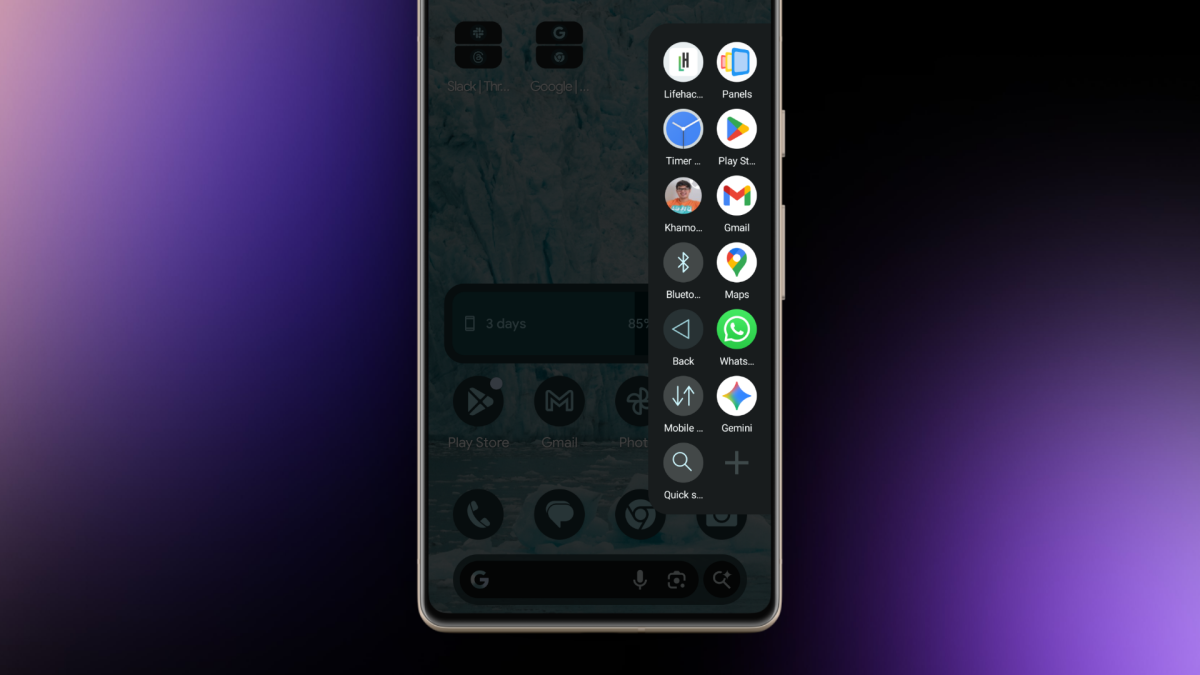
I’m a devout Pixel user. I love stock Android, and I’m always running the latest Android beta, making Pixel basically my only choice. But there are times when I get jealous looking at all the extra tools that Samsung provides on its Galaxy phones, Edge Panel being the big one. With Edge Panel, you can swipe in from the edge of your phone and a hidden drawer reveals itself, filled with apps, system actions, and shortcuts. Given how barebones Pixel Launcher is, I’ve always wanted something like this. Then I found the Panels app by Fossor Coding (not to be confused with the ill-fated wallpaper app by MKBHD).

In some ways, Panels is even better than Edge Panels on Samsung. It lets you use custom icon packs, there’s a quick search shortcut, and you can even open floating widgets. Plus, because it’s customizable, you can move the trigger point to the bottom edge of your phone instead of the side (incredibly handy for large phones), and you can add multiple columns (up to a ridiculous seven column layout). And while you can pay for Panels, all of that basic functionality is included for free.

How to customize the Panels app for Android

First, install the app and give it permission to display over other apps; this makes sure that the Panels launcher can work when you’re using any app.


Credit: Khamosh Pathak

Next, tap on the View button and customize the panel. The free version limits you to 3 columns and 9 rows, which seems like plenty to me. You can upgrade to the full version to remove this limit (which is quite cheap, at just $1.50). From the Trigger section, you can customize the trigger area. If you have a larger phone, I highly recommend bringing down the trigger area towards the bottom of the screen.

Now, let’s customize the Panels launcher itself. Swipe in from your trigger area and hold for a second to bring up the sidebar panel. By default, you’ll see some apps here already. Tap and hold on an empty area to start adding more apps.

Adding Panels shortcuts.


Credit: Khamosh Pathak

You can choose to add any of the following items:

  • Applications: Choose any installed app. Add your most frequently used apps here.

  • Shortcuts: Launch actions from inside any supported apps. For example, you can create a shortcut for adding a new task in TickTick, or messaging someone on WhatsApp.

  • App pair: Create shortcuts for launching two apps side-by-side, made even more useful after Android 16’s latest 90:10 split screen update.

  • Accessibility: Add shortcuts for system-level options like Home, Back, Notifications, Screenshot, and more.

  • System preferences: Quick access to frequently used settings like media volume, cellular data, airplane mode, Wi-Fi, and a lot more.

  • Website: You can add any website as a quick shortcut here.

  • Floating widget: This is a hidden gem. You can add widgets that open in a floating window above everything else. You can trigger widgets for news, weather, or sports updates. They can hover over everything else for a few seconds, before you dismiss them out of the way.

  • Folder: If you have too many quick app options, organize them in folders instead.

  • Contact: Add any contact here as an icon. Press and hold to quickly call, message, or email them.

  • Quick Search: Another useful hack. The Quick Search panel brings up a fast search for all installed apps.

Go over each option and choose what you’d like to add to your sidebar launcher. Me, I’m a simple man, so my focus is mostly on my most frequently used apps, shortcuts for common actions, and quick access to some system level functionality.


What do you think so far?

One swipe gesture: Lastly, here’s a pro tip. While you can open apps in Panels by swiping, lifting your thumb, and selecting, you can also do it without taking your thumb off the screen.

Once you swipe in from the edge and the Panels sidebar opens up, don’t let go. You can keep moving your thumb to highlight any app or shortcut (the icon that’s in focus will get bigger). Then simply let go over your selection to launch it.

Overall, Panels is a pretty robust app. Once you have your personalized setup, you can launch apps, shortcuts, or widgets, with just a swipe, no matter which app you’re using.

Editorial Team

Editorial Team

Related Posts

This App Lets You Use All Your AirPods' Features on Any Android
Protection

This App Lets You Use All Your AirPods’ Features on Any Android

April 29, 2026
The Entire 'Avatar' Franchise Explained in 10 Interactive Infographics
Protection

The Entire ‘Avatar’ Franchise Explained in 10 Interactive Infographics

April 29, 2026
The Eufy SoloCam S340 Is 40% Off Right Now
Protection

The Eufy SoloCam S340 Is 40% Off Right Now

April 29, 2026
I Tried Claude's New App Integrations, With Mixed Results
Protection

I Tried Claude’s New App Integrations, With Mixed Results

April 29, 2026
Apple's New Subscription Payment Option Isn't Coming to the US
Protection

Apple’s New Subscription Payment Option Isn’t Coming to the US

April 29, 2026
These Are the Cheap Running Watches Worn by the London Marathon Winners
Protection

These Are the Cheap Running Watches Worn by the London Marathon Winners

April 29, 2026
Load More
Next Post
Student loan borrowers get more time after Trump delay on collections

Student loan borrowers get more time after Trump delay on collections

Popular News

  • The key global oil contract tops $115 as Strait of Hormuz impasse continues

    The key global oil contract tops $115 as Strait of Hormuz impasse continues

    0 shares
    Share 0 Tweet 0
  • Southwest A-List Preferred: What to Know

    0 shares
    Share 0 Tweet 0
  • Air Canada Wi-Fi: What to Know Before You Fly

    0 shares
    Share 0 Tweet 0
  • Google Meet Is Now Available in CarPlay

    0 shares
    Share 0 Tweet 0
  • Trump says he had ’very productive’ call with Putin ahead of Zelenskiy meeting

    0 shares
    Share 0 Tweet 0

Latest News

US spends $25B on Iran conflict, ceasefire unlikely by April 30

US spends $25B on Iran conflict, ceasefire unlikely by April 30

April 29, 2026
0

The U.S. has spent $25 billion on its military operations against Iran, according to a senior Pentagon official. The probability...

Micron’s stock is gaining. Here’s why the semiconductor trade has sprung back to life.

Micron’s stock is gaining. Here’s why the semiconductor trade has sprung back to life.

April 29, 2026
0

Strong results from Seagate and NXP are boosting semiconductor-sector sentiment.

Bitcoin US military

Bitcoin In the US Military: How BTC Could Help Strengthen National Security

April 29, 2026
0

Trusted Editorial content, reviewed by leading industry experts and seasoned editors. Ad Disclosure Bitcoin (BTC) has moved beyond a payments...

Mexico to require federal projects to use local steel in response to US tariffs

Mexico to require federal projects to use local steel in response to US tariffs

April 29, 2026
0

Mexico to require federal projects to use local steel in response to US tariffs

Global Finances Daily

Welcome to Global Finances Daily, your go-to source for all things finance. Our mission is to provide our readers with valuable information and insights to help them achieve their financial goals and secure their financial future.

Subscribe

  • About Us
  • Contact
  • Privacy Policy
  • Terms of Use
  • Editorial Process

© 2025 All Rights Reserved - Global Finances Daily.

No Result
View All Result
  • Alternative Investments
  • Crypto
  • Financial Markets
  • Investments
  • Lifestyle
  • Protection
  • Retirement
  • Savings
  • Work & Careers

© 2025 All Rights Reserved - Global Finances Daily.

Welcome Back!

Login to your account below

Forgotten Password?

Retrieve your password

Please enter your username or email address to reset your password.

Log In
This website uses cookies. By continuing to use this website you are giving consent to cookies being used. Visit our Privacy and Cookie Policy.