No Result
View All Result
Global Finances Daily
  • Alternative Investments
  • Crypto
  • Financial Markets
  • Investments
  • Lifestyle
  • Protection
  • Retirement
  • Savings
  • Work & Careers
No Result
View All Result
  • Alternative Investments
  • Crypto
  • Financial Markets
  • Investments
  • Lifestyle
  • Protection
  • Retirement
  • Savings
  • Work & Careers
  • Login
Global Finances Daily
No Result
View All Result
Home Protection

How to ‘Remap’ Your PC’s Copilot Key to Do Something Actually Useful

February 5, 2026
in Protection
0
How to 'Remap' Your PC's Copilot Key to Do Something Actually Useful


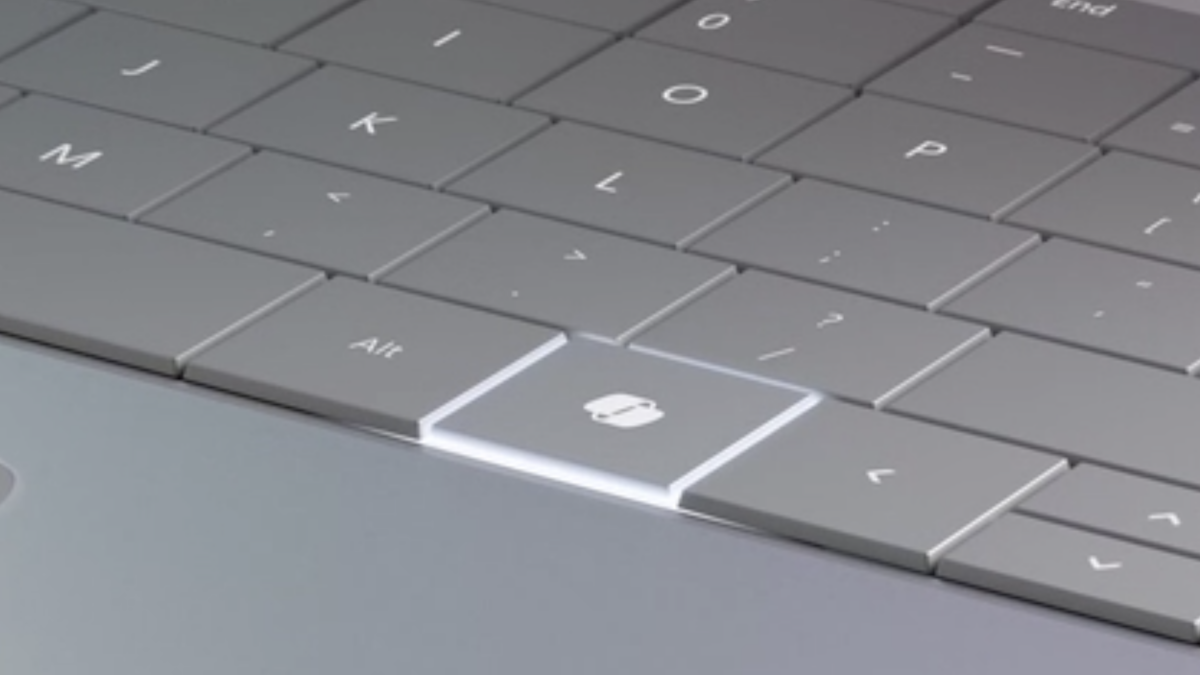
If you bought a Windows computer in the past couple years, there’s a good chance that it a “Copilot” key where the right ctrl key used to be. But what if you actually used the right ctrl key? Or what if you prefer Claude or ChatGPT to Copilot? Whatever your reason for not loving the Copilot key, don’t worry—you can change it. Here’s how to do so in the Windows settings or, if necessary, using Microsoft Powertoys.

How to change the Copilot key in settings

Open the Settings application and head to the Personalization section. You should find a Customize Copilot key option here, assuming you’re using a recent-ish version of Windows 11. Click the drop-down menu and you’ll have three options: Copilot, Search, and Custom. You can change the button to Search if you’d rather use the key to bring up the Windows search tool instead of Copilot.

Alternatively, you can use the Custom option to launch any application on your computer instead of Copilot. This could be a useful way to open the Claude or ChatGPT desktop apps instead of Copilot. Or, if you’re not a big AI fan, you could just have it open your browser.

This is a limited number of options, granted, but it’s easy and doesn’t require any sort of tools. It’s your simplest option.

How to change the Copilot key using Microsoft Powertoys

You may have noticed that the options in Settings don’t let you remap the Copilot key to the ctrl key, or any other key—all you can do is launch an application. For that, you’re going to need to install Powertoys, the secret Microsoft app that improves Windows.

After installing, go to the Keyboard Manager section. The simplest thing to do, which may or may not work on your computer, is to click Remap keys. You should be able to press your Copilot key to remap it (it will show up as F23, which we’ll get to). Now you can choose what you want the key to serve as. This could be ctrl, if you like, or it could be any other key. Click OK, and you should be done.


Credit: Justin Pot

There’s a chance this won’t work for you. Why? Because the Copilot key works a little differently depending on what kind of laptop you have. Buckle up: This gets complicated in a very Microsoft-y way.


What do you think so far?

On many computers, the Copilot key functions as an F23 key. This is a workaround, of sorts, allowing Microsoft to add a key without changing the operating system very much. Most modern keyboards only have one row of function keys—around 12 in total. Keyboards in the 80’s and 90’s sometimes had two rows of keys—around 24 in total. Windows, to this day, still supports all 24 keys, even though basically no one has that many function keys. Microsoft took advantage of this—on many laptops the Copilot key functions as an F23 key.

But this is Windows, so of course it’s more complicated than that. On some laptops, pressing the Copilot key triggers a keyboard shortcut: Windows-Shift-F23. This means you can’t use the Remap keys function in Powertoys to remap the Copilot key, because the Copilot key already triggers a keyboard shortcut.

What you can do is use the Remap a shortcut option. Use this, then press the Copilot key as your selection. You should see the keyboard shortcut Windows-Shift-F23 show up. Now choose what you want to remap your Copilot key to.

This works, with a caveat: You really can’t use it to bring back your ctrl key, as users have noted on Github. The issue is that you can’t remap a keyboard shortcut to a modifier key, just to a single keypress. It’s not clear what could fix this, and I suspect users of such laptops are just stuck. Which is all to say that you might not be able to get your control key back, but least you can remap the key to do something else.




Editorial Team

Editorial Team

Related Posts

These Switch 2 'Joy-Cons' Turn Your Handheld Into a Portable GameCube
Protection

These Switch 2 ‘Joy-Cons’ Turn Your Handheld Into a Portable GameCube

February 5, 2026
This High-End Roborock Robot Vacuum Is $300 Off Right Now
Protection

This High-End Roborock Robot Vacuum Is $300 Off Right Now

February 5, 2026
The Best Amazon Echo Speaker Is $80 Right Now
Protection

The Best Amazon Echo Speaker Is $80 Right Now

February 5, 2026
ChatGPT Is Down (Again) | Lifehacker
Protection

ChatGPT Is Down (Again) | Lifehacker

February 5, 2026
Samsung Has Killed Software Support for Most of the Galaxy S21 Series
Protection

Samsung Has Killed Software Support for Most of the Galaxy S21 Series

February 5, 2026
The Newest Amazon Echo Show Has Dropped to Its Lowest Price Yet
Protection

The Newest Amazon Echo Show Has Dropped to Its Lowest Price Yet

February 5, 2026
Load More
Next Post
Solana Price Prediction: $100 May Have Been the Last Dip You’ll Ever See – Is $300+ the Next Stop?

Solana Price Prediction: $100 May Have Been the Last Dip You’ll Ever See – Is $300+ the Next Stop?

Popular News

  • US Justice Department removes lawyer who told judge in immigration case ’this job sucks’

    US Justice Department removes lawyer who told judge in immigration case ’this job sucks’

    0 shares
    Share 0 Tweet 0
  • The 10 best banks for college students in 2025

    0 shares
    Share 0 Tweet 0
  • I Used Monarch Money for 30 Days: Here’s What Happened

    0 shares
    Share 0 Tweet 0
  • Bitrue Hacked $23 Million Worth of Crypto Stolen

    0 shares
    Share 0 Tweet 0
  • Where do businesses draw the line?

    0 shares
    Share 0 Tweet 0

Latest News

These Switch 2 'Joy-Cons' Turn Your Handheld Into a Portable GameCube

These Switch 2 ‘Joy-Cons’ Turn Your Handheld Into a Portable GameCube

February 5, 2026
0

We may earn a commission from links on this page. For me, third-party "Joy-Cons" were an absolute necessity for comfortable...

Bitcoin ETFs 'Hanging In There' Despite Price Plunge: Analyst

Bitcoin ETFs ‘Hanging In There’ Despite Price Plunge: Analyst

February 5, 2026
0

US-based spot Bitcoin exchange-traded fund (ETF) holders are showing relatively firm conviction despite a four-month Bitcoin downtrend, according to ETF...

U.S. pre-market cryptocurrency concept stocks generally fell 

BTC, SOL, UNI, PUMP slide

February 5, 2026
0

Crypto prices today are in the red as forced liquidations and weak demand pushed major tokens lower. Summary Extreme fear...

This High-End Roborock Robot Vacuum Is $300 Off Right Now

This High-End Roborock Robot Vacuum Is $300 Off Right Now

February 5, 2026
0

We may earn a commission from links on this page. Deal pricing and availability subject to change after time of...

Global Finances Daily

Welcome to Global Finances Daily, your go-to source for all things finance. Our mission is to provide our readers with valuable information and insights to help them achieve their financial goals and secure their financial future.

Subscribe

  • About Us
  • Contact
  • Privacy Policy
  • Terms of Use
  • Editorial Process

© 2025 All Rights Reserved - Global Finances Daily.

No Result
View All Result
  • Alternative Investments
  • Crypto
  • Financial Markets
  • Investments
  • Lifestyle
  • Protection
  • Retirement
  • Savings
  • Work & Careers

© 2025 All Rights Reserved - Global Finances Daily.

Welcome Back!

Login to your account below

Forgotten Password?

Retrieve your password

Please enter your username or email address to reset your password.

Log In
This website uses cookies. By continuing to use this website you are giving consent to cookies being used. Visit our Privacy and Cookie Policy.