No Result
View All Result
Global Finances Daily
  • Alternative Investments
  • Crypto
  • Financial Markets
  • Investments
  • Lifestyle
  • Protection
  • Retirement
  • Savings
  • Work & Careers
No Result
View All Result
  • Alternative Investments
  • Crypto
  • Financial Markets
  • Investments
  • Lifestyle
  • Protection
  • Retirement
  • Savings
  • Work & Careers
  • Login
Global Finances Daily
No Result
View All Result
Home Protection

Android 16 Makes Split Screen Easier on Smaller Screens

January 16, 2026
in Protection
0
Android 16 Makes Split Screen Easier on Smaller Screens


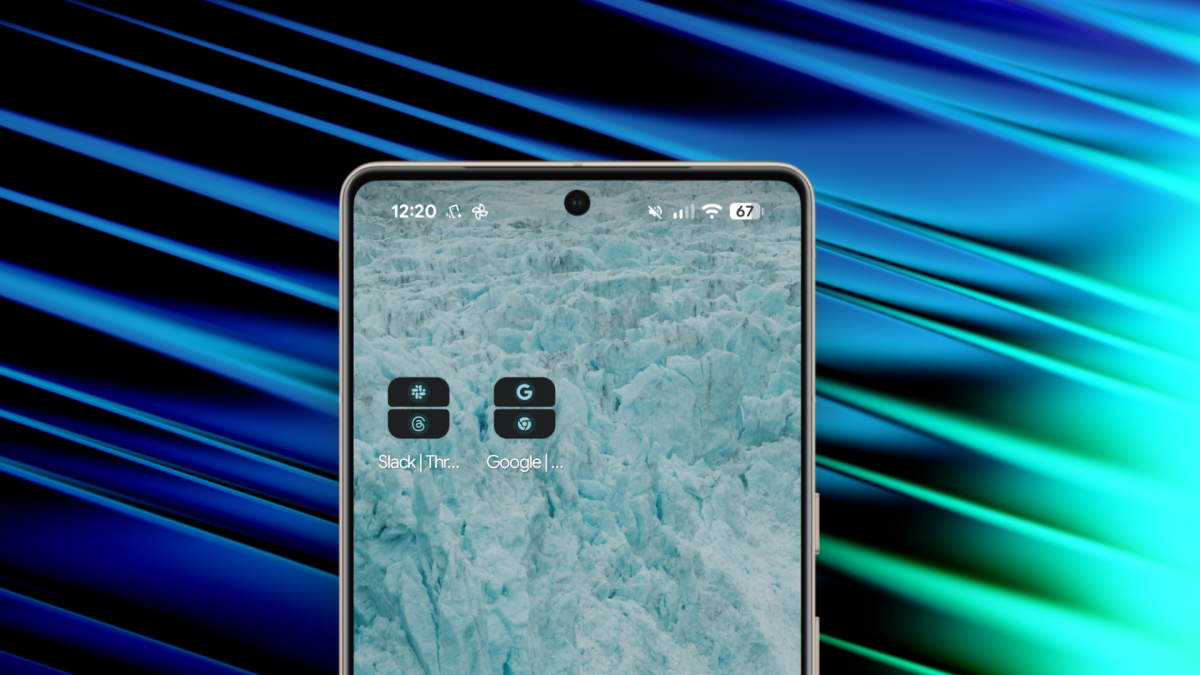
Stock Android added the concept of App Pairs back in Android 15. You choose two apps to use in split screen mode, add a shortcut to the paired apps to the home screen, and it’s now trivially easy to trigger split screen multitasking (instead of having to perform multiple tap and drag gestures).

It sounds neat, but I never really used it, because on my small Pixel 9a, using apps in 50:50 split-screen mode is hardly user-friendly. There’s just not enough room on the screen for each app to take up half of it and still be usable. But that changed with Android 16, thanks to a small update to how split screen works.

In Android 16, the split screen ratios for app pairs are much more flexible. You can have two apps in 70:30, or even 90:10. And once you get used to the idea of 90:10 split screen multitasking, things really start to flow.

For example, I have an app pair for my Chrome and Gemini apps. Chrome for browsing, and Gemini for research.


Credit: Khamosh Pathak

Chrome is usually my maximized app, taking up 90% of my screen space, while Gemini is docked at the bottom, minimized. But with one tap, Gemini comes to the front and Chrome takes a back seat. And I can keep switching between the two just as easily. This is much faster than using Android’s multitasking menu.


What do you think so far?

How to set up App Pairs with 90:10 split screen multitasking

To set up an App Pair and try this out for yourself, you’ll first need to create a split screen pair. Open the two apps that you want to pair, and then go to the multitasking view (swipe up from the Home bar and hold for a second). Tap the name of the first app you want to open and choose the Split screen option. Then choose another app to pair it with. You’ll now enter a 50:50 split screen view. Grab the handle in between the two apps and drag it all the way up or all the way down to trigger the 90:10 split. Alternatively, you can also set up a 70:30 split by leaving some extra space on your second app.

Triggering split screen feature for Android.


Credit: Khamosh Pathak

Now, go back to the multitasking view, tap on one of the app names, and choose the Save app pair option.

Saving app pairs on Android.


Credit: Khamosh Pathak

After that, you’ll find the app pair as a shortcut on your home screen. Tap on it to launch your pre-configured app combo. And yes, it does remember your last used split screen ratio, saving you some valuable setup time.



Editorial Team

Editorial Team

Related Posts

This Samsung Ultra-Wide Curved Monitor Is 33% Off Right Now
Protection

This Samsung Ultra-Wide Curved Monitor Is 33% Off Right Now

January 16, 2026
Millions of Earbuds and Headphones Have a Serious Android Security Vulnerability
Protection

Millions of Earbuds and Headphones Have a Serious Android Security Vulnerability

January 16, 2026
The Best Shows Like 'Bridgerton' You Should Watch Next
Protection

The Best Shows Like ‘Bridgerton’ You Should Watch Next

January 16, 2026
How to Protect Your Credit Cards From 'Web Skimming' Scams
Protection

How to Protect Your Credit Cards From ‘Web Skimming’ Scams

January 16, 2026
Is Gravity Ending? What People Are Getting Wrong This Week
Protection

Is Gravity Ending? What People Are Getting Wrong This Week

January 16, 2026
Shows Like ‘The Pitt’ You Should Watch Next
Protection

Shows Like ‘The Pitt’ You Should Watch Next

January 16, 2026
Load More
Next Post
These 3 factors matter the most now for investors in AI, crypto and tech stocks

These 3 factors matter the most now for investors in AI, crypto and tech stocks

Popular News

  • Josh Garber

    How to Contact Hilton Customer Service

    0 shares
    Share 0 Tweet 0
  • I Used Monarch Money for 30 Days: Here’s What Happened

    0 shares
    Share 0 Tweet 0
  • 33 Best Job Search Websites To Use In 2026

    0 shares
    Share 0 Tweet 0
  • The 10 best banks for college students in 2025

    0 shares
    Share 0 Tweet 0
  • Stunt rider jumps motorcycle between two moving trucks OVER a motorway gantry – but epic backflip trick almost goes horribly wrong…

    0 shares
    Share 0 Tweet 0

Latest News

Condé Nast Traveler

The Best Cruise Deals of Wave Season 2026

January 16, 2026
0

Wave season has officially arrived, bringing with it some of the year’s most compelling cruise deals. Now through March is...

NVO, RF, GEV, VST and more

NVO, RF, GEV, VST and more

January 16, 2026
0

Check out some of the companies making headlines in midday trading: Novo Nordisk — The maker of the Wegovy obesity...

This Samsung Ultra-Wide Curved Monitor Is 33% Off Right Now

This Samsung Ultra-Wide Curved Monitor Is 33% Off Right Now

January 16, 2026
0

We may earn a commission from links on this page. Deal pricing and availability subject to change after time of...

Ethereum ETFs Record $75M in Daily Outflows, Price Stalls

Key support and resistance levels

January 16, 2026
0

Ethereum price is slipping slightly on January 16, as ETH fights to maintain the $3,300 mark. Moves so far indicate...

Global Finances Daily

Welcome to Global Finances Daily, your go-to source for all things finance. Our mission is to provide our readers with valuable information and insights to help them achieve their financial goals and secure their financial future.

Subscribe

  • About Us
  • Contact
  • Privacy Policy
  • Terms of Use
  • Editorial Process

© 2025 All Rights Reserved - Global Finances Daily.

No Result
View All Result
  • Alternative Investments
  • Crypto
  • Financial Markets
  • Investments
  • Lifestyle
  • Protection
  • Retirement
  • Savings
  • Work & Careers

© 2025 All Rights Reserved - Global Finances Daily.

Welcome Back!

Login to your account below

Forgotten Password?

Retrieve your password

Please enter your username or email address to reset your password.

Log In
This website uses cookies. By continuing to use this website you are giving consent to cookies being used. Visit our Privacy and Cookie Policy.