No Result
View All Result
Global Finances Daily
  • Alternative Investments
  • Crypto
  • Financial Markets
  • Investments
  • Lifestyle
  • Protection
  • Retirement
  • Savings
  • Work & Careers
No Result
View All Result
  • Alternative Investments
  • Crypto
  • Financial Markets
  • Investments
  • Lifestyle
  • Protection
  • Retirement
  • Savings
  • Work & Careers
  • Login
Global Finances Daily
No Result
View All Result
Home Protection

Android 16 Now Has a Desktop Mode for Your Pixel 8 or Newer

March 16, 2026
in Protection
0
Android 16 Now Has a Desktop Mode for Your Pixel 8 or Newer


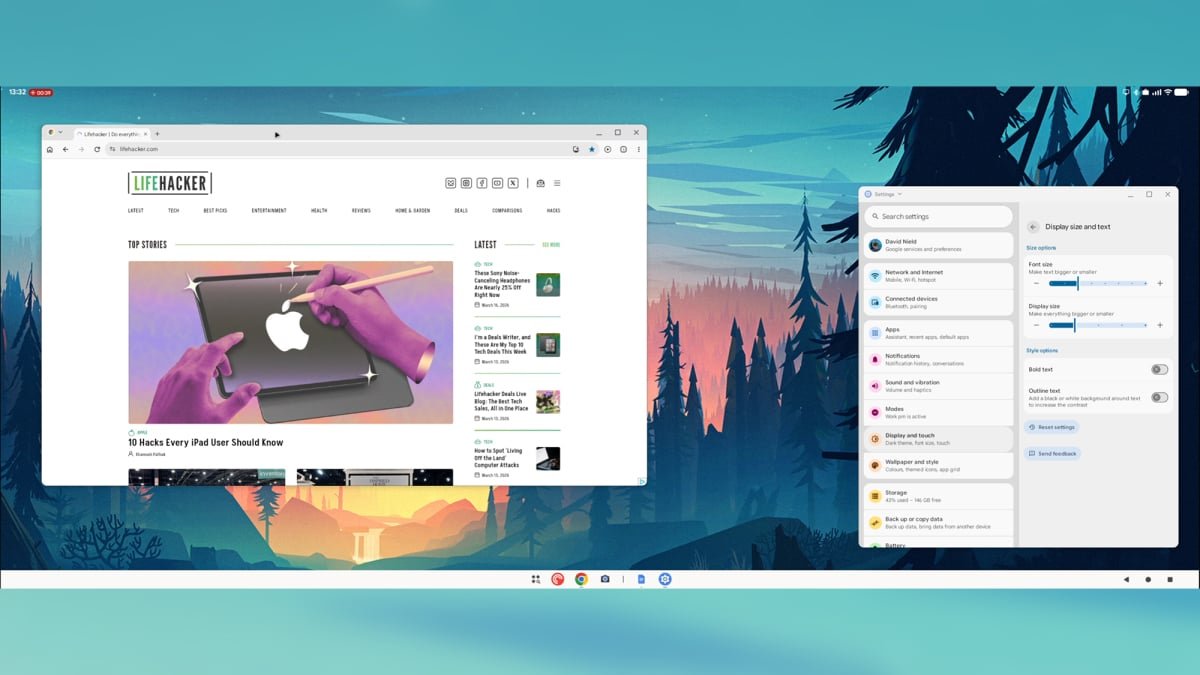
Galaxy phone owners have been able to use Samsung DeX to access a desktop mode for years at this point, and now Google Pixel users have a similar feature to call their own. The latest Android 16 QPR3 release, pushed out at the start of March 2026, lets you plug a Pixel phone into a monitor and access a desktop-like interface.

If you’re completely new to these desktop modes, they let you operate your phone as if it’s a Windows or macOS computer (sort of). The Android software and the apps don’t change, but you get a taskbar at the bottom of the display, the ability to run apps in windows alongside each other, and a few other helpful tweaks.

In theory, this can be a real boon to productivity. Sit down at your desk, and you can carry on using all the apps you’re familiar with on your phone, only with the added convenience of a larger display, as well as a mouse and keyboard. Mobile apps like Slack and Google Docs are now capable enough that most features available on the desktop can be used on mobile.

A simple launcher lets you access your apps.
Credit: Lifehacker

There are quite a few caveats, however. You need a Pixel 8 or newer for this to work, as well as a USB-C DisplayPort connection. You’re also going to need a Bluetooth mouse and keyboard connected to your phone to make the most of this: Pixels don’t yet have the use-your-phone-as-a-trackpad functionality of Samsung DeX.

If you do have the necessary hardware in place for this to work, it’s worth giving it a try, even at this early stage. You might find it’s helpful for working on the go and hot desking, or for finding a quiet place to work somewhere at home.

Using the desktop mode on a Pixel

While the desktop mode is now officially part of Android proper, don’t expect a flawless experience just yet. I managed to get my Pixel 9 hooked up to a monitor via a USB-C-to-DisplayPort connection, but this only worked directly—not through a hub. The display resolution maxes out at 1080p.

When you connect a compatible monitor to your Pixel’s USB-C port, you’ll see the choice to Mirror the phone display to the big screen or to open the new Desktop mode; it’s the latter one you want. With that done, you should see the desktop interface, and you can start clicking around with your connected mouse.

Pixel desktop mode

You can pin apps side by side.
Credit: Lifehacker

Everything is pretty easy to understand: You’ve got a taskbar at the bottom where your apps live, navigation buttons in the lower right corner, and a launcher button for opening more apps. Each app launches in a window that can be moved or resized as needed. If you hover over the resize button, you’ll find you can snap two apps side by side, if you want to.


What do you think so far?

One key benefit is that Chrome runs in desktop mode, so you get the full web experience—it’s great to be able to browse websites properly, rather than having to navigate through mobile versions. That said, when you try to log into sites such as Google Docs or Slack, you’ll get kicked out into the equivalent Android app, so it’s not quite the same as using an actual desktop computer.

It is possible to get stuff done, for sure—I typed out half of this article through Google Docs for Android on an external monitor—and for something in its early stages, it’s definitely usable. I appreciated being able to launch podcast and chat apps on a larger display and not have to worry about whether they were syncing back to my phone properly.

Pixel desktop mode

Many apps—including Netflix—don’t take full advantage of the extra space.
Credit: Lifehacker

App developers clearly haven’t caught up to this desktop mode yet. Apps like WhatsApp had misaligned buttons and oversized text in places, while most apps reverted to a standard tablet interface rather than a desktop one. With Netflix, for example, browsing the available titles felt like using a phone but just on a much bigger scale.

These problems will most likely get sorted over time, and it would be nice to see Google continuing to add features as well—such as the ability to use your phone as a trackpad for the desktop interface, once it’s connected, and better native monitor resolution support. With a bit more polish, this could be a seriously useful Android upgrade, and hopefully we’ll hear more about it at Google I/O in May.



Editorial Team

Editorial Team

Related Posts

The New AirPods Max 2 Will Finally Have Features Apple’s Earbuds Have Had for Years
Protection

The New AirPods Max 2 Will Finally Have Features Apple’s Earbuds Have Had for Years

March 16, 2026
Current Trends Explained: Frambled Eggs and the Staples Baddie
Protection

Current Trends Explained: Frambled Eggs and the Staples Baddie

March 16, 2026
These Sony WH-1000XM5 headphones Are Nearly 25% Off Right Now
Protection

These Sony WH-1000XM5 headphones Are Nearly 25% Off Right Now

March 16, 2026
10 Products That Will Make Cleaning Your Home Less Annoying
Protection

10 Products That Will Make Cleaning Your Home Less Annoying

March 14, 2026
I'm Learning How to (Virtually) Sail on the Meta Quest 3
Protection

I’m Learning How to (Virtually) Sail on the Meta Quest 3

March 14, 2026
How to Stop Social Media Platforms From Tracking You When You Share Posts
Protection

How to Stop Social Media Platforms From Tracking You When You Share Posts

March 14, 2026
Load More
Next Post
Tesla’s stock rises as investors embrace ambitious foray into making AI chips

Tesla’s stock rises as investors embrace ambitious foray into making AI chips

Popular News

  • The 10 best banks for college students in 2025

    The 10 best banks for college students in 2025

    0 shares
    Share 0 Tweet 0
  • How to Contact Hilton Customer Service

    0 shares
    Share 0 Tweet 0
  • South Korean regulators fine Bithumb $24.5M after uncovering violations

    0 shares
    Share 0 Tweet 0
  • Air France vs. Lufthansa: Which Is Best?

    0 shares
    Share 0 Tweet 0
  • Ex-Brite employees start a new advisory firm linked to their former CEO.

    0 shares
    Share 0 Tweet 0

Latest News

Abra Plans Nasdaq Debut in $750M SPAC Deal With New Providence

Abra Plans Nasdaq Debut in $750M SPAC Deal With New Providence

March 16, 2026
0

Digital asset wealth management platform Abra is going public through a reverse merger with special purpose acquisition company New Providence...

Opportunistic credit gains ground as private equity faces pressure

Opportunistic credit gains ground as private equity faces pressure

March 16, 2026
0

Opportunistic credit’s low correlation to public markets and returns profile mean it may be better suited to institutional investors allocating...

The New AirPods Max 2 Will Finally Have Features Apple’s Earbuds Have Had for Years

The New AirPods Max 2 Will Finally Have Features Apple’s Earbuds Have Had for Years

March 16, 2026
0

We may earn a commission from links on this page. On Monday, Apple officially announced the AirPods Max 2. As...

BlackRock’s ETHB staking ETF leans on Figment as Ethereum yield play goes mainstream

BlackRock’s ETHB staking ETF leans on Figment as Ethereum yield play goes mainstream

March 16, 2026
0

BlackRock’s ETHB staking ETF routes 70–95% of its Ethereum into validators run by Figment and others. Summary ETHB is BlackRock’s...

Global Finances Daily

Welcome to Global Finances Daily, your go-to source for all things finance. Our mission is to provide our readers with valuable information and insights to help them achieve their financial goals and secure their financial future.

Subscribe

  • About Us
  • Contact
  • Privacy Policy
  • Terms of Use
  • Editorial Process

© 2025 All Rights Reserved - Global Finances Daily.

No Result
View All Result
  • Alternative Investments
  • Crypto
  • Financial Markets
  • Investments
  • Lifestyle
  • Protection
  • Retirement
  • Savings
  • Work & Careers

© 2025 All Rights Reserved - Global Finances Daily.

Welcome Back!

Login to your account below

Forgotten Password?

Retrieve your password

Please enter your username or email address to reset your password.

Log In
This website uses cookies. By continuing to use this website you are giving consent to cookies being used. Visit our Privacy and Cookie Policy.