No Result
View All Result
Global Finances Daily
  • Alternative Investments
  • Crypto
  • Financial Markets
  • Investments
  • Lifestyle
  • Protection
  • Retirement
  • Savings
  • Work & Careers
No Result
View All Result
  • Alternative Investments
  • Crypto
  • Financial Markets
  • Investments
  • Lifestyle
  • Protection
  • Retirement
  • Savings
  • Work & Careers
  • Login
Global Finances Daily
No Result
View All Result
Home Protection

I Can’t Wait to Try Spotify’s Newest Playlist Sorting Feature

February 26, 2026
in Protection
0
I Can't Wait to Try Spotify's Newest Playlist Sorting Feature


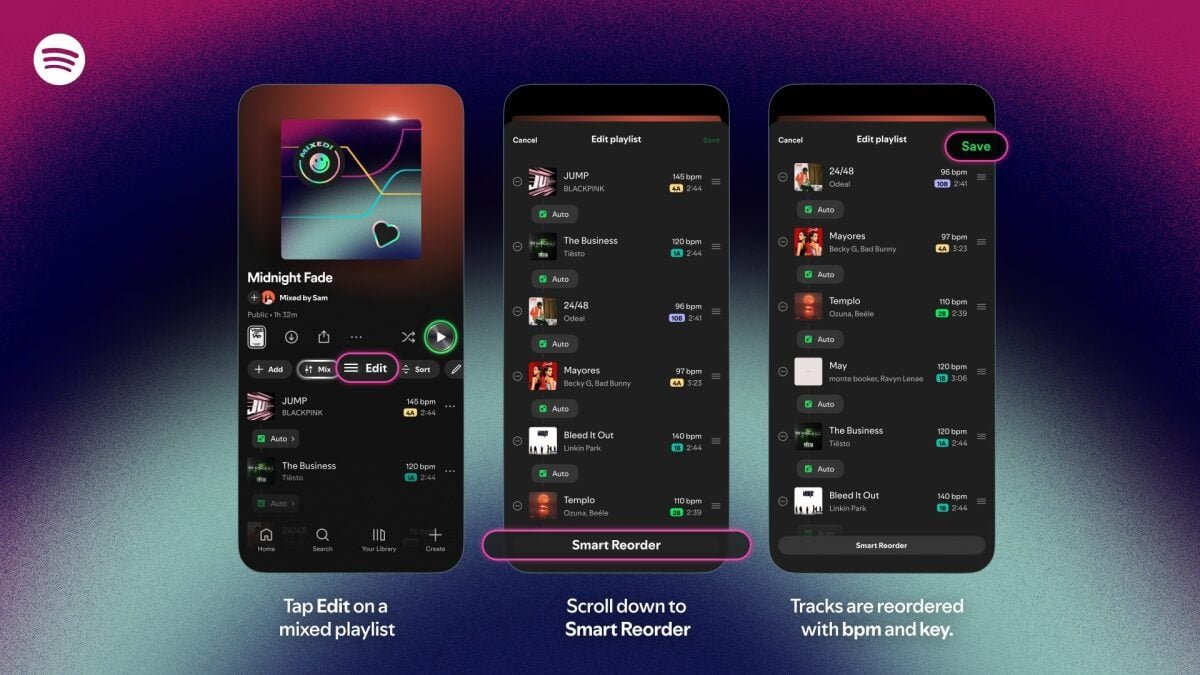
Spotify’s adding a new way to sort playlists for paying subscribers. The feature is called Smart Reorder, and it allows you to automatically sort your songs by BPM (beats per minute) and key. This is great for those who want to gradually bump up the intensity of the songs they listen to.

It’s worth noting that this feature only works for playlists you’ve created or those you’ve mixed using the Spotify Mix feature, which lets you add or customize song transitions like a DJ would. Also, because Smart Reorder is an extension of Spotify Mix, you can’t have one without the other. Spotify Mix hasn’t yet been launched in all markets where the streaming service is present, including where I live, and as such, Smart Reorder isn’t available in those regions yet. It’s a shame, because I’m really excited to try it.

How to use Smart Reorder in Spotify

If you’re a Spotify Premium subscriber, using the Smart Reorder feature is easy. Just open any of the playlists you’ve created or mixed, and tap the Edit button above the first song. Scroll to the bottom and select Smart Reorder. Spotify will automatically rearrange your songs by BPM, and you can tap the Save button up top to confirm the changes.

Smart Reorder should be a very useful feature for people like me, who prefer workout playlists that slowly bump up in intensity. I like to hear high BPM songs towards the end of my gym sessions or runs, but that might not be ideal for everyone. Some types of exercises, such as spin workouts, might be better off switching between high and low BPM songs as the intensity varies, and Smart Reorder wouldn’t be great for those use cases. Some users on Reddit also suggested that you should create a copy of your playlists before using Smart Reorder on them, since you can’t automatically restore playlists to their original order if you end up not liking the changes after saving them. To duplicate a Spotify playlist, open the playlist and tap the three-dots button above the list of songs. Select Add to other playlist > New playlist, then add a name for the copy and and tap Create.


What do you think so far?

This is another example of Spotify doing more with its AI DJ feature than Apple Music, where the AutoMix AI DJ feature has been more of a mixed bag for me. At the moment, AutoMix just handles song transitions, and Apple hasn’t added any kind of custom playlist reordering to it.



Editorial Team

Editorial Team

Related Posts

How Unscrupulous Home Sellers Can Trick You
Protection

How Unscrupulous Home Sellers Can Trick You

February 26, 2026
What Products to Expect From Apple's March Event
Protection

What Products to Expect From Apple’s March Event

February 26, 2026
These 'Nothing' Earbuds With an Open-Ear Design Are $50 Off Right Now
Protection

These ‘Nothing’ Earbuds With an Open-Ear Design Are $50 Off Right Now

February 26, 2026
Firefox Now Lets You Disable All Current (and Future) AI Features
Protection

Firefox Now Lets You Disable All Current (and Future) AI Features

February 26, 2026
This Massive Healthcare Data Breach Is Even Bigger Than Previously Reported
Protection

This Massive Healthcare Data Breach Is Even Bigger Than Previously Reported

February 26, 2026
The Samsung Odyssey G50D Gaming Monitor Is Nearly 50% Off Right Now
Protection

The Samsung Odyssey G50D Gaming Monitor Is Nearly 50% Off Right Now

February 26, 2026
Load More

Popular News

  • The 10 best banks for college students in 2025

    The 10 best banks for college students in 2025

    0 shares
    Share 0 Tweet 0
  • How to Contact Hilton Customer Service

    0 shares
    Share 0 Tweet 0
  • 23 Dublin Restaurants to Visit in 2026

    0 shares
    Share 0 Tweet 0
  • What The Clarity Act Means For Ripple And XRP Once Done

    0 shares
    Share 0 Tweet 0
  • One Key Travel Rewards Guide

    0 shares
    Share 0 Tweet 0

Latest News

I Can't Wait to Try Spotify's Newest Playlist Sorting Feature

I Can’t Wait to Try Spotify’s Newest Playlist Sorting Feature

February 26, 2026
0

Spotify's adding a new way to sort playlists for paying subscribers. The feature is called Smart Reorder, and it allows...

U.S. pre-market cryptocurrency concept stocks generally fell 

Reset ahead as 90D open interest falls

February 26, 2026
0

XRP price outlook leans towards a market reset amid falling open interest and a spike in realized losses. Summary XRP...

Where to Eat, Stay, and Play in Knoxville, East Tennessee's Gateway to the Smokies

Where to Eat, Stay, and Play in Knoxville, East Tennessee’s Gateway to the Smokies

February 26, 2026
0

The best place to learn about the region’s history is at the East Tennessee Historical Society and Museum, which has...

Yields in a crucial part of the Treasury market keep falling — and it may have something to do with AI

Yields in a crucial part of the Treasury market keep falling — and it may have something to do with AI

February 26, 2026
0

Concerns about AI’s potential as a destructive force on U.S. jobs have contributed to a rally in the 10-year Treasury...

Global Finances Daily

Welcome to Global Finances Daily, your go-to source for all things finance. Our mission is to provide our readers with valuable information and insights to help them achieve their financial goals and secure their financial future.

Subscribe

  • About Us
  • Contact
  • Privacy Policy
  • Terms of Use
  • Editorial Process

© 2025 All Rights Reserved - Global Finances Daily.

No Result
View All Result
  • Alternative Investments
  • Crypto
  • Financial Markets
  • Investments
  • Lifestyle
  • Protection
  • Retirement
  • Savings
  • Work & Careers

© 2025 All Rights Reserved - Global Finances Daily.

Welcome Back!

Login to your account below

Forgotten Password?

Retrieve your password

Please enter your username or email address to reset your password.

Log In
This website uses cookies. By continuing to use this website you are giving consent to cookies being used. Visit our Privacy and Cookie Policy.