In recent years, iOS has started to catch up to Android when it comes to customization, but Android is still well in the lead. That’s partly because it supports alternative launchers, which replace of the default software interface to completely revamp the look of home screens, menus, icons, and dialogs.
Using a launcher, you can take pixel-by-pixel control over the visuals of the Android OS. If that sounds like too much time and effort, you can take advantage of one of many preset templates instead. This article will tell you what you need to know about launchers, and suggest a few of the best that you can currently install.
How Android launchers work
When you go “home” on Android—with a swipe up on the gesture bar or a tap on the actual home button—that’s when a third-party launcher springs into action. Rather than seeing the default look determined by the Google Pixel or the Samsung Galaxy software, you see whatever the launcher has put in place.
Typically, these launchers give you more customization controls than Google, Samsung, and the other Android phone makers do. Depending on the launcher, you might be able to cram more shortcuts on to the home screen, or apply the same color scheme to all the home screen icons, or hide elements (like the Google search bar) from view.
You can switch launchers with a couple of taps.
Credit: Lifehacker
Each launcher will come with a host of different configuration settings that determine how elements appear on screen—not just the home screen, lock screen, and the app shortcuts on them, but also notifications, quick settings panels, media players, and menus. They give you the opportunity to fully revamp the look of the software.
Launchers can be managed on Pixel phones by heading to Settings then choosing Apps > Default apps > Home app. On Samsung devices, it’s Settings then Apps > Choose default apps > Home app. You’re able to switch between different launchers, or cancel all of your changes and go back to the normal look, in seconds.
What you can do with Android launchers
The capabilities of these apps vary by launcher, but just about every kind of customization option is offered somewhere. If you want to give your Android software a light and airy touch, a dark and foreboding theme, or anything in between, you can. You’re able to go all-in with your sports team’s colors, or switch to a minimal monochrome look instead.
Speaking of minimalism, many launchers give you the opportunity to declutter the look of your smartphone. Launchers can get access to notifications and on-screen messages as well as everything else, if you give them the necessary permissions, and that means alerts can be pushed to the background. You can control what actually appears on screen, as well as how everything looks.

Launchers offer plenty of customization options.
Credit: Lifehacker
Some launchers go even further, letting you customize the gestures and swipes that are used to get around Android. You can change the way apps are launched and switched between, for example, as well as tweak how Android search works—giving you easier access to the apps and files you need the most.
Nothing is affected in your actual apps by installing third-party launchers—these will still look and operate the same as they always have. What you might see are some differences in how home screen widgets for your apps are rendered, but as far as the apps themselves are concerned, nothing changes.
The best Android launchers (now that Nova Launcher has been shut down)
There are a lot of options for Android launchers on the Google Play store, and I’ve collected five of my favorites below. Sadly, one of the most beloved Android launchers, Nova Launcher, has recently been shut down. I’m waiting to see if the launcher might be opened sourced, but in the meantime, I’ve had to replace it on my list.
Niagara Launcher

Niagara Launcher brings with it a cleaner home screen.
Credit: Lifehacker
Niagara Launcher is one of those launchers that can totally transform the layout of the home screen, putting your apps, notifications, and media controls in an ordered, customized list on screen—so it can be as minimal or as busy as you want it to be.
The launcher can hide apps, remind you to take breaks at certain times, put apps into folders, suggest apps based on your usage, and tweak all kinds of colors and layout options. More customizations are available with a Pro subscription ($14 per year).
Smart Launcher

Smart Launcher is packed with features and settings.
Credit: Lifehacker
Smart Launcher is another choice you’ll often see atop best launcher lists, as it brings with it lots of intelligent features: auto app sorting based on usage, a useful one-handed mode, responsive widgets, a comprehensive search tool, and lots of customizations.
Those customizations run the full gamut from adaptive icon shapes, to gestures you can use to get around Android, to hidden apps. As usual, there’s a premium-level option you can subscribe to—from $2.50 a month—which adds on even more customization tweaks.
Square Home

Square Home builds up your home screen with tiles.
Credit: Lifehacker
Square Home is a great example of a launcher that can change the whole look of Android—in this case, into something that’s more like the old Windows Phone look, with your apps and widgets sorted into rectangular tiles that fill up your home screens.
What do you think so far?
While the layout may look fixed, there are many ways to tweak the look, from photo slideshows to notification badges. The quick start tutorial is a welcome way in, and while several features are available for free, you can unlock all of them for $2 per year.
AIO Launcher

AIO Launcher packs a lot of info into the home screen.
Credit: Lifehacker
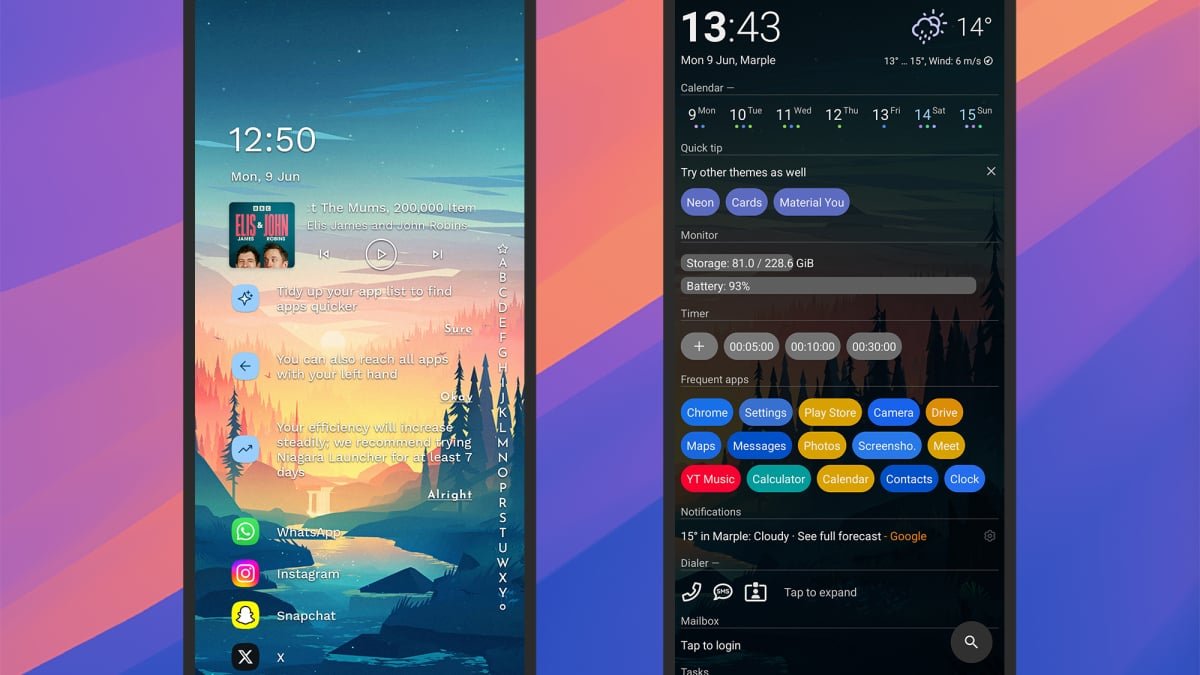
AIO Launcher goes in the opposite direction to the minimal launchers out there, choosing instead to cram in as much information on the home screen as possible—though you still get full control over what’s shown, including shortcuts, widgets, and real time information.
The app developer promises everything you need on one screen, and they certainly deliver, with over 30 excellent widgets to pick from (weather, stocks, messages, tasks, and so on). Various extra features can be picked up at various prices as in-app purchases.
Hyperion Launcher

A simple interface and lots of customization options.
Credit: Lifehacker
Hyperion Launcher transforms the look and feel of your phone right away, bringing with it options for changing colors, iconography, fonts, the appearance and behavior of the app drawer, home screen widgets, and animations—and those are just some of the settings.
It’s a launcher suitable for those that want to invest some time in getting everything looking exactly how they want it, though the minimal interface that pops up by default works great too. A Pro subscription unlocks all features, a one-off cost of $1.99.
Microsoft Launcher

The ideal pick if you use a lot of Microsoft apps.
Credit: Lifehacker
Microsoft Launcher is another excellent launcher choice, if you don’t mind the Microsoft of it all. You get rapid performance, lots of ways to tweak the look and feel, and of course tight integration with all of Microsoft’s own apps (perfect if you’re using Outlook a lot).
As soon as you install the launcher you can choose the apps you use the most so they’re front and center on the home screen, and there are handy features here like customizable gesture support, rotating wallpaper picks, and a personalized home screen dock.
Kvaesitso

A minimal look and helpful app and file shortcuts.
Credit: Lifehacker
Kvaesitso is slightly different to the other launchers in this list in that it’s not available on the Google Play Store, so you need to sideload it via F-Droid (instructions here). It’s worth that slight inconvenience though, offering tons of features and customizations for free.
There’s a strong focus on search, enabling you to quickly find anything, and a useful shortcuts system for jumping straight to Gmail labels, Dropbox folders, and much more. Some gorgeous widgets are included too, really improving the aesthetics of your device.