No Result
View All Result
Global Finances Daily
  • Alternative Investments
  • Crypto
  • Financial Markets
  • Investments
  • Lifestyle
  • Protection
  • Retirement
  • Savings
  • Work & Careers
No Result
View All Result
  • Alternative Investments
  • Crypto
  • Financial Markets
  • Investments
  • Lifestyle
  • Protection
  • Retirement
  • Savings
  • Work & Careers
  • Login
Global Finances Daily
No Result
View All Result
Home Protection

This Shortcut Solves the Biggest Issue With Finding Messages on Your iPhone

February 17, 2026
in Protection
0
This Shortcut Solves the Biggest Issue With Finding Messages on Your iPhone


I have always found it annoying to search for anything in Apple’s Messages app. Admittedly, things have gotten better in recent years, especially as Messages allows you to use search filters now, but my biggest complaint still stands: searching in Messages can be both slow and complicated, particularly if you just want to find a specific text. If you have the same experience, I have good news: I’ve found a workaround that offers a massive improvement to Apple’s built-in search function.

The problem with searching in Messages

For most people, the easiest way to search for texts on an iPhone involves opening the Messages app, tapping the search bar near the base of the screen, and typing in what you’re looking for. You’ll receive a variety of results, but that’s the problem: It’s too much information.

When I search for a person’s name, for example, Messages in iOS 26 shows a list of four chats where the name is mentioned, followed by two chat threads, pinned chats, shared notes, links, photos, locations, and documents. This is great when I want a more in-depth search, but when I’m just looking for a specific message, these extra details just get in the way.

The fastest way to search for texts in iOS 26

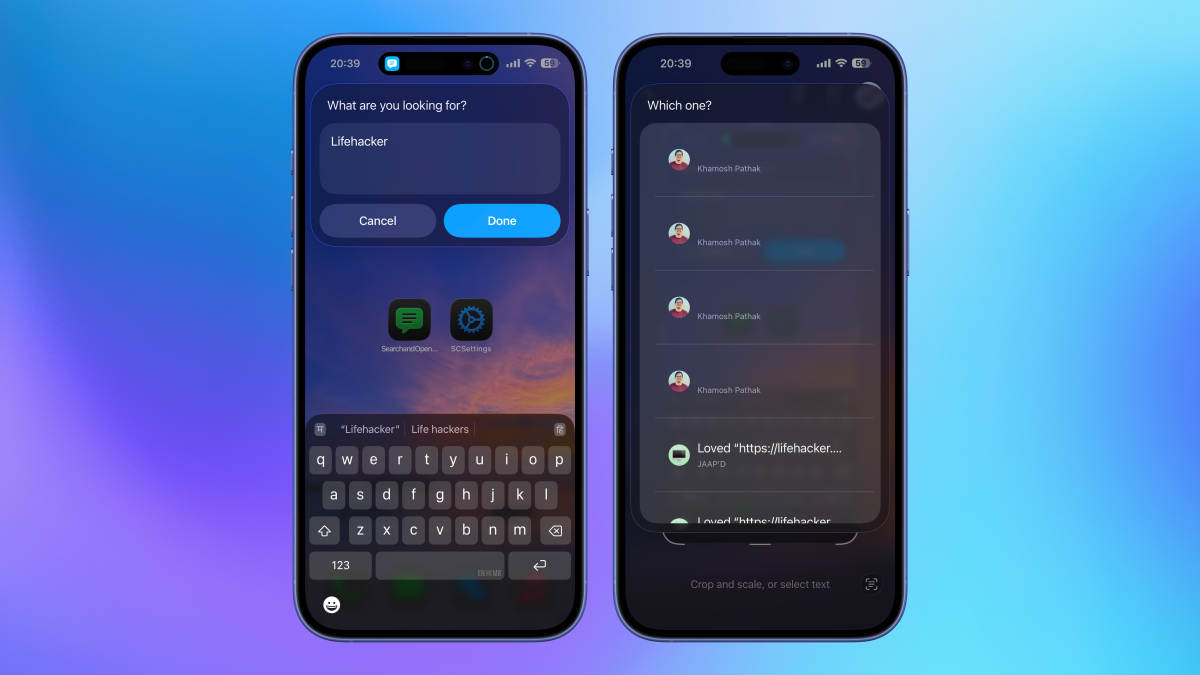
That’s where our hack comes in. First, open the Shortcuts app on your iPhone, then install the Search and Open Messages shortcut. This shortcuts takes advantage of actions released in iOS 26, which allow you to look for text messages and open them in a single tap. Once the shortcut is installed, you can run it from the Shortcuts app, or add it to your iPhone’s Home Screen for easier access.


What do you think so far?

The shortcut will prompt you to type what you want to search for, and almost instantly, it’ll list all the chats containing those words. In some cases, it even highlights the exact sentence containing those words. It’ll find keywords in images you share, as well: These appears as “blank” entries in the search results, but if you tap through, you’ll see the image the search identified.

The moment you tap a result, the shortcut instantly takes you to the relevant part of the chat, and doesn’t make you scroll through hundreds of results to find the right one. This is the kind of functionality Apple needs to add directly to Messages. But, for now, this shortcut workaround will have to do.




Editorial Team

Editorial Team

Related Posts

Four Ways to Recover Your 'Lost' Work in Microsoft Word
Protection

Four Ways to Recover Your ‘Lost’ Work in Microsoft Word

February 17, 2026
Current Trends Explained: What Is a 'Bebot Girl'?
Protection

Current Trends Explained: What Is a ‘Bebot Girl’?

February 17, 2026
Shows Like 'Silo' You Should Watch Next
Protection

Shows Like ‘Silo’ You Should Watch Next

February 14, 2026
The Easiest (and Cheapest) Ways to Turn Your Attic Into Useful Storage Space
Protection

The Easiest (and Cheapest) Ways to Turn Your Attic Into Useful Storage Space

February 14, 2026
These Viture Luma Pro Smart Glasses Are Cheaper Than Ever During Amazon's Early Presidents Day Sale
Protection

These Viture Luma Pro Smart Glasses Are Cheaper Than Ever During Amazon’s Early Presidents Day Sale

February 14, 2026
OpenAI Actually Shut Down GPT-4o
Protection

OpenAI Actually Shut Down GPT-4o

February 13, 2026
Load More
Next Post
Merit’s Lip Blush Is The Comfiest Lipstick I've Found

Merit’s Lip Blush Is The Comfiest Lipstick I've Found

Popular News

  • The 10 best banks for college students in 2025

    The 10 best banks for college students in 2025

    0 shares
    Share 0 Tweet 0
  • These might be the winners from the latest round of Chinese new year AI launches

    0 shares
    Share 0 Tweet 0
  • How to Contact Hilton Customer Service

    0 shares
    Share 0 Tweet 0
  • Solana NFT minting now cheaper with new technology

    0 shares
    Share 0 Tweet 0
  • I Used Monarch Money for 30 Days: Here’s What Happened

    0 shares
    Share 0 Tweet 0

Latest News

Merit’s Lip Blush Is The Comfiest Lipstick I've Found

Merit’s Lip Blush Is The Comfiest Lipstick I’ve Found

February 17, 2026
0

If you’re just as obsessed as I am with celebrity makeup artist Nina Park, specifically the way she makes her clients’ lips appear...

This Shortcut Solves the Biggest Issue With Finding Messages on Your iPhone

This Shortcut Solves the Biggest Issue With Finding Messages on Your iPhone

February 17, 2026
0

I have always found it annoying to search for anything in Apple's Messages app. Admittedly, things have gotten better in recent...

American Bitcoin surpasses 6,000 BTC milestone worth $411M

American Bitcoin surpasses 6,000 BTC milestone worth $411M

February 17, 2026
0

American Bitcoin, a Nasdaq-listed Bitcoin mining firm, said its Bitcoin holdings have surpassed 6,000 BTC. Arkham data shows the company...

Financial

Will LTAFs boost DC scheme investment in private markets?

February 17, 2026
0

While long-term asset funds (LTAFs) have broadened access to private markets over the past few years, UK defined contribution (DC)...

Global Finances Daily

Welcome to Global Finances Daily, your go-to source for all things finance. Our mission is to provide our readers with valuable information and insights to help them achieve their financial goals and secure their financial future.

Subscribe

  • About Us
  • Contact
  • Privacy Policy
  • Terms of Use
  • Editorial Process

© 2025 All Rights Reserved - Global Finances Daily.

No Result
View All Result
  • Alternative Investments
  • Crypto
  • Financial Markets
  • Investments
  • Lifestyle
  • Protection
  • Retirement
  • Savings
  • Work & Careers

© 2025 All Rights Reserved - Global Finances Daily.

Welcome Back!

Login to your account below

Forgotten Password?

Retrieve your password

Please enter your username or email address to reset your password.

Log In
This website uses cookies. By continuing to use this website you are giving consent to cookies being used. Visit our Privacy and Cookie Policy.