There are many ways to set a schedule, from using a pen and paper planner to getting out some dry erase markers and scribbling on your clock. They range from tedious to totally archaic, but there’s a technique for everyone. One method I have come to enjoy aims to work by giving you more insight into how you spend your time—and helping you manage your day down to the minute. It’s called time blocking.
What is time blocking?
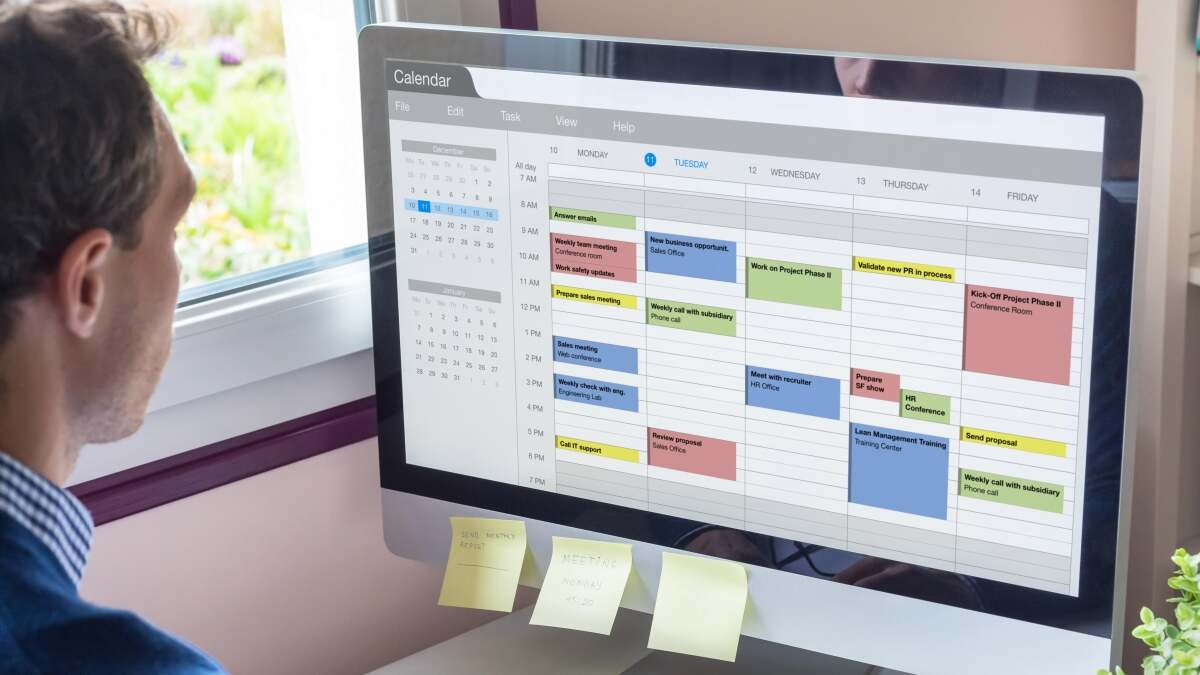
Time blocking is the act of arranging your schedule so every activity you need to do in a day is accounted for visually. Ideally, you’ll do this using a digital calendar tool like Google Calendar or iCal, but it’s possible with a planner and some highlighters. Even if you’re writing it all down by hand on a piece of paper, consider the way a Google Calendar looks before you start. Each day is represented by a column split up into 15-minute increments, from midnight until 11:59 p.m. When you add a meeting or appointment into the calendar, a box appears and fills up the space representing how much time the event will take out of your day.
With time blocking, your goal is to fill the entire column with boxes, leaving no blank space. Even your rest periods should be marked as such (and yes, you need rest periods to be your most productive, so don’t skip those). No activity—from having breakfast to running errands to calling your mom—is too small to add to the list. Then, you get to classify everything with a pretty color (when it comes to time management, you have to find your own fun).
How to create a time blocking schedule
Start by making a list of everything you’re going to do tomorrow. For instance, you might wake up, check the news, shower, make coffee, commute to work, grab breakfast, answer emails, attend a meeting, get lunch with an old friend, work on a project, commute home, take the kids to a baseball game, pick up dinner, eat that dinner, watch your favorite show, get ready for bed, lie awake thinking about climate change, and actually sleep. Get granular here. At first blush, you might think your to-do list on a given day is just something like “hit deadlines at work” and “make a doctor’s appointment,” but think of everything else in there, like packing your lunch, driving to the locations, stopping for gas, etc.
Once you’ve written out the exhaustive list of your day’s tasks, mark down how long each might (or should) take. This part will take practice because we tend to give ourselves too much time for tasks—and that’s bad for multiple reasons. First, you need a bit of urgency and stress (but not too much) to make you productive, so you need a limited amount of time. Second, the longer you give yourself to work, the more you’ll drag out that work—and the less you’ll get done. Give yourself a few weeks to get in the swing of cutting down the amount of time you estimate each task will take, but commit yourself to eventually shrinking those windows.
Then, grab the paper (or open the software) you’re using to time block and enter every single event and responsibility in, according to the time you’ve allotted for it. If you want to see how you are splitting up your day, choose different colors to classify tasks, like blue for grooming/bathing, yellow for work, and green for meals. Be strategic about which tasks make the cut on a given day, though. Use a prioritization technique like the Eisenhower Matrix to determine which of your tasks are actually pressing and which can be bumped to another day. Then, use a to-do list organizing method like 1-2-3 to divvy up your daily time correctly. Remember, your time in a day is finite, so you can’t do everything all at once. With 1-2-3, you select one major task, two medium-sized ones, and three smaller ones to do in a day. The smaller ones can be building blocks for the big one or can be simple maintenance activities like answering emails or picking up the dry cleaning.
The trick after that is to treat each box the same way you’d treat a meeting: Don’t reschedule it. Don’t mess with it too much. Honor the time commitment it represents, commit to doing the task at the specified time, and do your best to get it done in the time you set aside to do it. This is called time boxing, a similar but slightly different concept that involves giving yourself a set amount of time to do something, only focusing on that task during that time, and stopping your work when the time is up. I’ve written more extensively on the similarities and differences between time boxing and time blocking, but all you need to know right now is that during the time you set aside to do something on your calendar, you should engage completely in deep work, avoid distractions, and turn all your energy toward the responsibility at hand. As with any pre-planned meeting or event, things will come up that disrupt the schedule, but in the absence of a major upheaval (the kind of thing you’d move a work meeting for), vow to stick with your time blocks.
What do you think so far?
It’s smart here to also implement some kind of time tracking, whether that involves writing down how long your tasks actually take you or using a software to monitor your work, so you can make adjustments to your time blocks as you get better at following the system. During the first week or two, you’ll likely be guessing at how long each task will take you when you’re building the schedule, but after a while, you should be able to identify if something takes a longer or shorter amount of time than you’ve been allotting, then adjust the schedule to match those needs going forward.
The reason time blocking works
Time blocking is beloved by its adherents. As the Harvard Business Review points out, a regular to-do list gives you way too many choices and not enough structure. Adding in the time element helps you stay on task. Making a visual, color-coded representation of that time keeps you focused and helps you ensure you always know exactly what you’re supposed to be doing. There is no more indecision paralysis. You look at your Google Calendar and simply know what to do and how long you have to do it. Plus, if you use a shared calendar with colleagues or your family, everyone else will also know when you’re available and what you’re doing.
It also helps you meet deadlines and stay within your guidelines. If you know a certain project or task will take a combined 50 hours, time blocking helps you space those out and make room for them in your schedule, enabling you to get things done on a set timetable without having to guess whether you really have time for it. If you finish something ahead of schedule, great! Go ahead and add in a little block of time off.
A final note on time blocking
Time blocking is often confused with time boxing and a lot of productivity blogs and hacks will say “time boxing” when they mean time blocking. That Harvard Business Review article above does it, for instance. It’s an easy mistake to make and, in fact, in a previous version of this post, I called time blocking time boxing. As long as you’re sticking to the plan and making a detailed calendar, it doesn’t matter what you’re calling it, but this could cause some confusion while you read up on other guides, so just be warned. A complete rundown of the differences between the two can be found here.