We may earn a commission from links on this page.
One million years ago (sometime before 2020), Peloton had a series of Bike classes designed around heart rate zone training. Christine D’Ercole would tell you what zone your heart rate should’ve been in for each part of the workout, and you’d adjust your effort accordingly. Those classes are long gone, but Peloton is dipping a toe back into the world of heart rate training with its new “Zone 2” collection.
Peloton’s collections are just groupings of existing classes, so there aren’t (yet?) any classes that are designed around heart rate zones. Instead, if you tap the “Zone 2” collection on your Bike, Tread, or Row, or in the phone app, you’ll see 16 Zone 2-ish classes, including:
-
Four cycling classes, including two 60-minute Power Zone Endurance rides and two shorter Power Zone Recovery rides.
-
Eight “Tread + Outdoor” classes, about half of which are walks and half are runs. You can do these either on a treadmill, or outdoors with your phone in your pocket.
-
Four Row classes, all labeled as Endurance Row and ranging from 20 to 45 minutes.
What it’s like to take one of Peloton’s Zone 2 classes
Credit: Beth Skwarecki
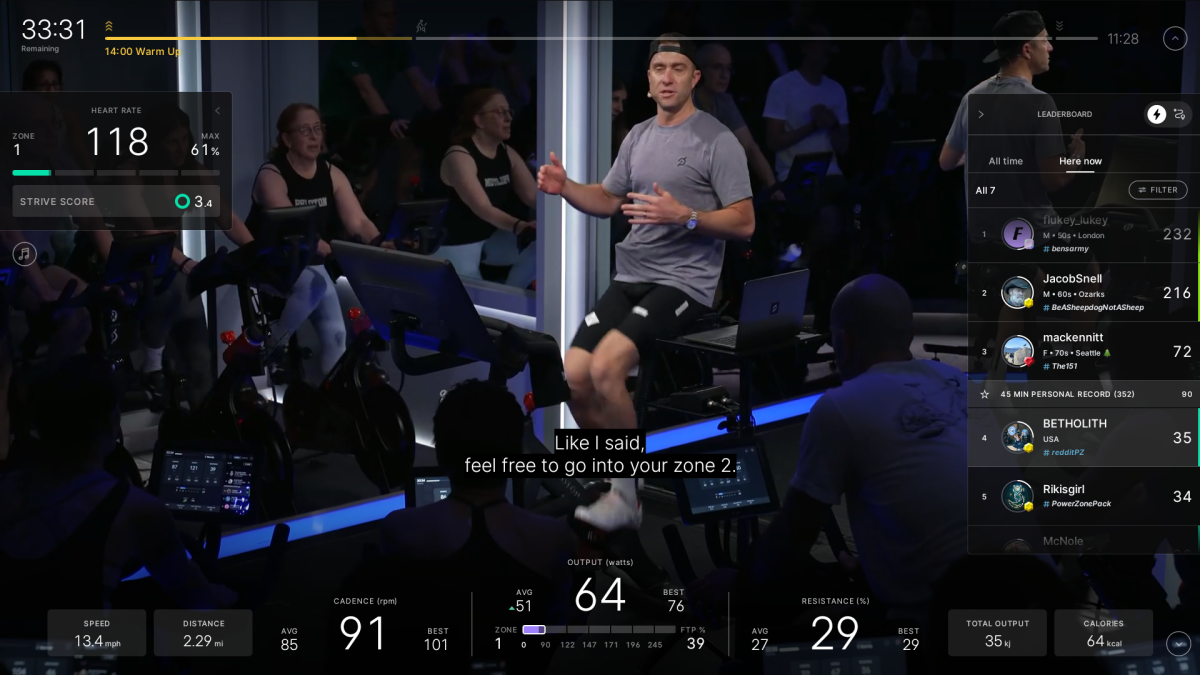
I tested out one of the cycling classes—the 45-minute Power Zone Recovery Ride with pro cyclist Christian Vande Velde. Power Zone training is no relation to heart rate zones. Instead of watching your heart rate, the instructor cues you to pedal hard enough to match one of seven power zones that are based on how much mechanical power you are putting into the pedals.
Normally, Power Zone workouts range from zone 1 to 5, with Power Zone Max classes peaking in the higher zones. Power Zone Endurance rides (PZE) are at the other end of the spectrum, with most of the class spent in zones 2 and 3.
The two Power Zone Endurance rides in the Zone 2 collection are notable for being lower intensity than most other PZEs. Instead of bouncing between power zones 2 and 3, you’re in power zone 2 the whole time. The Power Zone Recovery rides are even easier: you bounce between power zones 1 and 2.
I hooked up my trusty heart rate chest strap to both my Peloton Bike and to my Coros watch, and took the class. We spent the first 15 minutes in zone 1, then a few short segments in zone 2 (while standing up out of the saddle!) with long zone 1 sections between. If this doesn’t sound like much of a workout, you’re right—Christian emphasized that “this is not training. This is recovery from your training.”
What is the purpose of Zone 2 classes on Peloton?
Christian’s statements during the class made me wonder if people might find this type of workout to be a bait-and-switch. If you listen to the fitness influencers, we should all be doing more—maybe all—of our cardio in heart rate zone 2. So what do you mean these classes aren’t training?
Truthfully, I get it: Heart rate zone 2 is a pretty low intensity of exercise. It’s a great low-stress addition to your training routine, especially if you’re trying to increase the number of miles you run or hours you train. But if you’re training to get fitter, you need intensity! Heart rate zone 3 has plenty of benefits, and the VO2max-boosting Norwegian 4×4 workout does its magic in heart rate zone 4.
I could definitely see myself reaching for the Zone 2 collection when I want a recovery day or an easier version of an endurance day. But I’d still stick with the regular PZE classes for a more standard endurance workout.
What do you think so far?
Do Peloton’s Zone 2 classes actually put you in zone 2?

Left to right: Peloton, Coros, Garmin. All are using data from the same ride. (Coros recorded a little bit of my stretching session afterward, which is why the average HR is different on that one.)
Credit: Beth Skwarecki
Besides checking out the class design and intensity level, my other reason for trying one of these classes was to see whether my heart rate actually reached, and stayed in, zone 2 while taking it.
Coospo H6M Bluetooth/ANT+ Heart Rate Monitor

Whether it succeeded depends on whose definition of zone 2 you’re using—because apps disagree. If you connect a heart rate monitor to your Peloton equipment or app, you’ll get Peloton’s five heart rate zones, which define zone 2 as being 65% to 75% of your maximum heart rate. On the other hand, my Coros watch has six zones, with zone 2 being 50% to 60% of my max heart rate.
For what it’s worth, my average heart rate was 122, which is around 60% of my max.
-
Coros tells me I spent 39% of my time in the “warm up” zone (zone 2) and 43% in the “fat burn” zone (zone 3).
-
Peloton says I spent 65% of my time in zone 1, and 31% in zone 2.
-
If I were using a device like a Fitbit or Pixel Watch, I would have been split pretty evenly between “moderate” and “vigorous” (low and medium, in a three-zone scale).
-
If I were using an Apple Watch, I would have been split between zone 1 and zone 2.
-
Garmin is the “winner” here, in a sense—it’s the only system that has me in zone 2 for the majority (57%) of the ride, with 23% in zone 1 and 15% in zone 3. (To get those numbers, I used the Peloton-to-Garmin sync.)
Watching my heart rate on the Peloton screen (with a paired chest strap), I noticed that most of the time when I was told to pedal in power zone 1, my heart rate was near the top end of heart rate zone 1. On the intervals, I found that standing up spiked my heart rate into zone 3 pretty quickly, but that if I did the intervals while seated, my heart rate didn’t go above zone 2. In part that’s because standing up is less efficient (so you work harder for the same output), but I don’t think that’s the only reason.
Heart rate reflects more than just your effort during an exercise; it can also change with body position (standing versus sitting) and other factors, like how warmed-up you are, the temperature of your room you’re in, and more. Which is why cyclists prefer power zones to heart rate zones, in general—power is a more direct measurement of what you’re doing on the bike.