We may earn a commission from links on this page.
It’d be fair in some respects to call WWDC 2026 “the Siri keynote.” After a two-year delay, Apple finally revealed Siri AI, and spent much of the event discussing all the ways it improves upon the old assistant. But while Siri might have stolen the show on Monday, it wasn’t the only AI news Apple presented. So long as you have a compatible device, Apple’s upcoming slate of updates is adding a host of new AI features to the mix. Here’s what’s coming down the pike:
Safari gets intelligent tab management and smart notifications
Credit: Apple
Safari’s new Apple Intelligence features are all about streamlining web browsing. You can use AI to automatically organize all your messy tabs, sorted by topic. This even updates dynamically, as you surf the web. There’s also a new feature called “Notify Me” that will monitor a webpage on your behalf. You can tell it to watch out for something, like a price drop on an item you want to buy, and it will notify you when the webpage is updated.
There’s also a small vibe-coding feature here. You will be able to create your own bespoke Safari extensions by telling the browser what you want to see. Apple will provide some categories and quick-start suggestions, but you can also use natural language commands to generate an extension that can customize a webpage and add extra features to Safari.
Visual Intelligence expands to the camera and your Mac

Credit: Apple
The Camera app is getting a big update this year, by taking Visual Intelligence and adding it as a new “Siri” option in the camera. Point your camera towards any object or scene and ask Siri any questions you might have. The assistant will then suggest relevant actions based on what you’re looking at. For example, you can ask for a nutritional breakdown of the meal you’re eating, or split a bill with your friends.
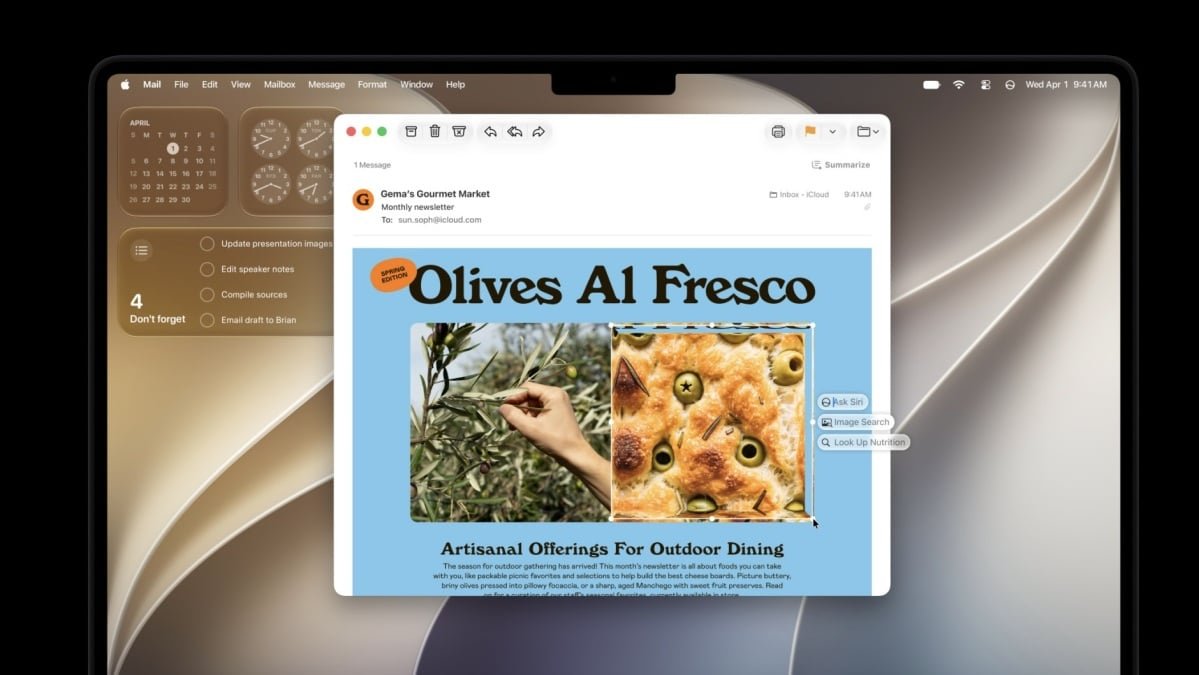
On the Mac, Visual Intelligence is directly integrated into the screenshot tool. Once you capture a screenshot, you can ask Siri about it. Here too, Siri will automatically recognize the content and will provide contextual prompts. On the iPad, you can ask Siri about anything that’s on your screen simply by circling it using your Apple Pencil after taking a screenshot.

Credit: Khamosh Pathak
Apple has some new AI-powered image editing tools this year. There’s “Extend,” which expands the frame around a subject with generative AI fill, and “Reframe,” which lets you adjust the framing of a photo as if you were still taking it live. When you adjust the framing, the edges will blur, indicating where Apple Intelligence will fill in the details using AI. Clean Up also gets some upgrades with Apple’s improved AI models.
Image Playground also gets its biggest upgrade yet, shipping with the ability to generate photo-realistic images for the first time. You can pull in photos from your library, edit them with text prompts, and generate images in different aspect ratios. You can also generate unique wallpapers or Contact Posters using this feature. And all the images will be watermarked with SynthID data, making it easier to know that the image was generated with AI.
Apple’s Passwords app will reset compromised passwords for you

Credit: Apple
AI is at its best when it takes care of tedious tasks. Resetting passwords surely fits the bill. With this year’s updates, Apple has integrated an AI agent in the Passwords app that resets compromised passwords on your behalf. You just have to give the go-ahead, and it’ll head to the website in question, enter your old password, reset it, and save the new password to the app.
Shortcuts are now easy to build

Credit: Apple
Shortcuts are awesome, but they require a lot of planning and multi-step workflows. They can get complex fast, which sharply reduces the accessibility of the whole experience. That might be changing this year: The Shortcuts app will now let you create an automation or a shortcut using natural language. You can describe the shortcut you want to create in detail, and the app should be able to create it for you. For example, you could tell Shortcuts: “Message my partner with my ETA when I leave work.” From this request, Shortcuts should be able to integrate Messages, Apple Maps, and the task together into one automation, without you having to build the steps from scratch.
What do you think so far?
AI-supported communication systems

Credit: Apple
Apple is integrating Siri AI into all its major apps, like Phone, Mail, Messages, and even Calendar. When you’re on a call with a family member or a business, the Phone app will automatically bring up contextual information, like your reservation number or flight details, just in case you need it. Natural language input is also coming to the Calendar app. You’ll be able to create appointments by typing them in detail, including date, time, and who you’re meeting with.
Apple Intelligence will also keep an eye on your conversations in Messages and will provide contextual prompts when needed. For example, if someone asks for a photo or an address, you’ll see suggestions for a one-tap response with the relevant data already loaded up. Smart Reply will be able to craft messages on your behalf in the Mail and Messages app, maintaining your writing style. According to Apple, the AI can adjust the tone based on the contact; so emails to your boss could sound more formal than texts to your best friend. Apple says it’s also improving its grammar, spell-check, and speech-to-text tools using AI. The latter will automatically remove filler words, add correct punctuation, and format your speech as well.
Apple’s Home app gets some AI upgrades
Apple Intelligence will automatically group all smart home notifications in one active stream. You won’t receive five pings in a row because you opened the garage door, then the main door, and turned on the outdoor lights; instead, a single alert will update dynamically to reflect the changes. The Home app will also summarize movements from HomeKit cameras and will provide a text summary about any important updates.
Apple also improved searching in the Home app, especially when it comes to camera footage. You can now search with natural language, and the Home app will comb through data from all your cameras to show you the moment you’re looking for. Note the AI summary and multi-camera search features are only available for iCloud+ subscribers.
A glowing Siri orb comes to Apple Vision Pro

Credit: Apple
Siri AI also makes its way to the Apple Vision Pro. The Siri app, with the conversation view, is right there too, but more interestingly, you can now add a glowing Siri orb to your Vision Pro space. You can place it anywhere in your home and start a conversation just by looking at it. The orb glows and responds in the same view.