No Result
View All Result
Global Finances Daily
  • Alternative Investments
  • Crypto
  • Financial Markets
  • Investments
  • Lifestyle
  • Protection
  • Retirement
  • Savings
  • Work & Careers
No Result
View All Result
  • Alternative Investments
  • Crypto
  • Financial Markets
  • Investments
  • Lifestyle
  • Protection
  • Retirement
  • Savings
  • Work & Careers
  • Login
Global Finances Daily
No Result
View All Result
Home Protection

Five Hacks Every Garmin Forerunner 165 User Should Know

July 14, 2026
in Protection
0
Five Hacks Every Garmin Forerunner 165 User Should Know


We may earn a commission from links on this page.


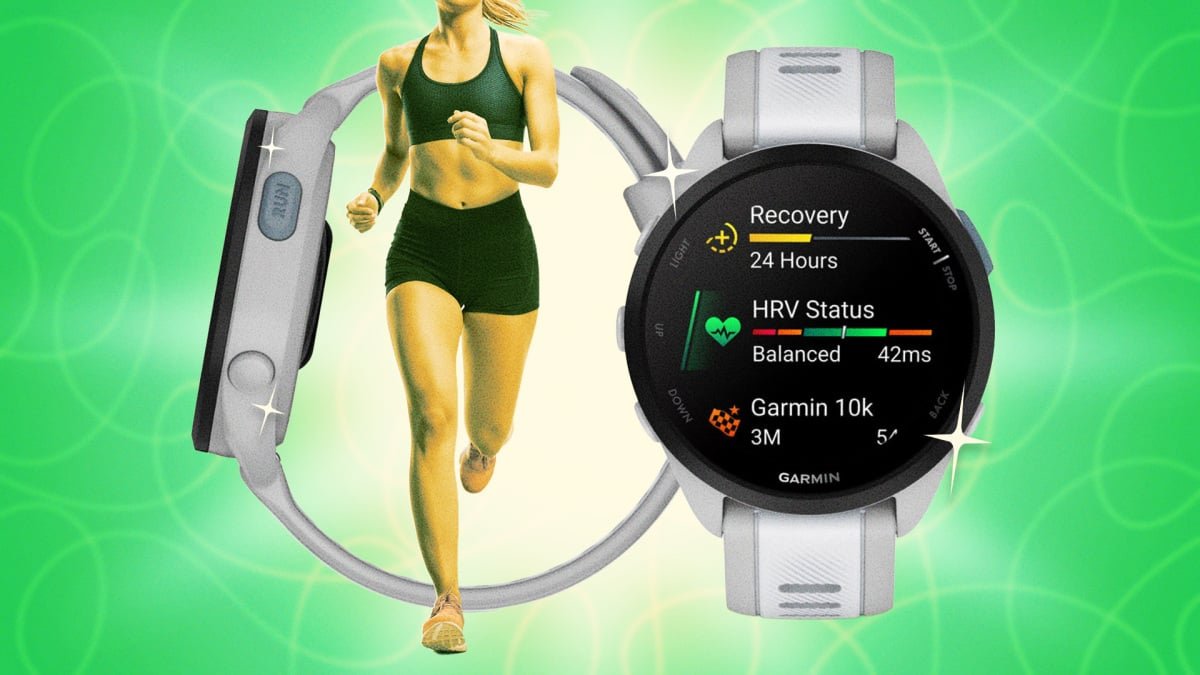
The Forerunner 165 is an accessible, reliable running watch for Garmin users who want serious metrics without complexity overload. It’s slotted in below the 255/265 line, offering a bright, colorful touchscreen and solid running fundamentals—GPS, heart rate, sleep and stress tracking, and support for structured workouts—without some of the pricier extras like maps or a solar panel. (If you’re confused by Garmin’s numbering system, we’ve got you covered.)

The 165 has been succeeded by the Forerunner 170, but it’s still a fan favorite—even if most owners aren’t using this watch to its full potential. Here are my favorite hacks and hidden features to get more out of your Garmin Forerunner 165. 

Garmin Forerunner 165

Add the flashlight to your controls menu—and adjust it to see better at night

The 165 may not have a dedicated LED hardware flashlight like the higher-end models, but it does have a “flashlight feature” where it turns the watch’s bright AMOLED display fully white. By default you won’t have flashlight available, but you can go into Controls (by holding the UP button) and add “Flashlight” as a tile. Once it’s added, you can unlock the red light mode by pressing the DOWN button until it cycles through to it. Red light is easier on the eyes, especially at night, compared to the stark white default. 

Unlike the 265 and up, the 165 doesn’t support customizable hardware button shortcuts for things like Garmin Pay or the flashlight I mention above. The workaround is to be intentional about ordering your Controls menu items, putting whatever you use mid-run (flashlight, Do Not Disturb, music controls) at the very top, so it’s always one swipe away, instead of buried in a scroll. (And instead of scrolling through your options one-by-one on your watch, take a gander at this list here and build out your control menu with intention.)

Use a workaround to get your Forerunner 165 to provide “breadcrumb navigation”

The 165 may not have full on-screen mapping like the higher-end Forerunners, but it will still show you a breadcrumb trail if you load a course from Garmin Connect—meaning you can follow a planned route’s shape even on a “map-less” watch. (It just won’t render surrounding streets.)


What do you think so far?

Create custom activity profiles instead of editing the default one 

Rather than constantly changing your data screens between an easy run and a track workout, you can duplicate the Run profile and build multiple ones with different fields, alerts, and auto-lap settings. It sounds obvious, but you may not realize you can stack multiple Run-type profiles in the activity list at once.

Personally, I recommend stripping down your data screens. Pace, heart rate, and cadence are plenty for most workouts. Everything else (elevation, calories, lap count) can live on a secondary screen you can glance at during recovery jogs, not hard efforts. You can customize directly on your watch, or it’s a little easier to explore in the Garmin Connect app:

  1. Tap Activities & Apps, then select Run.

  2. Select Data Screens and choose the screen you want to edit.

  3. Tap Layout to choose how many data fields (1 to 4) you want on that screen.

  4. Select Data Fields to change what metric displays (e.g., pace, distance, heart rate zone).

Pause before uploading to Strava after a run for more accurate data

Every runner I know has had to grit their teeth through syncing issues between Garmin and Strava. If you’re the type to hit “sync” the second you stop your watch (like I know I am), here’s my tip: Slow down. Give Garmin Connect two to three minutes to finish processing the activity file before it pushes to Strava. That processing window is when Garmin finalizes GPS smoothing and segment matching. When you upload too early, you can end up with jagged pace spikes or missed segment credit that never seems to correct itself.


Editorial Team

Editorial Team

Related Posts

Your Mac's Next 'Crash Report' Might Actually Be Malware
Protection

Your Mac’s Next ‘Crash Report’ Might Actually Be Malware

July 14, 2026
How to Join the Waitlist to Try the New Siri AI
Protection

How to Join the Waitlist to Try the New Siri AI

July 14, 2026
Disable These Gboard Settings to Protect Your Privacy
Protection

Disable These Gboard Settings to Protect Your Privacy

July 14, 2026
10 Shows Like 'I Will Find You' You Should Watch Next
Protection

10 Shows Like ‘I Will Find You’ You Should Watch Next

July 14, 2026
Google Images Is Celebrating Turning 25 With Two New Features, and One of Them Is Actually Pretty Useful
Protection

Google Images Is Celebrating Turning 25 With Two New Features, and One of Them Is Actually Pretty Useful

July 14, 2026
Microsoft Is Finally Fixing Windows Search
Protection

Microsoft Is Finally Fixing Windows Search

July 14, 2026
Load More

Popular News

  • CLARITY Act window slams shut after May 21 - 1

    What the CLARITY Act actually says: A reader’s guide

    0 shares
    Share 0 Tweet 0
  • Where to get high yield on stablecoins in 2025: Top 5 projects

    0 shares
    Share 0 Tweet 0
  • The 10 best banks for college students in 2025

    0 shares
    Share 0 Tweet 0
  • CVC Credit prices reset of Cordatus Loan Fund XIX

    0 shares
    Share 0 Tweet 0
  • Current Trends Explained: Alysa Liu and ‘Goonbait’

    0 shares
    Share 0 Tweet 0

Latest News

Five Hacks Every Garmin Forerunner 165 User Should Know

Five Hacks Every Garmin Forerunner 165 User Should Know

July 14, 2026
0

We may earn a commission from links on this page. The Forerunner 165 is an accessible, reliable running watch for...

CLARITY Act's real obstacle: Trump's crypto business

Trump backs UK stablecoin pact as CLARITY Act faces bank revolt

July 14, 2026
0

President Donald Trump has strengthened support for a new UK-US stablecoin framework as the Senate races to advance the CLARITY...

What IBM’s profit warning means: Hardware is ‘eating everyone’s lunch’

What IBM’s profit warning means: Hardware is ‘eating everyone’s lunch’

July 14, 2026
0

The company said the shortfall in its software and infrastructure business was tied to clients spending on memory ahead of...

What Federal Employees Need to Know

What Federal Employees Need to Know

July 14, 2026
0

Many federal employees have children who will be attending colleges and universities in the fall. The options for paying for...

Global Finances Daily

Welcome to Global Finances Daily, your go-to source for all things finance. Our mission is to provide our readers with valuable information and insights to help them achieve their financial goals and secure their financial future.

Subscribe

  • About Us
  • Contact
  • Privacy Policy
  • Terms of Use
  • Editorial Process

© 2025 All Rights Reserved - Global Finances Daily.

No Result
View All Result
  • Alternative Investments
  • Crypto
  • Financial Markets
  • Investments
  • Lifestyle
  • Protection
  • Retirement
  • Savings
  • Work & Careers

© 2025 All Rights Reserved - Global Finances Daily.

Welcome Back!

Login to your account below

Forgotten Password?

Retrieve your password

Please enter your username or email address to reset your password.

Log In
This website uses cookies. By continuing to use this website you are giving consent to cookies being used. Visit our Privacy and Cookie Policy.