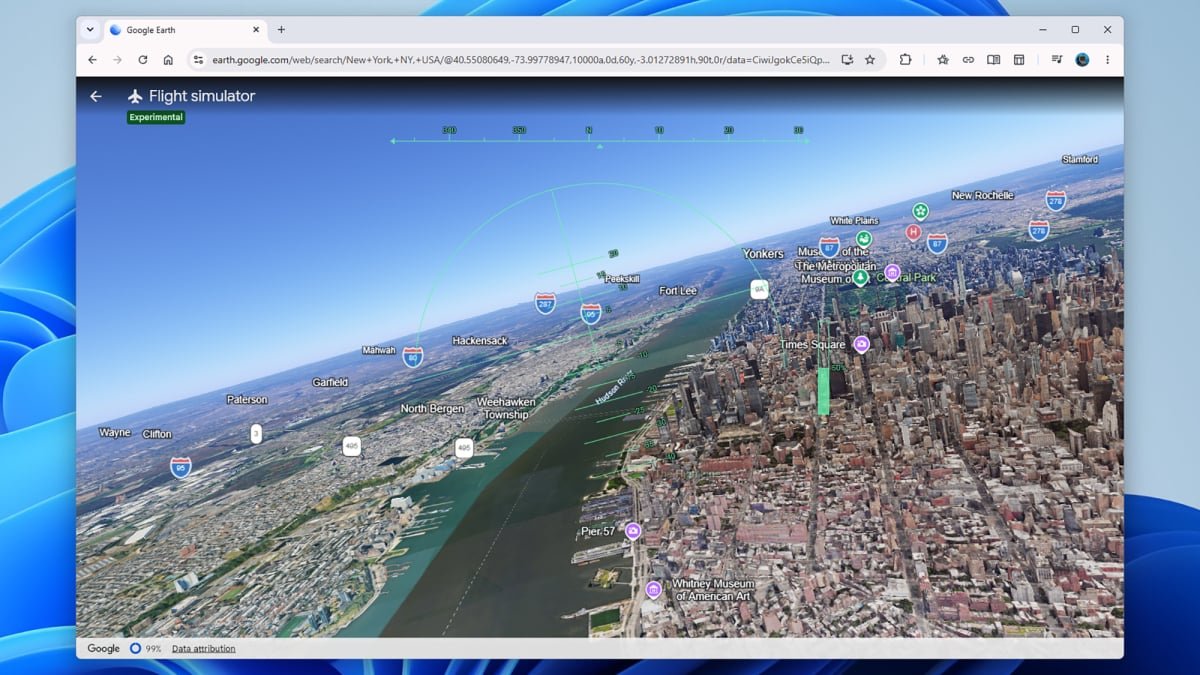
Flying above New York in Google Earth.
Credit: Lifehacker
Titles like Microsoft Flight Simulator can offer truly gorgeous visual experiences, but there’s an awful lot of simulation involved before you get to the flight. You have to learn a lot about cockpit controls, take-offs and landings, and other simulator-y stuff before you’re allowed to soar into the sky and see the planet from a bird’s eye view.
That’s one of the reasons that the flight simulator mode that just launched in Google Earth on the web is likely to be so popular—in just a couple of clicks, you can be zooming through canyons or across cities, without worrying about what kind of plane you’re in or how your flaps are set.
As Google mentions, this isn’t a completely new experience. It’s actually been ported over from the Google Earth desktop app, but there, it’s rather hidden—more of an Easter egg than a full-blown feature—and offers much more of a flight simulator feel. For example, you need to choose a plane, and figure out how to take off in it, before you get to the eye-popping visuals.
This Tweet is currently unavailable. It might be loading or has been removed.
Now that this simplified version is available in the web app for free, and it can be run instantly without any flight training, it’s likely to be much more popular. To test it out yourself, point your browser towards Google Earth on the web, then click Explore Earth. Find somewhere you want to fly through, then choose Tools > Flight simulator.
Google has helpfully provided some instructions for flying around. You can use either the mouse or the keyboard, and there are basically four directions to master: Up, down, left, and right. You can also adjust your thrust speed.
Everything works through your web browser, so you’ll need a fairly modern Windows or macOS computer for this to work smoothly—a lot of data needs to be streamed to your system as you fly. “Flying at extreme speeds or over low-bandwidth connections may result in temporary loading delays,” Google says.
Taking to the skies in Google Earth’s flight simulator on the web
The first thing you’ll notice once you’re in the air is that your flight is harder to control than you might think. It’s worth taking a few seconds just to appreciate the view before you do anything, because there’s a fair chance you’re going to get into trouble pretty quickly once you start pressing keys or clicking around.
Use the Up arrow to nudge the nose of the plane down (go lower), the Down arrow to nudge it up (go higher), and the Left arrow and the Right arrow to bank in those directions. Small touches are key: If nothing seems to happen immediately, don’t keep pressing the keys, as you’ll very soon get out of control.
What do you think so far?
I found the mouse controls, where you just click and drag on screen, even harder to use. Within a few seconds of trying to change course, I was flying upside down. Not long after that, I was spinning around uncontrollably. Every adjustment I tried to make seemed to make the situation worse.
The controls can take some getting used to.
Credit: Lifehacker
Don’t worry about too much about hitting the ground—you’ll just see a “You crashed! Restart” message, and you immediately take off again. Actually, it was quite a relief after a few minutes of spin-induced dizziness. I think Google Earth needs to make the flying controls less sensitive, or at least give us a quick reset option.
For now, you can’t pause or reset the flight without quitting the simulator (via the arrow, top left) and going back in. There are no external views available either—you’re basically locked in to looking dead ahead from the cockpit
Even with those caveats, and especially now that I am starting to get the hang of the controls, it’s fantastic to be able to soar across any point of the globe in 3D. If you’ve been looking for something like Microsoft Flight Simulator without the learning curve—and you don’t care about advanced features beyond the actual flight—this is a perfect way to zone out for a few minutes.