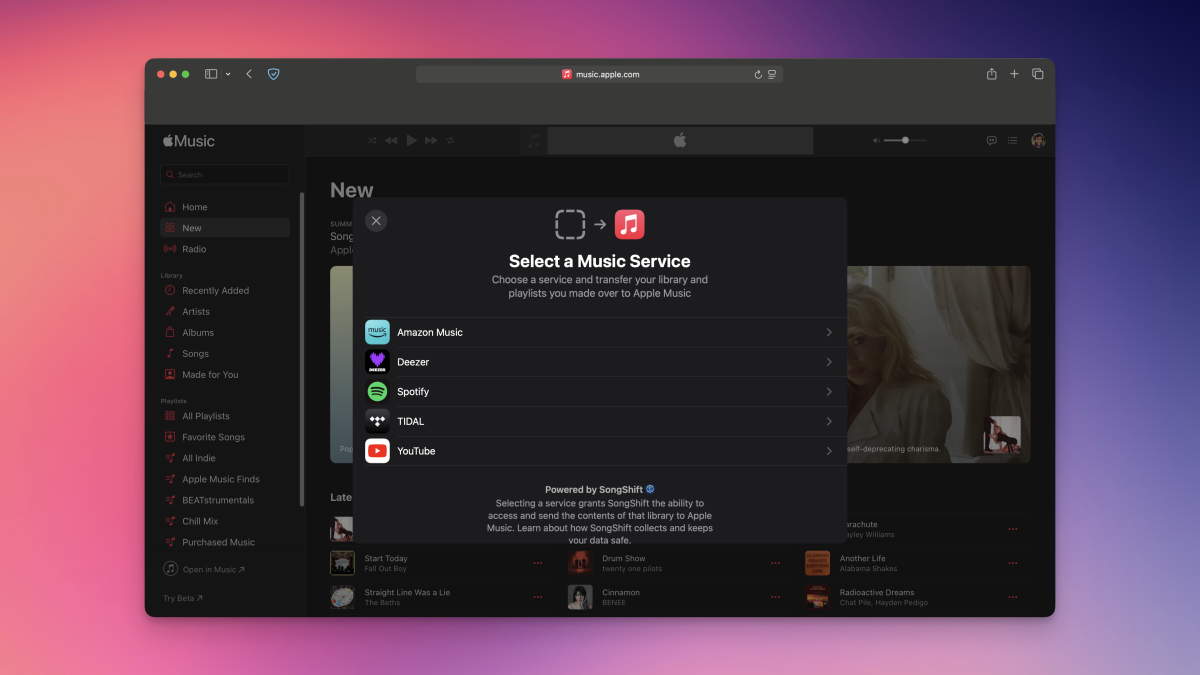
No one wants to build their playlists from scratch when moving from one music streaming service to another. Sure, some of us circumvent this issue by subscribing to multiple streaming services simultaneously, but that’s not an option for everyone. Several third-party alternatives let you easily transfer songs from Spotify to Apple Music, or vice-versa, but official support for this feature has been lacking so far.
Apple Music is changing that, as you can now transfer your playlists right to Apple’s music app from other streaming services such as Spotify. At the time of writing, this feature is available in Australia, Brazil, Canada, France, Germany, Mexico, New Zealand, the United Kingdom, and the United States.
Which music streaming sites can I import songs from?
Apple Music’s library transfer feature is powered by SongShift, which my colleague Khamosh Pathak has already covered. It supports importing music from the following streaming services:
-
Amazon Music
-
Deezer
-
Spotify
-
Tidal
-
YouTube Music
What you need before you transfer songs to Apple Music
There are a few small requirements if you want to transfer songs from any supported streaming service to Apple Music using this method. Here’s what you’ll need:
-
An Apple Music subscription.
-
Either an iPhone/iPad with the latest version of iOS/iPadOS, or an Android phone with the latest version of the Apple Music app. Alternatively, you can also transfer your library over using any web browser.
-
Your credentials for Spotify, or whichever service you’re transferring music from.
You also need to ensure that the Sync Library feature is enabled on all your devices that have Apple Music. This should be enabled by default, but you can double check it easily. On your iPhone/iPad, go to Settings > Apps > Music and enable Sync Library. If you have Apple Music for Mac, open the app and click the Music button in the menu bar up top, and open Settings. Under the General tab, enable Sync Library.
Once this is done, you can proceed to transferring your music from other streaming services.
How to transfer music from Spotify (or others) to Apple Music
Credit: Jake Peterson
To transfer songs from Spotify (or other streaming services) to the mobile version of Apple Music, follow these steps on your iPhone/iPad or Android phone:
What do you think so far?
-
On an iPhone/iPad, go to Settings > Apps > Music. On an Android device, open the Apple Music app, tap the More button (three-dots icon), and select Settings.
-
Tap Transfer Music from Other Music Services.
-
Choose the streaming service you’re importing music from, and sign in to your account for that service.
-
Pick the music you want to transfer, and once you’re done, tap Add to Library.
-
Sit tight and wait for Apple Music to match your catalogs. Once your music is swapped over, you’ll see a message that says “Transfer Complete.”
-
If Apple Music can’t find exact matches for your content, you’ll see a message that says “Some Music Needs Review.” Select Review Now, choose alternate versions of the problem songs, and hit Save to finish the transfer.

Credit: Jake Peterson
To transfer music to the web version of Apple Music, follow these steps:
-
Go to music.apple.com and sign in with your Apple Account.
-
Click the profile icon in the top-right corner, then select Transfer Music.
-
Select the service you’re importing music from, and sign in to your account for that service.
-
Pick the music you want to import, and click Add to Library once you’re done. Apple Music will start the transfer process, and the time it’ll take to complete will vary based on the size of your library. When the transfer is finished, you’ll see a notification that says “Transfer Complete.”
-
If exact matches can’t be found for some of your content, you’ll also see a message that says “Some Music Needs Review.” Select Review Now, which will let you pick alternative songs, and hit Save to finish your transfer.
Apple says you have 30 days from the date of initial transfer to review your transferred music and complete the transfer process. During that time, you can’t initiate a new transfer on that device until you complete reviewing your last one. This means that if you’re trying to import music from multiple streaming services, you’ll have to review your songs from the first service before you can move on to the next one. Luckily, doing so is easy.
How to review imported songs in Apple Music
You’ll get an opportunity to review your transfer immediately after completing it, but if you skipped it, you can still review it within a 30 day window. Follow these steps to complete your review, depending on your device:
-
On an iPhone/iPad, you can go to Settings > Apps > Music > Review Current Transfer.
-
Open Apple Music on your Android phone and tap More. Now, go to Settings > Review Current Transfer.
-
On music.apple.com, click the profile icon in the top-right corner, and then hit Review.
Note that, depending on your service, you have a good chance of being unable to transfer certain playlists to Apple Music. That’s because, while it’ll transfer the playlists you created yourself, it won’t be able to bring in playlists that Spotify, Tidal, or other services created for you.