We may earn a commission from links on this page.
This past weekend I ran a 10K while wearing both the Garmin Forerunner 970 and the Forerunner 165 Music, and while I’ll be doing a full comparison soon, the experience made one thing immediately clear: Sometimes it’s worth it to have a premium running watch. While both watches have excellent running features, the 970 has a few that the 165 lacks—and after putting them to use on race day, I can say that two of them in particular made a real difference.
Master your “race pace” with Garmin’s PacePro feature
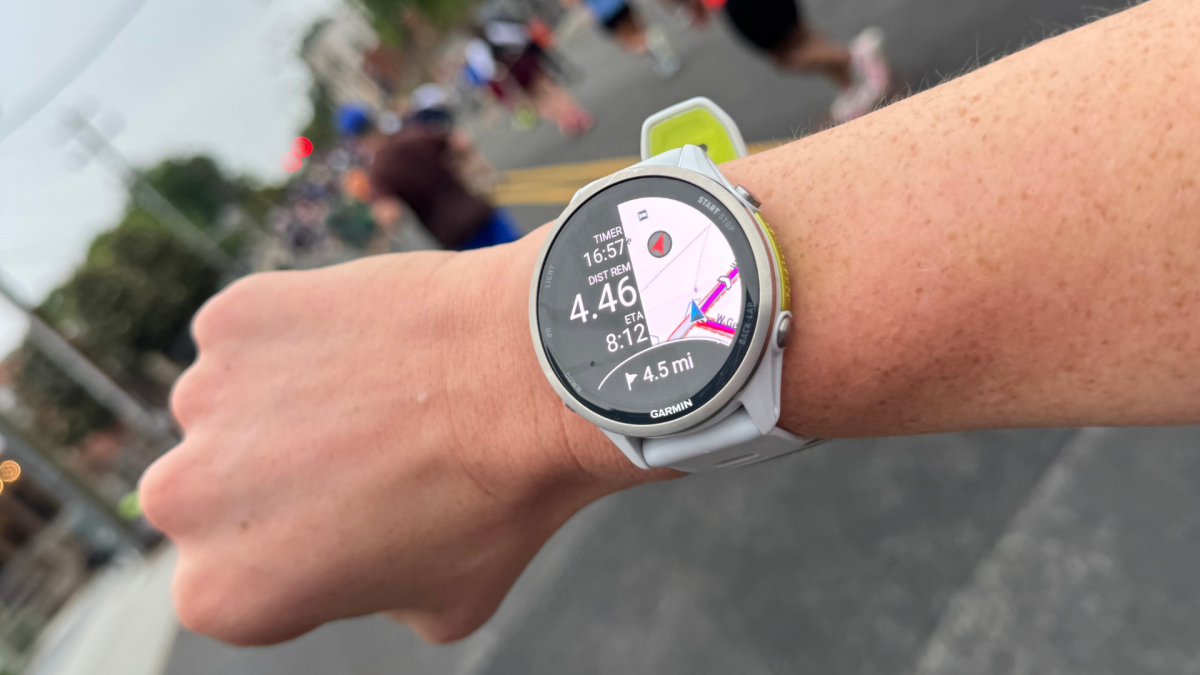
I’d never tested Garmin’s PacePro in real race-day conditions before this weekend. The selling point of this feature is that it analyzes the elevation profile of your course and generates “dynamic pace guidance” based on both the terrain and your personal preferences. Before the race, you set a goal time or pace in Garmin Connect, then tell the watch how you want to handle hills—your options are to push harder on the uphills, use the downhills to recover, or aim for a negative split in the second half. On race day, a data field on your watch shows your target pace for the current split and how you’re tracking against it in real time.
I love PacePro because it takes the mental math out of racing. Instead of constantly doing pace calculations in your head, you can glance at your wrist and instantly know whether you’re ahead, behind, or right on target. It’s like running alongside a coach who already knows the course.
To set up PacePro, head to Garmin Connect > Training & Planning > PacePro, select or create your course, enter your goal time, and sync it to your watch before race day. The Forerunner 165 Music also supports PacePro, so this one isn’t exclusive to the 970—but it’s still an undersung feature, and worth calling out.
Stay accurate with a suggested finish line reminder
This feature, which is on the 970 but not the 165 Music, is beloved by many Garmin runners—and for good reason: When you cross the finish line, you’re more focused on grabbing a banana than hitting the “stop” button on your watch. When, 20 minutes later, you realize your watch is still recording, you’ve screwed your stats. Congratulations, your 10K now says 10.8 miles, and your pace is completely borked.
If you have a course loaded on your compatible Garmin watch, the watch can detect when you’ve crossed the finish line and prompt you to trim your data to that point, even if you forgot to hit stop. It’s one of those features that seems small until the moment you need it, and then it feels like a lifesaver for your post-race data.
Luckily, this feature works automatically once a course is active. To make sure it works, you’ll need to go to Garmin Connect app, select “Races & Events,” and double-check that your race is loaded onto your watch and ready to go before race day.
What do you think so far?
Ease your mind with “Auto Lap by Timing Gates”
Credit: Meredith Dietz
This is the feature I’m most excited to talk about, and it’s likewise exclusive to the Forerunner 970 (the 165 doesn’t have it). Here’s the problem it solves: In any big city race, you end up weaving through crowds, cutting tangents imperfectly, and generally accumulating a little extra distance that GPS dutifully records. By mile three or four, your watch’s splits probably won’t line up perfectly with the mile markers on the course. You might feel like you’re running a 9:00 pace, but the marker says something different, and now you’re doing mental gymnastics mid-race to figure out what’s real.
“Auto Lap by Timing Gates” solves this by triggering laps based on the actual course mile or kilometer markers rather than GPS-measured distance. So when you cross mile one on the course, your watch logs a lap, regardless of how much GPS drift has accumulated. Your splits reflect the race as it’s actually measured, not the slightly off version your GPS recorded.
To enable this feature, you’ll need to go to the Garmin Connect app and find your specific race under the “Races & Events” menu. You can either select an existing race by searching for the name or location, or you can create your own event. Toggle on the “Timing Gate” option, then specify whether you want to use miles or kilometers. On race day, you’ll start the official race as an activity on your watch, and your watch will automatically trigger laps as you pass the predefined official course marker, in addition to showing the actual distance run. This past race wasn’t too crowded, so I’m excited to put this feature to the test during a popular Brooklyn half-marathon next weekend.