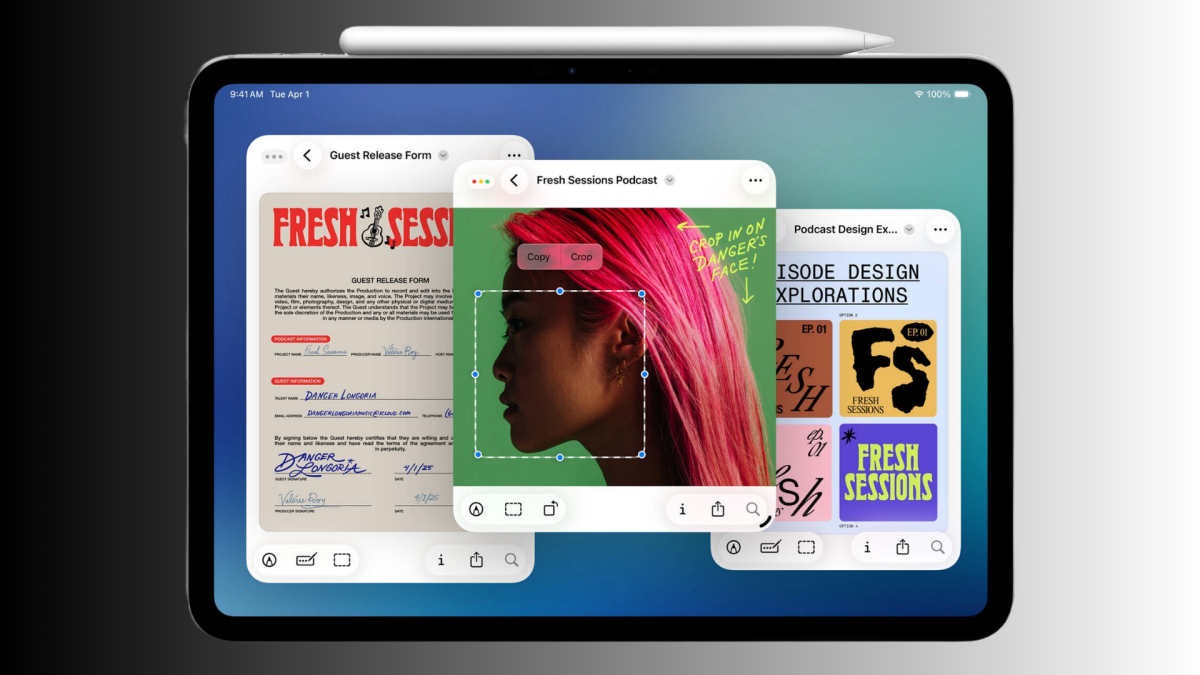
With iPadOS 26, Apple is finally giving the iPad a software experience that’s worthy of its increasingly powerful hardware. But it’s still very much a start. Answering calls to make the iPad more like a Mac, Apple has added much-requested features like freeform window multitasking, background app processes, better file management, and more. It’s surprising how much you can now do on an iPad that was just not possible before. And for many users, especially school/college students and some business users, the new changes can actually translate to tangible productivity gains. But for most, it’s probably still worth holding onto your Mac.
The iPad’s new windowing system is good, but a bit messy
Apple now offers three different multitasking modes on the iPad. And it can be a bit overwhelming. There’s the default Full-Screen mode, the new Windowed Apps mode, and the old-school Stage Manager mode.
Credit: Khamosh Pathak
But for most users, I think defaulting to the Windowed Apps mode is the best option. This is where you can use the handle icon in the bottom-right corner of any window to resize it and move it anywhere you want. Need to open another app? Just repeat the process (although I think it’s pretty jarring that every new app first opens full-screen, and then needs to be resized down).
If you have a newer, more powerful iPad, Windowed mode lets you comfortably use seven or ten apps together in the same desktop without missing a beat. That’s not a limit with iPadOS 26, to be clear, but once you go over 10 apps, things start to get a bit laggy. I can pull off opening a couple of apps together on my aging iPad Pro from 2018, but that’s about it.

Credit: Khamosh Pathak
You can use the new traffic-light buttons (straight from macOS) to close, minimize, or expand your windowed apps (something I’m still not used to). You can also swipe down from the top to access a Mac-like menu bar. This will hold app-related shortcuts and offer ways to move or dock apps to the left or right.
The Windowed app mode also has a version of the classic Split View, if you just want to dock two apps side by side. Pick up a window, and flick it to the left or right. When there are just two windows on the screen, you’ll see a little handle in the middle to freely resize the windows.

Credit: Jake Peterson
With the iPadOS 26.1 update, Apple also brought back Slide Over, a crowd favorite that lets key apps slide in and out of view as needed, but it works in a slightly different manner now. From the menu bar, you can pin any window to the top of the screen to be your Slide Over app. And because this window itself is freeform, you can now resize it to any size you want (something that wasn’t possible before). Though, it’s still a downgrade in a sense because you can only pin one window at a time (before, you could pin multiple windows in Split View and switch between them like you do on the iPhone).
I’ll admit that all of this can seem like a bit much on such a small, touch-based screen, especially for the iPad users who are used to the traditional approach to Split View and Slide Over. Apple really isn’t helping the case by separating out the different modes. Though, like most things, it’s a learning curve that you can get over pretty quickly. In time, I think the gesture for resizing windows will become second nature.
How the iPad is inching closer to the Mac
Beyond Windowed mode, The iPadOS 26 update rights many other wrongs, all of which bring over key functionality from the Mac, though there are still sometimes caveats.
External monitor support is finally worth using, and doesn’t require you to use Stage Manager. Now, the display automatically adapts to the 16:9 aspect ratio of the monitor, so no more black bars. But you still can’t use the external display as the primary display, as you can on the Mac (the menu bar and Control Center still only work on the iPad). That means you always have to have the iPad display on, and you can’t connect to more than one external monitor.

Credit: Khamosh Pathak
The Files app is also much improved, combining a column layout with the ability to expand nested folders while in the same view. You can also add custom-colored icons. Plus, you can now add folders to the Dock for quick access. And finally, you can assign a default app for file extensions right in the Files app. The new Preview app makes it easy to view and mark up PDFs and images, too.
There’s also support for background tasks in the Files app and some third-party apps. That means longer actions, like moving large folders or downloading large files, can continue in the background (monitored via Live Activities). Switching to a different app won’t kill large exports of render jobs. There’s even a new Local Capture feature that lets you record professional audio from any attached microphone, and it supports independent audio capture from multiple microphones at once. A boon for podcasters and YouTubers.
How the iPad still falls behind the Mac
The iPadOS 26 update has a lot of useful, desktop-like features. But at its core, it’s still iPadOS, built on iOS. It is still sandboxed, and installing apps from outside of the App Store is not intended and requires lengthy workarounds. Many popular desktop-class apps also just won’t work on the iPad (like the full version of Adobe Premiere, the macOS version of Final Cut Pro, Logic Pro, coding IDEs, and more). Even Safari on the iPad is limited, and doesn’t offer desktop-class support. A lot of heavy/dynamic sites refuse to function on the iPad, but work well on Safari on a Mac.
There’s also no Terminal, so you can’t do things like running Homebrew projects, automation scripts, and more. iPadOS 26, is still single-user focused, so you can’t create multiple accounts like you can on the Mac. As discussed above, the external display mode, while a nice addition, is also severely limited.
Can you replace a Mac with an iPad?
Can an iPad replace your MacBook? The answer to that question is more personal than ever. Subjectively, I can say not yet. While the new windowing system and background processes are a great start, it still lacks the core features that make a Mac so helpful. For someone like me who relies on desktop-class apps, dynamic websites, and loves the hundred little utilities that are only possible on the Mac, the iPad really can’t replace my MacBook.
But the iPad can be a great companion for me, and is. I love using the iPad for research, reading, taking notes, and watching media. Now, with the new features in the iPadOS 26 update, I can see podcasters and even content creators take up an iPad as their main computer. It really depends on your workflow. For light workflow like editing documents, managing PDFs, taking notes, emails, and online meetings, the iPad is very much comparable to the Mac. And thanks to its cellular connectivity, it might even have an edge for people who are always on the road. If you like the idea of a light-weight tablet that’s built-really well, or if you’re a creative, the iPad can make a lot of sense for you.
For everyone else, I would recommend you pick up at least an M4 MacBook Air, which goes on sale regularly and costs less than an iPad Pro.