No Result
View All Result
Global Finances Daily
  • Alternative Investments
  • Crypto
  • Financial Markets
  • Investments
  • Lifestyle
  • Protection
  • Retirement
  • Savings
  • Work & Careers
No Result
View All Result
  • Alternative Investments
  • Crypto
  • Financial Markets
  • Investments
  • Lifestyle
  • Protection
  • Retirement
  • Savings
  • Work & Careers
  • Login
Global Finances Daily
No Result
View All Result
Home Protection

This App Lets You Use All Your AirPods’ Features on Any Android

April 29, 2026
in Protection
0
This App Lets You Use All Your AirPods' Features on Any Android


Apple AirPods have always supported Bluetooth, so you can pair them with any phone, tablet, or computer you like—whether or not it’s made by Apple—for basic audio listening. Until now, though, getting the full set of features on these earbuds, including head gestures and all the rest, required using an iPhone, iPad, or Mac.

That’s now changed with the arrival of LibrePods, an app that actually launched a couple of years ago but that’s now available on the Google Play Store. Previously, to get LibrePods to work, you had to jailbreak your Android device and sideload it. That’s no longer necessary—you can just install it like any regular Android app.

According to developer Kavish Devar, Google recently fixed an issue with the Bluetooth stack in Android, and rolled it out with Android 16 QPR3. That means a jailbreak isn’t required any longer, though you do need a phone with the Android 16 QPR3 update installed. At the moment, that means a Google Pixel, OnePlus, Oppo, or Realme device. As the Android update makes its way to other phones, including Samsung Galaxy handsets, they’ll be able to use LibrePods too.

AirPods connected via Bluetooth on Android.
Credit: Lifehacker

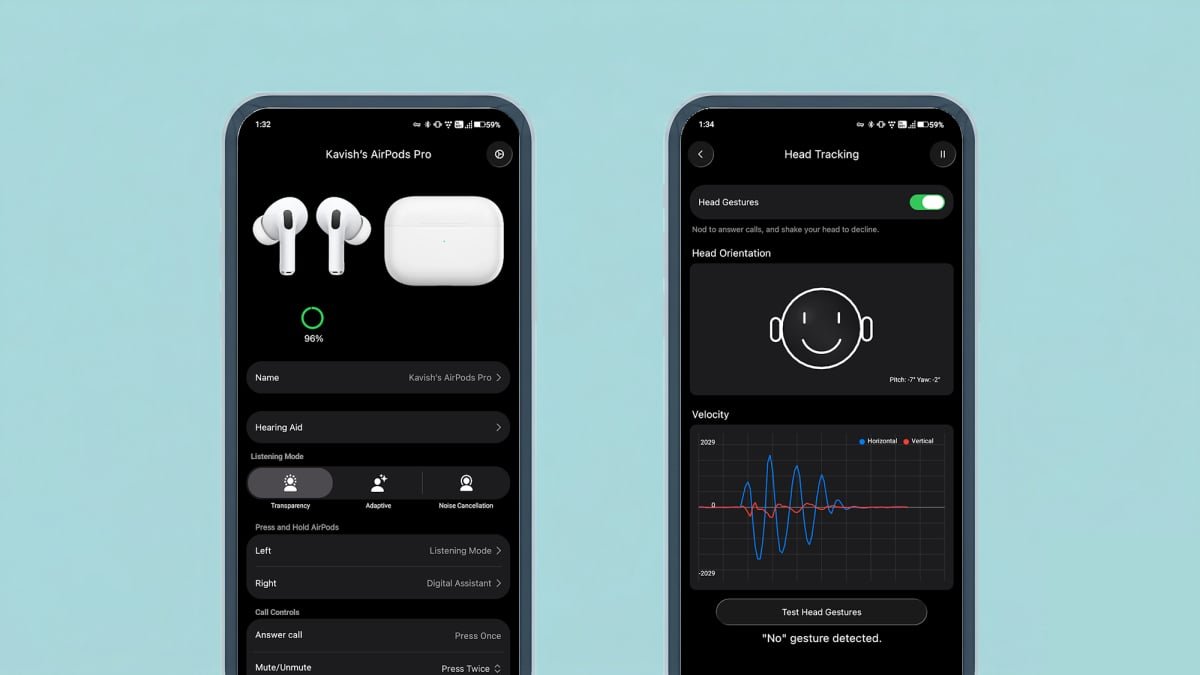
Among the AirPods features that LibrePods enables on Android, we’ve got head gestures (so you can accept or reject calls with a nod or a shake of the head), plus noise control modes (controlling how much external sound leaks), ear detection, more accurate battery level reporting, and conversational awareness (where the AirPods audio dips if you’re talking to someone). Note that some of those features, including head gestures and conversational awareness, require a one-off purchase of $4.99 inside the app. You can see the differences between the free and paid-for versions of the app from the main settings screen—tap the cog icon in the top right corner of the app’s front page to find it.

How to customize settings in LibrePods

The app should work with all AirPods models, but first you need to connect your earbuds over Bluetooth. To do this on a Pixel phone, for example, head to Settings, then tap Connected devices > Pair new device. You also need to press the pairing button on the AirPods case or double-tap the case, depending on the AirPods you have. Once you’ve got your AirPods linked to your Android phone over Bluetooth, LibrePods should be able to see them, but the earbuds options will only show up when the AirPods are actively connected—so you may have to take them out of the case.


What do you think so far?

Finding your way around the app is straightforward. Right from the main screen you can switch between listening modes, if they’re available on your AirPods: Transparency (letting external noises in), Active Noise Cancellation (blocking out external noises), and Adaptive (an automatic balance between the other two modes). You’re able to customize the action taken with a press and hold action on the left or right AirPod—you can even launch Gemini, if you want—and there’s also the option to customize which AirPod microphone is used by default.

LibrePods app

Choosing listening modes in LibrePods.
Credit: Lifehacker

Tap Head Gestures to enable this feature (if you’ve paid for it): You can tweak the sensitivity of the gestures needed, based on your preferences, and practice the detection. If you find that you need to use gestures that are aggressive and pronounced to get this to work, for example, you can dial up the sensitivity here. More options can be found by tapping the cog icon in the top right corner of the AirPods info screen: You can enable a home screen widget for battery information, choose the level of volume reduction for conversational awareness, and choose whether or not media playback should automatically connect to your AirPods.




Editorial Team

Editorial Team

Related Posts

The Entire 'Avatar' Franchise Explained in 10 Interactive Infographics
Protection

The Entire ‘Avatar’ Franchise Explained in 10 Interactive Infographics

April 29, 2026
The Eufy SoloCam S340 Is 40% Off Right Now
Protection

The Eufy SoloCam S340 Is 40% Off Right Now

April 29, 2026
I Tried Claude's New App Integrations, With Mixed Results
Protection

I Tried Claude’s New App Integrations, With Mixed Results

April 29, 2026
Apple's New Subscription Payment Option Isn't Coming to the US
Protection

Apple’s New Subscription Payment Option Isn’t Coming to the US

April 29, 2026
These Are the Cheap Running Watches Worn by the London Marathon Winners
Protection

These Are the Cheap Running Watches Worn by the London Marathon Winners

April 29, 2026
You Can Now Talk to YouTube’s AI About What Kinds of Videos You Want to Watch
Protection

You Can Now Talk to YouTube’s AI About What Kinds of Videos You Want to Watch

April 29, 2026
Load More
Next Post
Top Xcaret Promo Codes for April 2026 | Condé Nast Traveler

Top Xcaret Promo Codes for April 2026 | Condé Nast Traveler

Popular News

  • The key global oil contract tops $115 as Strait of Hormuz impasse continues

    The key global oil contract tops $115 as Strait of Hormuz impasse continues

    0 shares
    Share 0 Tweet 0
  • Southwest A-List Preferred: What to Know

    0 shares
    Share 0 Tweet 0
  • Air Canada Wi-Fi: What to Know Before You Fly

    0 shares
    Share 0 Tweet 0
  • Google Meet Is Now Available in CarPlay

    0 shares
    Share 0 Tweet 0
  • Trump says he had ’very productive’ call with Putin ahead of Zelenskiy meeting

    0 shares
    Share 0 Tweet 0

Latest News

US spends $25B on Iran conflict, ceasefire unlikely by April 30

US spends $25B on Iran conflict, ceasefire unlikely by April 30

April 29, 2026
0

The U.S. has spent $25 billion on its military operations against Iran, according to a senior Pentagon official. The probability...

Micron’s stock is gaining. Here’s why the semiconductor trade has sprung back to life.

Micron’s stock is gaining. Here’s why the semiconductor trade has sprung back to life.

April 29, 2026
0

Strong results from Seagate and NXP are boosting semiconductor-sector sentiment.

Bitcoin US military

Bitcoin In the US Military: How BTC Could Help Strengthen National Security

April 29, 2026
0

Trusted Editorial content, reviewed by leading industry experts and seasoned editors. Ad Disclosure Bitcoin (BTC) has moved beyond a payments...

Mexico to require federal projects to use local steel in response to US tariffs

Mexico to require federal projects to use local steel in response to US tariffs

April 29, 2026
0

Mexico to require federal projects to use local steel in response to US tariffs

Global Finances Daily

Welcome to Global Finances Daily, your go-to source for all things finance. Our mission is to provide our readers with valuable information and insights to help them achieve their financial goals and secure their financial future.

Subscribe

  • About Us
  • Contact
  • Privacy Policy
  • Terms of Use
  • Editorial Process

© 2025 All Rights Reserved - Global Finances Daily.

No Result
View All Result
  • Alternative Investments
  • Crypto
  • Financial Markets
  • Investments
  • Lifestyle
  • Protection
  • Retirement
  • Savings
  • Work & Careers

© 2025 All Rights Reserved - Global Finances Daily.

Welcome Back!

Login to your account below

Forgotten Password?

Retrieve your password

Please enter your username or email address to reset your password.

Log In
This website uses cookies. By continuing to use this website you are giving consent to cookies being used. Visit our Privacy and Cookie Policy.