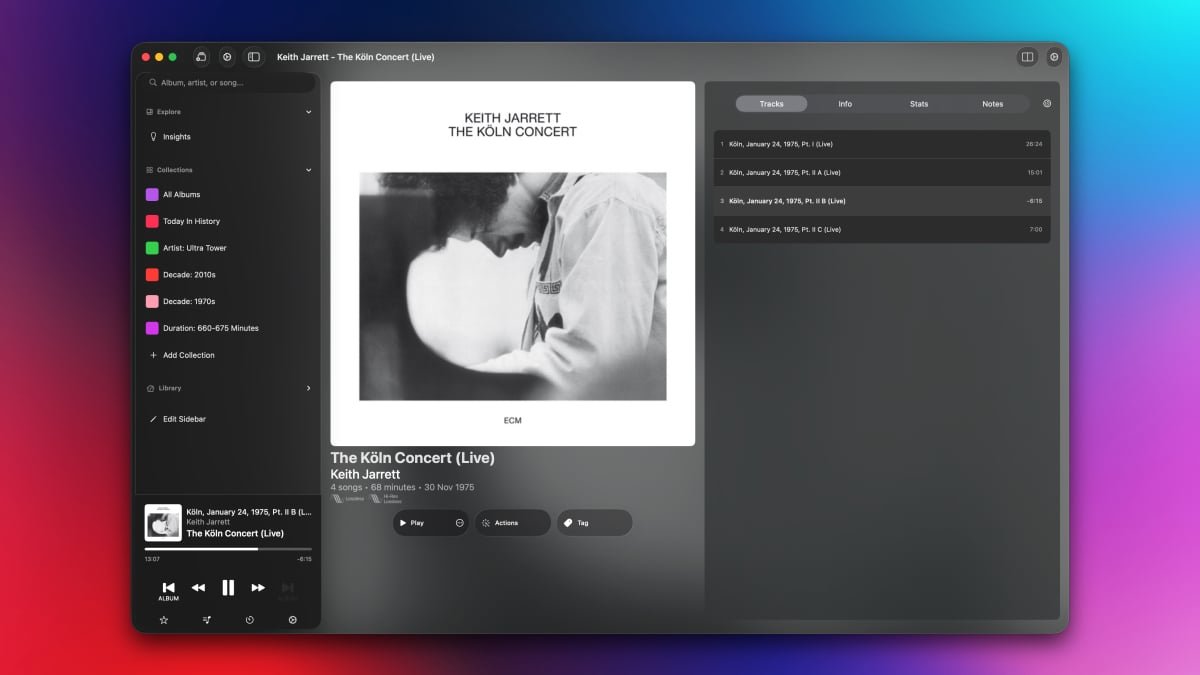
Apple Music’s selection is exceptional, but I’ve never enjoyed using its Mac app much. It’s slow, buggy, and lacks the razor sharp focus on albums that I sometimes desire.
On my iPhone, I often turn to the excellent Albums app to scratch that itch, which is why I’m excited to say that the same app has recently arrived on the Mac as well. I’m always looking for excuses to avoid opening the Music app on the Mac, and Albums has arrived at exactly the right time for me to make the switch. While I do enjoy listening to individual songs or playlists, I am going through an albums phase right now. For this, the Albums app is perfect. Its sole focus is on playing whole albums from your Apple Music library, rather than mixing and matching songs for you. It goes without saying that this app requires an active Apple Music subscription, but I far prefer it to the official Music app.
Play whole albums from Apple Music
Credit: Pranay Parab
Albums is available as a free download from the Mac App Store, but it does have a premium tier that unlocks some of its best features. On the free tier, you can search for and listen to albums. When you open the app, it shows a randomized grid containing all the albums in your Apple Music library. You can click any album to start playing it, and you can also queue other albums to play after the current one ends.
Albums Premium is available either as a subscription ($2/month or $19/year) or a one-time purchase ($90). If you join the premium tier, you get access to a whole bunch of power user features, such as listening stats, a release feed that tracks upcoming albums from artists in your library, and an “Insights” section for you to find curated lists of music albums you’ve listened to before. You only need to subscribe or purchase the app on one device to unlock it on your iPhone, iPad, and Mac.
Stats and insights in Albums for Mac

Credit: Pranay Parab
The Albums app’s Insights section is a fascinating way to discover music. It gives you the choice to enter your date of birth and generates a full list of collections based on that. Some examples of these collections include “High School,” “Late Teens/Early 20s,” “My 30s,” and so on. If you open any of these collections, it shows you albums (from your Apple Music library) that were released during that stage of your life, which is a great way to take a walk down memory lane.
Most collections in the Insights section don’t require your personal information, though. Albums will also look at your Apple Music data, and create useful collections such as “Only Listened Once,” “Never Played,” etc. I also like the “Today In History” section here, which highlights albums released on the day you’re listening on, but in previous years. Once you open a collection, you can either choose an album you want to play, or use the shuffle option to automatically queue other albums after the current one finishes playing. This is also a nice way to stick to the app’s core principle of focusing on whole albums, while still including a “shuffle” feature.
The Albums Premium tier also lets you create custom collections. You can create a collection of albums by a specific artist, music from a particular decade, or even albums of a particular runtime. For instance, if you’re only in the mood for short albums, you can use the app’s collection filters to group all albums under 15 minutes long. This is how I learned that the longest album in my Apple Music library is a 666-minute epic (Beethoven: Piano Sonatas, by Daniel Barenboim). I might actually play that start-to-finish when I start writing an epic fantasy novel.
Power user features in Albums

Credit: Pranay Parab
If you’re looking for different ways to discover and play albums, this app does a great job. It’s also perfect for people who love customizing a UI. You can edit the sidebar to reorder various sections, add collections, or even opt for a minimalist look by picking just one element for each section in the sidebar. Albums also supports bulk actions that let you quickly add notes to a bunch of albums or add a set of albums to a new collection. And there are useful sorting options that let you order albums based on release date, title, time spent listening to them, etc.
In fact, some of you may complain that Albums has too many customization options, since they can make the UI a bit confusing. For instance, I noticed three different gear icon buttons on the same screen in the app. One of them opens app settings, the second is for collection settings, and the third one is for now playing settings. Power users may enjoy this degree of customizability, but it can also be overwhelming for someone who’s just looking for the right button to change their collection’s sort order. I also spotted a minor UI bug that displays search results on top of sidebar elements, which makes both hard to read.
Still, other than these minor complaints, Albums is a great app that brings some much-needed improvements to Apple Music. It is much faster than Apple Music’s own Mac UI, loads songs flawlessly, and does its one job of curating all your albums very well. On the surface, Albums may look like a one-trick pony, but the moment you start exploring it, you’ll realize that it has a lot of amazing features for you to enjoy.
The developer is clearly is an album enthusiast, and it’s nice to see such care still being put into listening to music in the order the artists intended.