Apple Music has been steadily getting useful new features since the release of iOS 26, and the latest changes are especially exciting. Finally, the music streaming service is adding support for offline lyrics, which will officially come in iOS 26.2 when it releases in the next few weeks (although you can try them out now via the iOS 26.2 beta). Meanwhile, in iOS 26.1, users got the ability to swipe on the mini player to go to the next or previous song in their lineup, alongside enhanced AI DJ features and playlist folders for improved music organization. These followed previous additions, such as lyrics translation, a new DJ-like feature called AutoMix, and animated cover art on the lock screen. If that sounds like a lot, I’ve got you covered. Here are all the new Apple Music features in iOS 26, starting with the most recent.
Apple Music lyrics now work offline
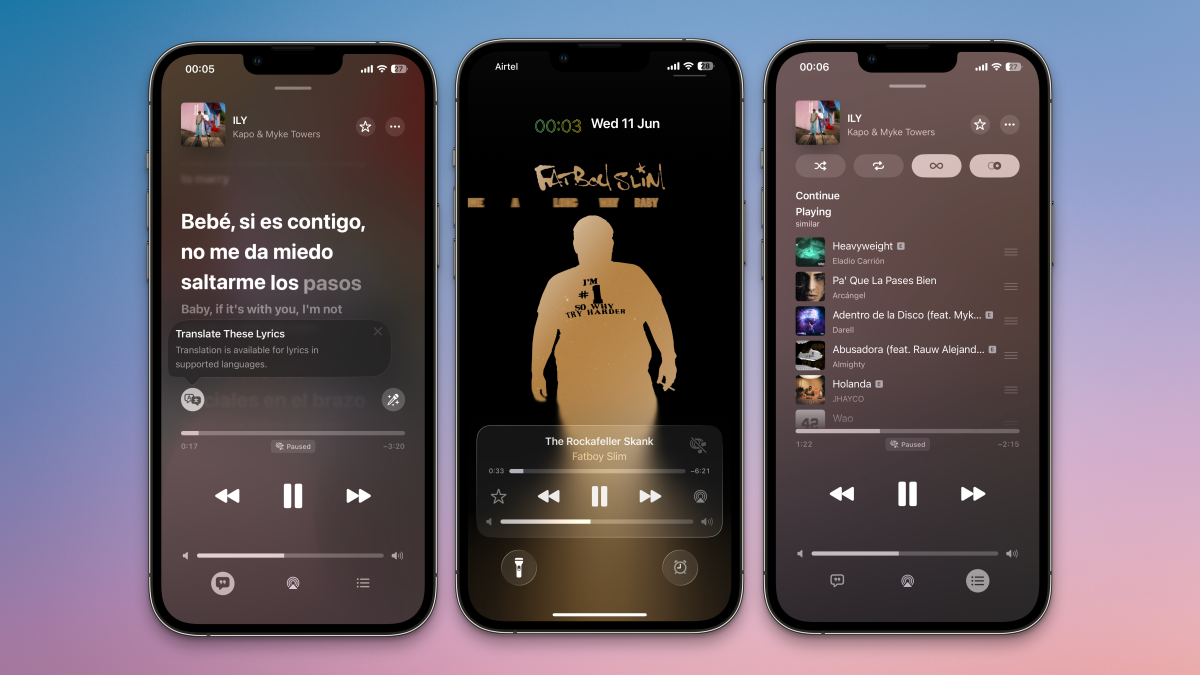
When I travel, I rarely have access to great connectivity. It always annoys me when Apple Music just stops showing lyrics while I’m offline, which happens whenever I take a flight, or when I’m traveling in the beautiful mountains in my country. Previously, I would download songs from Apple Music to keep me company during these offline periods, but I did miss having access to lyrics. That’s about to change with iOS 26.2, which is currently available in beta. Eagle-eyed Reddit users spotted support for offline lyrics in iOS 26.2, so you can expect it to ship to your iPhone soon.
Swipe to change songs
Credit: Pranay Parab
This is one of the most exciting additions to Apple Music, and it came in iOS 26.1. When you’re listening to music in the app, you can swipe left or right on the mini player to switch to the previous or next song. Previously, you had to expand the mini player to see the previous/next song buttons, but now swapping music is much faster. And even if the player is expanded, you can still swipe on the song’s name up top to change the track.
Lyrics Translation for your favorite songs
Apple Music has had time-synced lyrics for a while now, which works great when you speak the language the song was written in. However, it’s not as helpful when you’re listening to songs in different languages, and that’s where Lyrics Translation comes in. It adds translations below each time-synced lyric line, making it easy to follow a song’s meaning, too. I’ve been seeing translated lyrics for many songs across multiple languages, even when the primary song lyrics are in a non-Roman script.
Learn how to pronounce lyrics correctly

Credit: Pranay Parab
Another iOS 26 lyrics upgrade lets Apple Music show you the correct pronunciations for lyrics in foreign languages. Not every song has lyrics in Roman script, so if you can’t read the alphabet they’re in, this new feature will help you learn how to pronounce those words. It does this by showing you a transliteration from the original script to Roman, which makes it easier to sing along. I’ve been listening to songs by various Indian musicians, and noticing that Apple Music almost always has transliterations available to help with pronunciation.
AutoMix is an AI DJ for your playlists
AutoMix is a new addition to Apple Music’s playback controls. You’ll see it alongside the Shuffle, Repeat, and Autoplay buttons. When enabled, AutoMix will analyze the audio features of songs and use DJ-like tricks such as time stretching and beat matching to deliver continuous playback. Initially, I did not like AutoMix much because it often made the transitions between songs very jarring. Over time, that has become a lot less noticeable, but I still wouldn’t use it with any of my own painstakingly curated playlists, where I’ve manually matched the sounds at the end of one song with the sounds at the start of the next one.
With the release of iOS 26.1, Apple Music has also added AutoMix support over AirPlay. This means that, when using AutoMix while streaming songs from my iPhone to my HomePod mini (or any other AirPlay speaker), the AI DJ will continue to do its thing.
Sort playlists into custom folders

Credit: Pranay Parab
I enjoy Apple Music’s editorially curated playlists, but my friends and I have already curated a bunch of playlists for our various moods and occasions. I listen to these frequently, but finding them becomes a bit of a challenge when you’ve added hundreds of playlists to your account. Thanks to Apple Music’s new playlist folders, I’ve been able to tame this chaos quite easily.
What do you think so far?
Get started by opening the Music app on your iPhone and going to Library > Playlists. Tap the + button in the top-right, and select Create New Folder. The good news is that you’re free to create nested folders if you wish, which is perfect for all those obsessed with organization.
Pin your favorite playlists
This is a sweet feature that lets you quickly open your favorite Apple Music playlists. You can press and hold any playlist in the Music app in iOS 26, and pin it to the top of the Library tab. If you’ve pinned your favorite contacts in Messages, then you’ll find music pinning to be a familiar feature. You can pin up to six items at a time in Apple Music, which is ideal for bookmarking your favorites.
Animated cover art comes to your lock screen
Animated cover art is one of the more visually appealing features of Apple Music, and now it’s coming to your lock screen as well. When you play a song that has animated album art, you can tap the player on the lock screen to see it in a neat full-screen view.

Credit: Pranay Parab
If you’re not happy with having your music on the lock screen alone, you’ll enjoy Apple Music’s iOS 26 home screen widgets. You can quickly add different sized widgets to any of your iPhone’s home screens, and start playing music without even launching the Music app. You can choose widgets that show recently played music, top music in your region, recommendations, or even radio stations. Each home screen widget for Apple Music is available in three sizes, so you can pick one that’s best for your current home screen layout.
A karaoke feature for Apple TV users
Apple Music is also getting a new feature called Sing, which only works if you have an iPhone with iOS 26 and an Apple TV running tvOS 26. With all those requirements in place, you can use your iPhone as a mic and have your voice amplified by Apple Music to have a fun karaoke experience right at home.