In all likelihood, Apple won’t acknowledge iOS 27’s existence until WWDC 2026, but that doesn’t mean the company is saving all its iOS 27 announcements until then. On Tuesday, Apple published a press release announcing a slew of new accessibility features coming “later this year.” While Apple didn’t specify, that almost assuredly means they will arrive with iOS 27.
Apple does have a good track record when it comes to accessibility features, and it usually announces a slate of new accessibility updates ahead of WWDC. But this year feels a bit different: While these features will indeed likely benefit users with limitations or special needs, Apple also advertises them as “powered by Apple Intelligence.” This is almost certainly the company’s way of signaling to the tech community (as well as investors) that it is continuing to take AI seriously, especially after two years of slowdowns and setbacks. Moreover, several of these features seem widely useful, whether you “need” them or not.
You can use Voice Control with natural language
Perhaps the most universally useful new upgrade is to Voice Control. While Apple currently lets you use Voice Control to navigate your iPhone with spoken commands, Apple Intelligence will let you use Voice Control with natural language. That means instead of asking Voice Control to tap an input at a certain grid number, you can say “Open the yellow folder” in Files, or “tap the ‘Best Restaurants’ guide” in Maps.
This is going to be huge for users who rely on Voice Control to use their iPhone or iPad. But it also shows that Apple Intelligence has advanced to the point where any of us can control these devices with our voices. If you need to use your iPhone hands-free for any reason—say, you want to check a recipe while cooking—you could direct your iPhone with your voice, rather than wash your hands, find the right recipe, then wash your hands again.
Add subtitles to personal videos
Apple says that with its future update, Apple Intelligence will be able to caption videos whenever subtitles aren’t present. That could work on a clip you watch online that doesn’t have subtitles, or on a video you filmed yourself. This will happen automatically on your iPhone, iPad, Mac, Apple TV, and Apple Vision Pro, and Apple says the entire process is processed privately on-device (though it can be toggled on or off).
VoiceOver and Magnifier
Credit: Apple
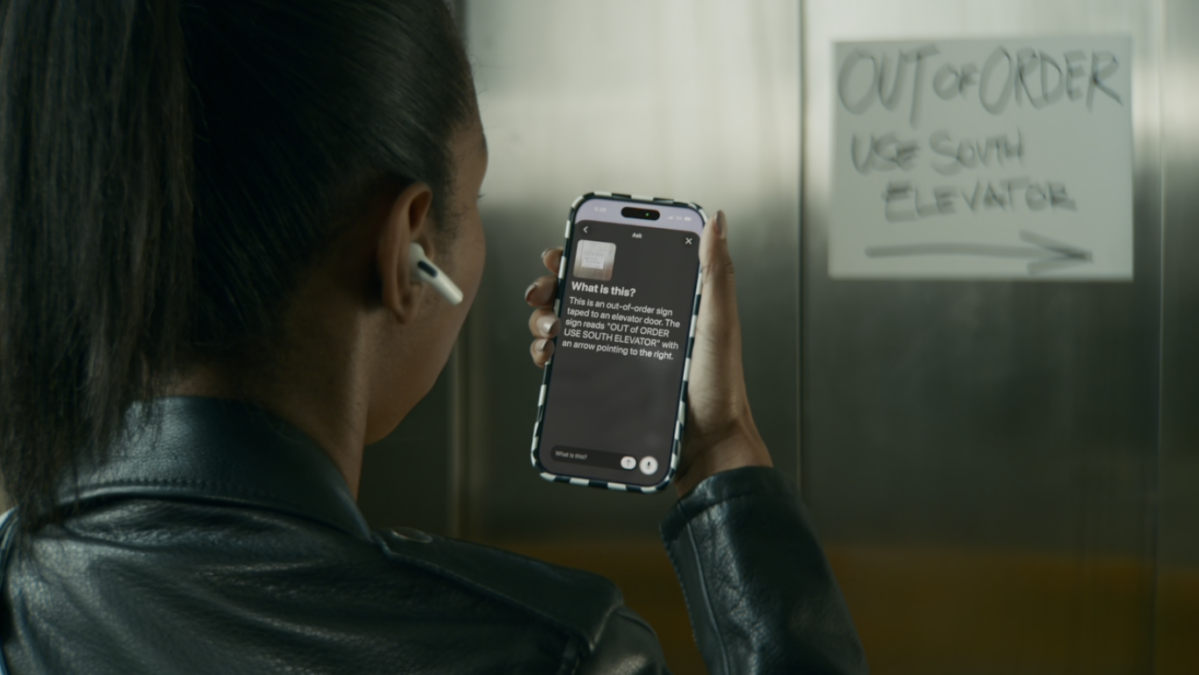
Apple says later this year, VoiceOver and Magnifier will be able to describe what’s on your screen—which, when paired with the camera, means your phone will be able to describe what’s going on around you. You’ll be able to use the “Image Explorer” in VoiceOver to receive descriptions of photos, bills, records, and anything else you feed it. With Live Recognition, Apple Intelligence will be able to describe what’s going on in the camera view, similar to how competitor products like Gemini Live work. To that point, Apple says you will also be able to ask follow-up questions “in your own words,” which makes the experience a bit more of a back-and-forth, rather than constantly pinging the assistant.
The Magnifier option makes it easier for users with low vision to see certain elements up close. After the upgrade, though, when hovering Maginifier’s camera over a document or a receipt, you’ll also be able to ask Apple Intelligence questions about the subject For example, you could ask “How much is the bill for?” and get a full answer with context. You can also use voice commands to take actions, like “zoom in” or “turn on the flashlight.”
What do you think so far?
Apple is improving the Accessibility Reader

Credit: Apple
Apple’s Accessibility Reader can make it easier to read bodies of text with customizable fonts, backgrounds, layouts, and colors. Now, with Apple Intelligence, Accessibility Reader will work across “more complex source materials.” That includes scientific articles, text printed in multiple columns, as well as images and data tables. The feature will also offer summaries, so you can get the gist of the material before reading on.
Apple Vision Pro accessibility updates are coming too

Credit: Apple
Apple has a few new Vision Pro upgrades coming this fall as well. First, the company is adding a new wheelchair control feature to the headset, which will allow users in power wheelchairs to control their wheelchairs with eye movements. In addition, Apple announced that Vehicle Motion Cues are coming to the headset. This feature, previously an iOS-exclusive, adds moving dots to the display to counteract the effects of motion sickness. It will be interesting to see if it can help combat motion sickness that is sometimes caused by using the Apple Vision Pro in a moving vehicle. Finally, users will have new options to perform taps and system actions via face gestures.
Other accessibility updates in the works
In addition to the above, Apple is adding the following accessibility options to iOS 27:
-
Sony Access controller support for iOS, iPadOS, and macOS
-
Touch Accommodations will support a “new way to personalize setup” in iOS and iPadOS
-
Made for iPhone hearing aids are in the works, which can pair and hand off between your Apple devices like AirPods—which are also FDA-approved hearing aids
-
Apple is adding larger text support for tvOS
-
Name Recognition is expanding to over 50 languages