We may earn a commission from links on this page.
The Xteink X4 is a wallet-sized e-reader from China that has attracted a cult following of tinkerers online for its no-frills charm and crisp 4.3-inch display. When I reviewed it last year, I had a few minor complaints, but “too big” definitely wasn’t one of them—not surprising, given I was already an adherent of the phone-sized Boox Palma 2. But now that I have tested out the Xteink X3, the X4’s even tinier brother, I can’t help but wonder if there exists an e-reader so small I won’t prefer it.
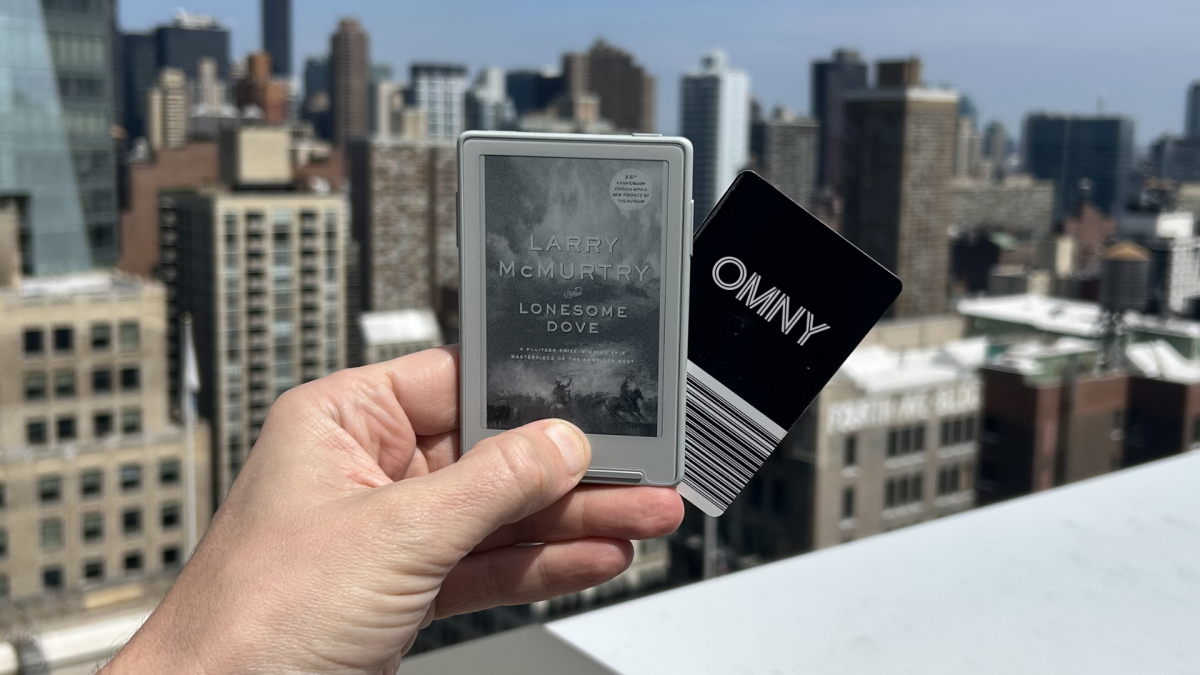
The X3 has a 3.7-inch screen measured diagonally, which makes it about 14% smaller than the X4; including the bezels, it has an overall footprint that’s roughly 20% smaller. When we’re already talking about a device so small my wife rolled her eyes when I showed it to her, you’d think that downsizing would make it unusable—but after spending a few weeks using it to read one of the longest novels on my TBR (the 900-page 1985 western Lonesome Dove, by Larry McMurtry), not only did I find myself preferring the X3 for being even less obtrusive to carry around with me, I didn’t think the loss of screen space affected the reading experience at all. (Here’s where I note that if the idea of reading on such a cramped device makes you anxious, consider the possibility that this device is just not for you, or that the people who like it are nuts, or both.)
Credit: Joel Cunningham
Sizing differences between the Xteink X3 and Xteink X4
The X4 measures 114 x 69 x 5.98 mm and weighs 74g, while the X3 is 98 x 64 x 4.98 mm and 55g. Both are small and light to be sure, but at about the size of a credit card, the X3 is so tiny, you might forget you’re carrying it around. It’s worth noting that while early images of the X4 advertised it could magnetically attach to the back of your phone (ostensibly so you’d flip your phone over to read instead of doomscrolling), it was too big to do so securely on my iPhone 14. The X3, on the other hand, is sized just right, though I still don’t think I’d ever actually do this, as the connection is loose enough that the e-reader slides off the back of the phone when I take it out of my pocket.)

Credit: Joel Cunningham
Readability differences between the Xteink X3 and Xteink X4
Compared to a Kindle Paperwhite’s 6.8-inch screen, both the X3 and the X4 look pretty tiny, but I find both to be equally readable. Both offer 480×800 resolution, but because the screen on the X3 is smaller, the resolution is actually better, at 250ppi versus 220ppi for the X4. Unless you’re about an inch from the screen, you probably won’t be able to spot this difference with the naked eye, however—text on both is nice and crisp.
I prefer to read in portrait mode, and find both devices show enough text that I don’t feel like I’m turning pages too often. If you instead read in landscape mode, here’s a comparison showing how much text fits on a page (with a large-print trade paperback for scale):

Credit: Joel Cunningham
Battery and charging differences between the Xteink X3 and Xteink X4
Both devices have the same 650 mAh battery, which will give you at least two weeks of regular use on one charge, but how you charge them is different: While the X4 uses a standard USB-C cable, to save on space, the X3 has pgo pins on the back that require a special charging cable. I charge it rarely enough that this doesn’t bother me, but I don’t love needing to remember where I put yet another proprietary cable. (Members of the Xteink Reddit suggest a fix for this—a USB-C-to-pogo adapter—but that kinda just seems like something else I’d lose.)
Differences in buttons between the Xteink X3 and Xteink X4
While both have physical buttons, the X3 has one extra, adding discreet up/down (or is that left/right?) buttons on either side of the device, rather than the X4’s single dual-function rocker on the right-hand side. This improves usability somewhat, as every once in a while I would put pressure on the wrong side of the X4’s page-turn button, and move back a page instead of forward a page. (Both devices have the same dual-purpose buttons on the bottom front bezel, however, and they will still take a little while to get used to.) I also like that the power/sleep button has been moved to the top, where I’m less likely to press it accidentally.
Gyroscope and NFC on the Xteink X3 and Xteink X4
The X3 also adds a gyroscope that will ostensibly allow you to turn pages by tilting the device, but in practice, it isn’t very useful, as I found the amount of movement necessary to trigger a page turn inconsistent (you can toggle in the settings between more and less movement, but neither option worked well for me). The X3 also supports near-field communication (NFC) to support wireless connection with your phone for file transfers, but I found it just as easy to use Bluetooth or wifi, which are supported on both.
Storage differences between the Xteink X3 and Xteink X4
Neither device has internal storage, opting instead for a card slot that accepts flash cards up to 512GB, which is enough to hold all of your books unless you are a major league digital hoarder.
Price differences between the Xteink X3 and Xteink X4
While both e-readers are fairly inexpensive, at $69, the X4 is weirdly cheaper than the X3, which costs $10 more (likely due to the added tech and inclusion of the pogo cable).
What do you think so far?
Installing the CrossPoint firmware is a must, whichever you choose
The big caveat for both of these e-readers is that the native software kind of sucks. Though the developers keep updating it, as of this writing it only offers two font choices, it can’t display images, and text styling like bold and italics are a no-go. Luckily, a huge online community has sprung up around the device, and there are multiple crowdsourced options for replacing the firmware—and the process is so easy, anyone who can plug in a USB cable into their computer can do it.
The best known of these alternate operating systems is called CrossPoint, and once installed, these Xteink devices will do basically everything a reader could ask for. You can switch fonts, install new ones, change your lock screen wallpaper (or use the cover of the book you’re reading), tweak your margins, remap the buttons, set a sleep timer, automate page turns, sync with the KOreader reading app, and more.
There are currently a bunch of CrossPoint variations (“forks”) that offer slightly different features, so poke around to find one that suits you—whether it’s CrossPet, which adds a Tamagotchi-like virtual chicken game to your reader; or this one, which is loaded with options to track your reading stats.
Flashing your Xteink device with CrossPoint couldn’t be simpler. You just plug it into your computer, and point your browser at this website (https://xteink.dve.al/). Scroll down the page until you see the “Flash CrossPoint firmware” button. Click it, and your device will automatically load the new operating system and reset itself.
Where to buy the Xteink X3
While the Xteink X4 has been available on Amazon for a few weeks, if you want the X3, you’ll need to order directly from Xteink. If you want to save some cash, you can also pick up both devices from AliExpress, which is sort of like China’s answer to Amazon Marketplace; you’ll likely pay a bit less for the device, and it’s likely to ship with the Chinese version of the firmware installed—but that’s fine, because you’re going to flash CrossPoint anyway, right?