No Result
View All Result
Global Finances Daily
  • Alternative Investments
  • Crypto
  • Financial Markets
  • Investments
  • Lifestyle
  • Protection
  • Retirement
  • Savings
  • Work & Careers
No Result
View All Result
  • Alternative Investments
  • Crypto
  • Financial Markets
  • Investments
  • Lifestyle
  • Protection
  • Retirement
  • Savings
  • Work & Careers
  • Login
Global Finances Daily
No Result
View All Result
Home Protection

The Newest Garmin Forerunners Now Have a Smart Wake Alarm, a Calculator, and More

August 20, 2025
in Protection
0
The Newest Garmin Forerunners Now Have a Smart Wake Alarm, a Calculator, and More


We may earn a commission from links on this page.


The latest software update for Garmin Forerunner 570 and 970 watches, and for the Fenix 8, adds a smart wake alarm, previously only available on the Vivoactive 6 and the Index sleep monitor, which I reviewed here. The update brings a few other new features, including automatic rest countdowns for strength activities (even if you aren’t following a structured workout).

How to update

This is a regular update, not a beta. You can update by going to settings and then System, Software Update, and Check for Updates. You want to make sure you’re up to 12.70 to get the smart alarm and other new features. 

Here are the release notes for the Forerunner 570 and Forerunner 970 versions of the update. The Fenix 8 also gets a smart alarm and other features in its 17.28 update.

Here are some of the other new features:

How the smart alarm works


Credit: Beth Skwarecki

Once you’ve updated, you’ll see a few new options when you set an alarm. To set alarms, go to your watch’s settings (from long pressing the middle left button) and then select Clocks.

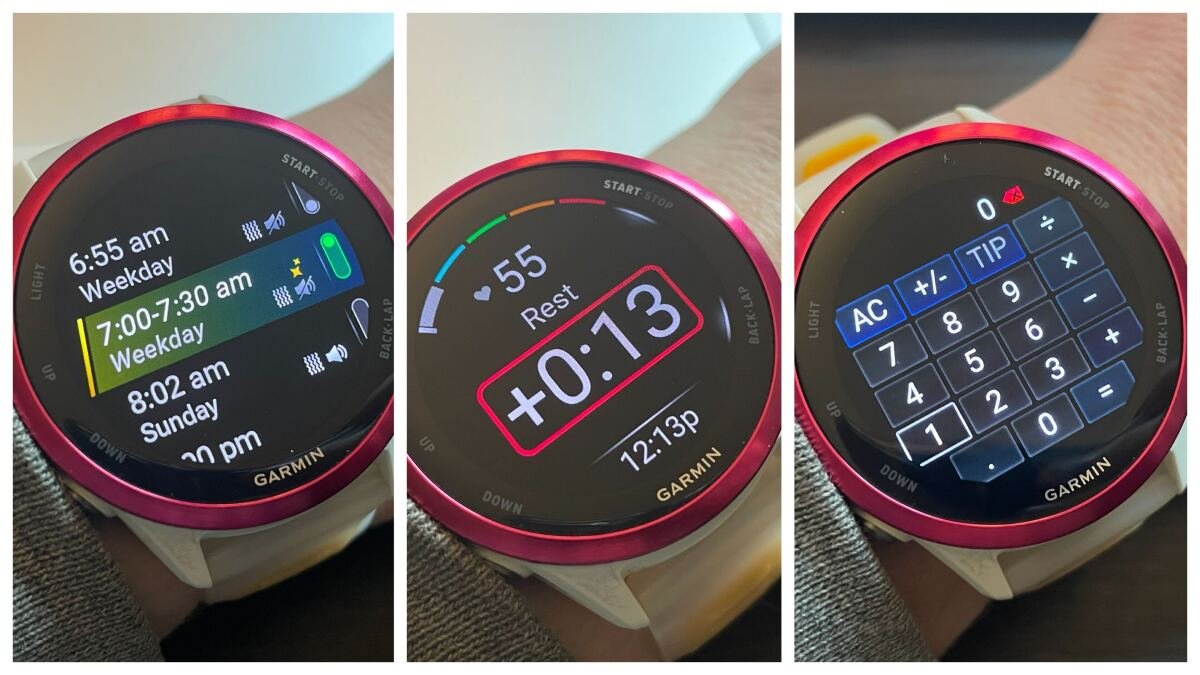
Now, when setting an alarm, you can turn on a toggle for “Smart Wake.” When this is on, the alarm may wake you up at any time in the 30 minutes prior to the set time. (So a 7:30 alarm would wake you up between 7:00 and 7:30). The alarm will wake you early if the watch detects that you’ve gotten enough of a full night’s sleep and if it can detect you being in a lighter sleep stage. 

Smart alarms will have a yellow sparkle icon, and will give the time as a window (like “7:00-7:30”) in the list of alarms.

Focus modes

Focus modes screen showing sleep and theater


Credit: Beth Skwarecki

You can now adjust your watch’s settings based on a focus. We’ve already had Sleep Mode, but now you can enable Theater Mode, which turns off move alerts (thank you!), mutes all sounds, sets brightness to low, and disables the gesture that turns on the screen when you move your wrist. 

For now, my only options are Sleep, Theater, and Activity. I can edit the settings of each mode from the Garmin Connect app, but I can’t add new modes there. Instead, I have to go into settings on the watch and select Focus Modes, scroll to the bottom, and tap Add. This option isn’t available from the shortcut menu on the watch, only the settings. 

Automatic rest countdowns for strength workouts

Rest timer on the watch, counting up

What it looks like after time is up
Credit: Beth Skwarecki

I’ve always loved the way I can program a strength workout and get an automatic rest timer when I finish each set, so that it buzzes when I need to get up and do the next set. 


What do you think so far?

Now, you can get that feature even on “free” strength workouts—the ones where you aren’t following a specific workout, but just doing your thing in the gym and hitting the lap button to start and end sets. 

Before you begin your strength workout, there’s now a menu item for Rest Countdown. Turn that on, and set it to your desired time—for example, two minutes. (Need help deciding? I’ve written about rest times here. Most of you are not resting long enough.)

Now, when you end a set, a timer appears that starts at 2:00 and counts down. Once it hits zero, the watch alerts you, and it starts counting up, with a plus sign and a red border around the time so you know how long you’ve been slacking. 

You can change the rest time during the workout. Just go to the workout settings (long middle press the left button) and change the time. If a rest timer is currently running, it will be updated immediately.

Calculator app

Tip calculator view

Punch in the cost of your meal and hit “tip,” and you get this handy screen.
Credit: Beth Skwarecki

It took me a minute to find the calculator app, but it’s there! Go into your Controls menu (long press the top left button) and then Controls settings (long press the middle left button). Tell it you want to Add a control, and scroll down until you find the calculator. 

There’s even a handy Tip button. Enter the cost for your meal, hit Tip, and you’re taken to a screen where you can decide on the percentage you’d like to tip (default 20%). This screen also shows the total, and can automatically split the bill, saying how much each person should pay to cover the final amount.



Editorial Team

Editorial Team

Related Posts

The Sony LinkBuds Wireless Portable Bluetooth Speaker Is 46% Off Right Now
Protection

The Sony LinkBuds Wireless Portable Bluetooth Speaker Is 46% Off Right Now

May 1, 2026
The Soundcore C50i Open Ear Earbuds Are $40 Right Now
Protection

The Soundcore C50i Open Ear Earbuds Are $40 Right Now

May 1, 2026
What Is a Good Resting Heart Rate?
Protection

What Is a Good Resting Heart Rate?

May 1, 2026
Here's What We Expect to See at Google I/O 2026
Protection

Here’s What We Expect to See at Google I/O 2026

April 30, 2026
Samsung Says the Memory Crisis Will Get Worse, so You Have Two Choices
Protection

Samsung Says the Memory Crisis Will Get Worse, so You Have Two Choices

April 30, 2026
Amazon Prime Day Is Coming Early This Year
Protection

Amazon Prime Day Is Coming Early This Year

April 30, 2026
Load More
Next Post
Client Challenge

Client Challenge

Popular News

  • AAPL, EL, ROKU, RDDT, RBLX and more

    AAPL, EL, ROKU, RDDT, RBLX and more

    0 shares
    Share 0 Tweet 0
  • Bitcoin ETFs Post Strong April Inflows as Ether Turns Positive

    0 shares
    Share 0 Tweet 0
  • 35 Best Hotels in New York City We Won’t Shut Up About

    0 shares
    Share 0 Tweet 0
  • Brent crude tops $108 as US-Iran tensions escalate

    0 shares
    Share 0 Tweet 0
  • How to Become a Statistician – Career Sidekick

    0 shares
    Share 0 Tweet 0

Latest News

Bitcoin

Are Satoshi’s 600,000 BTC At Risk? Unveiling The Hard Fork That Targets Bitcoin

May 1, 2026
0

Trusted Editorial content, reviewed by leading industry experts and seasoned editors. Ad Disclosure On-chain sleuth Tyler has drawn attention to...

Embattled U.S. manufacturers show their mettle, grow for the fourth month in a row despite Iran war

Embattled U.S. manufacturers show their mettle, grow for the fourth month in a row despite Iran war

May 1, 2026
0

American manufacturers grew in April for the fourth month in a row — the longest streak in four years —...

The Sony LinkBuds Wireless Portable Bluetooth Speaker Is 46% Off Right Now

The Sony LinkBuds Wireless Portable Bluetooth Speaker Is 46% Off Right Now

May 1, 2026
0

We may earn a commission from links on this page. Deal pricing and availability subject to change after time of...

Cointelegraph

DeFi’s Lose-Lose Problem on Freezing Stolen Funds

May 1, 2026
0

Decentralized finance (DeFi) protocols are stepping in to freeze stolen funds while centralized issuers face criticism for holding back.A recent...

Global Finances Daily

Welcome to Global Finances Daily, your go-to source for all things finance. Our mission is to provide our readers with valuable information and insights to help them achieve their financial goals and secure their financial future.

Subscribe

  • About Us
  • Contact
  • Privacy Policy
  • Terms of Use
  • Editorial Process

© 2025 All Rights Reserved - Global Finances Daily.

No Result
View All Result
  • Alternative Investments
  • Crypto
  • Financial Markets
  • Investments
  • Lifestyle
  • Protection
  • Retirement
  • Savings
  • Work & Careers

© 2025 All Rights Reserved - Global Finances Daily.

Welcome Back!

Login to your account below

Forgotten Password?

Retrieve your password

Please enter your username or email address to reset your password.

Log In
This website uses cookies. By continuing to use this website you are giving consent to cookies being used. Visit our Privacy and Cookie Policy.